 Botmonster Tech
Lazy loading cuts your initial JavaScript weight by 60%

Lazy loading holds back work until the user needs it, whether that work is fetching an image or parsing a component’s JavaScript. Add loading="lazy" to your images, wrap heavy components in dynamic import(), and split routes with your framework’s code splitting. Those three changes cut 60% or more off the first load. You see the result in how fast the biggest thing on screen shows up, in Interaction to Next Paint (INP), and in the bounce rate on slow phones.
Why lazy loading pays off in 2026
The average web page in 2026 weighs about 2.5MB, ships over 500KB of compressed JavaScript, and holds 25 or more images. Most of it sits below the fold. The user never sees any of that before deciding whether to keep scrolling or close the tab. Every kilobyte the browser parses before paint pushes LCP higher and steals main-thread time from hydration and event handling.
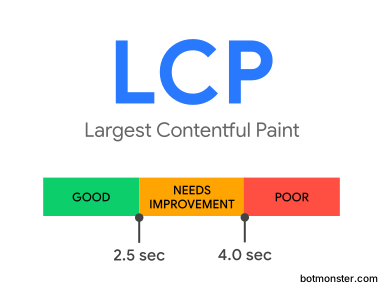
Google’s Core Web Vitals thresholds put a number on the cost. A good LCP is under 2.5 seconds. A good INP is under 200 milliseconds, and about 43% of sites still miss that bar in 2026. That makes INP the most missed Core Web Vital of the three. The budget for first-load JavaScript on a mid-range phone is around 200KB compressed. Go past it and parse plus execution alone can eat a full second.
Every lazy-loading trick runs on the same rule: load nothing the user cannot see, and load it the moment they get there. Done well, none of it shows. Content lands right when the user expects it, same as eager loading, on a first payload a fraction of the size. Three layers are worth your time, in order of difficulty:
- Images, the easiest win, often a one-attribute change.
- Components, moderate effort with dynamic
import()and code-splitting bundlers. - Routes, the highest impact for single-page apps and almost always the place to start.
Lazy loading images
Images are usually the largest part of a page’s payload, and the browser already has a built-in fix.
Native loading=“lazy”
Add the loading attribute to any <img> element and the browser handles everything:
<img src="photo.jpg"
     loading="lazy"
     alt="A red panda climbing a tree"
     width="800"
     height="600">
The width and height attributes are not optional. They hold layout space so the page does not jump when the image lands, which keeps Cumulative Layout Shift (CLS) at zero. The attribute works in Chrome, Firefox, Safari, and Edge, and older browsers fall back to eager loading. The browser also sets the trigger distance itself. Chrome starts fetching about 1250 pixels before an image reaches the viewport, far enough that the user rarely catches a blank box.
Do not lazy load above the fold
The most common mistake is putting loading="lazy" on every image, hero included. That pushes the LCP candidate behind an extra network round trip and wrecks the score. The hero, the first product photo, and anything on screen at first paint should stay eager, which is the default. The rule: if it shows up in the first viewport, leave it alone. To have the browser grab it ahead of everything else, add fetchpriority="high".
Intersection Observer for custom behaviour
When the native attribute cannot do the job, reach for the Intersection Observer API. Fade-in animations, blur-up placeholders, and custom trigger distances all need it:
const observer = new IntersectionObserver((entries) => {
  entries.forEach(entry => {
    if (entry.isIntersecting) {
      const img = entry.target;
      img.src = img.dataset.src;
      img.classList.add('loaded');
      observer.unobserve(img);
    }
  });
}, { rootMargin: '200px 0px' });

document.querySelectorAll('img[data-src]').forEach(img => observer.observe(img));
The rootMargin setting here starts each image 200 pixels before it enters the viewport. That is close enough for a fade-in to feel natural, and far enough that nobody catches the placeholder mid-scroll.
Responsive images still apply
Native lazy loading sits fine alongside <picture> and srcset. The browser picks the format and density first, then decides whether to fetch it lazily. You never have to trade modern image formats for lazy loading. The MDN lazy loading guide walks through every combination.
The same loading="lazy" attribute also works on <iframe> elements, which is a quick win for any page that embeds YouTube players, maps, or third-party widgets.
For logos and icons, skip lazy loading and vectorize instead. Run a flat graphic through a client-side image-to-SVG tracer and you get inline SVG you can paste into the markup. It costs no network request and stays sharp at any screen density.
Lazy loading components with dynamic import()
JavaScript is the other half of the bundle. A chart library, a rich-text editor, a map widget, or a date picker can weigh hundreds of kilobytes and do nothing until the user touches it. Dynamic import() is the tool that holds them back.
Plain JavaScript
button.addEventListener('click', async () => {
  const { Chart } = await import('./chart.js');
  new Chart(container, data);
});
When Vite, webpack, or esbuild hits a dynamic import(), it splits that module into its own chunk. The chunk only crosses the network when the click handler runs. Your first bundle pays a few bytes for the import statement and nothing more. The bundler itself runs on whichever server-side JavaScript runtime you build with, and a faster one shortens this split-heavy step in CI.
React with lazy() and Suspense
React has a first-class API for the same idea:
import { lazy, Suspense } from 'react';

const Chart = lazy(() => import('./Chart'));

function Dashboard() {
  return (
    <Suspense fallback={<Spinner />}>
      <Chart />
    </Suspense>
  );
}
Suspense can wrap several lazy children, so one fallback covers a whole section and you skip the spinner confetti. Put an error boundary around the outer one so a flaky chunk cannot take down the app. Keep in mind that React.lazy is client-only. For SSR you want a streaming React 19 setup or a library like loadable/component.
Loading a component when it scrolls into view
Pair Intersection Observer with dynamic import() and components load themselves as the user scrolls toward them. It suits a heavy map parked near the bottom of a long article:
const observer = new IntersectionObserver(async (entries) => {
  if (entries[0].isIntersecting) {
    const { renderMap } = await import('./map.js');
    renderMap(container);
    observer.disconnect();
  }
}, { rootMargin: '300px' });

observer.observe(container);
Loading content as it scrolls into view is infinite scroll by another name, and the old alternative still holds up. Numbered pagination, the kind the bootpag jQuery widget draws, loads each page on a click and keeps the document short. That avoids the memory growth of a long infinite-scroll session.
Preloading without eager parsing
Lazy loading creates a tradeoff: the chunk is small, but the user pays a network round trip the moment they need it. The fix is <link rel="modulepreload">:
<link rel="modulepreload" href="/assets/chart-a3f9c.js">That tells the browser to fetch the chunk early, alongside other resources, but not to run it. When the click handler finally calls the import, the file is already cached and resolves at once. You keep the bundle savings of lazy loading and the snap of eager loading.
Route-based code splitting
Route splitting does the most for any single-page app, and it is usually where to start. A typical SPA packs every page into one JavaScript file. Open /settings and you also download /dashboard, /profile, and the eight other routes nobody will visit this session.
React Router
import { lazy, Suspense } from 'react';
import { Routes, Route } from 'react-router-dom';

const Dashboard = lazy(() => import('./pages/Dashboard'));
const Settings = lazy(() => import('./pages/Settings'));
const Profile = lazy(() => import('./pages/Profile'));

function App() {
  return (
    <Suspense fallback={<PageSpinner />}>
      <Routes>
        <Route path="/dashboard" element={<Dashboard />} />
        <Route path="/settings" element={<Settings />} />
        <Route path="/profile" element={<Profile />} />
      </Routes>
    </Suspense>
  );
}
Frameworks that do it for you
Route-level splitting helps so often that most modern frameworks just do it for you:
| Framework | Behaviour |
|---|---|
| Next.js | Every file in pages/ or app/ is its own chunk by default. |
| SvelteKit | Per-route code splitting with streaming SSR. |
| Nuxt | Automatic route-level chunks via Vite. |
| Remix | Route modules become separate bundles. |
| SolidStart | Route-based splitting out of the box. |
For a vanilla JavaScript app, a small router that calls import() on the right module per URL does the same job in about 30 lines. Pair it with animated page swaps from view transitions and the result feels like a native app with no extra framework weight.
The numbers
Take a 500KB SPA bundle that splits into a 50KB shared core and about 80KB per route. First load drops to roughly 130KB instead of 500KB, a 74% cut. Every later navigation costs only the new page’s chunk, because the core is already cached.
Prefetching the next click
You can beat waiting for the click. A hover over a nav link is a strong hint that the user is about to go there, and 200 to 300 milliseconds of it is plenty of time to prefetch that route’s chunk:
<link rel="prefetch" href="/assets/settings-7c2b1.js">Next.js already does this for <Link> components in the viewport. Other frameworks offer something similar, and the built-in Speculation Rules API can prerender whole pages before the click with no client-side router at all.
Measuring the impact
Lazy loading without measurement is guesswork. A few tools will tell you whether the change did anything.
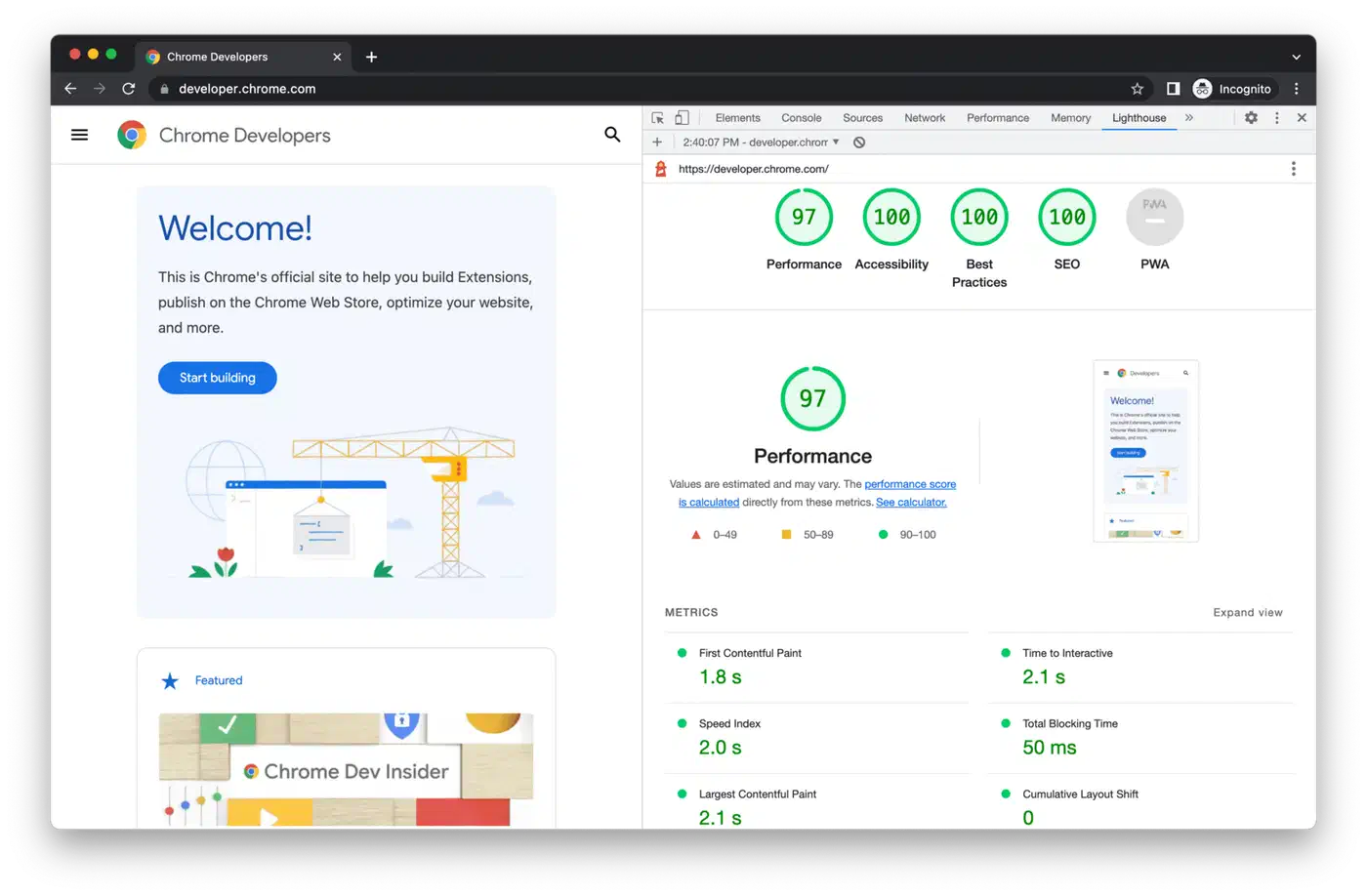
- Lighthouse: run an audit before and after, then compare LCP, Total Blocking Time, and the “Reduce unused JavaScript” report. That report explicitly flags chunks the page downloads but never executes.
- Chrome DevTools Network panel: filter by JS, throttle to “Slow 4G”, and watch the waterfall on initial load. Route-split bundles show as a small initial payload followed by on-demand fetches.
- Chrome DevTools Coverage panel: open with
Cmd/Ctrl+Shift+Pand pick “Show Coverage”. Each script gets a red bar showing how much of it the current page never used, which is the code you should be splitting out. - Web Vitals extension: monitors LCP, INP, and CLS in real time as you browse. Useful for spotting regressions during development.
- Bundle visualizer:
npx vite-bundle-visualizerfor Vite projects,webpack-bundle-analyzerfor webpack. Both draw a treemap that makes fat chunks obvious.
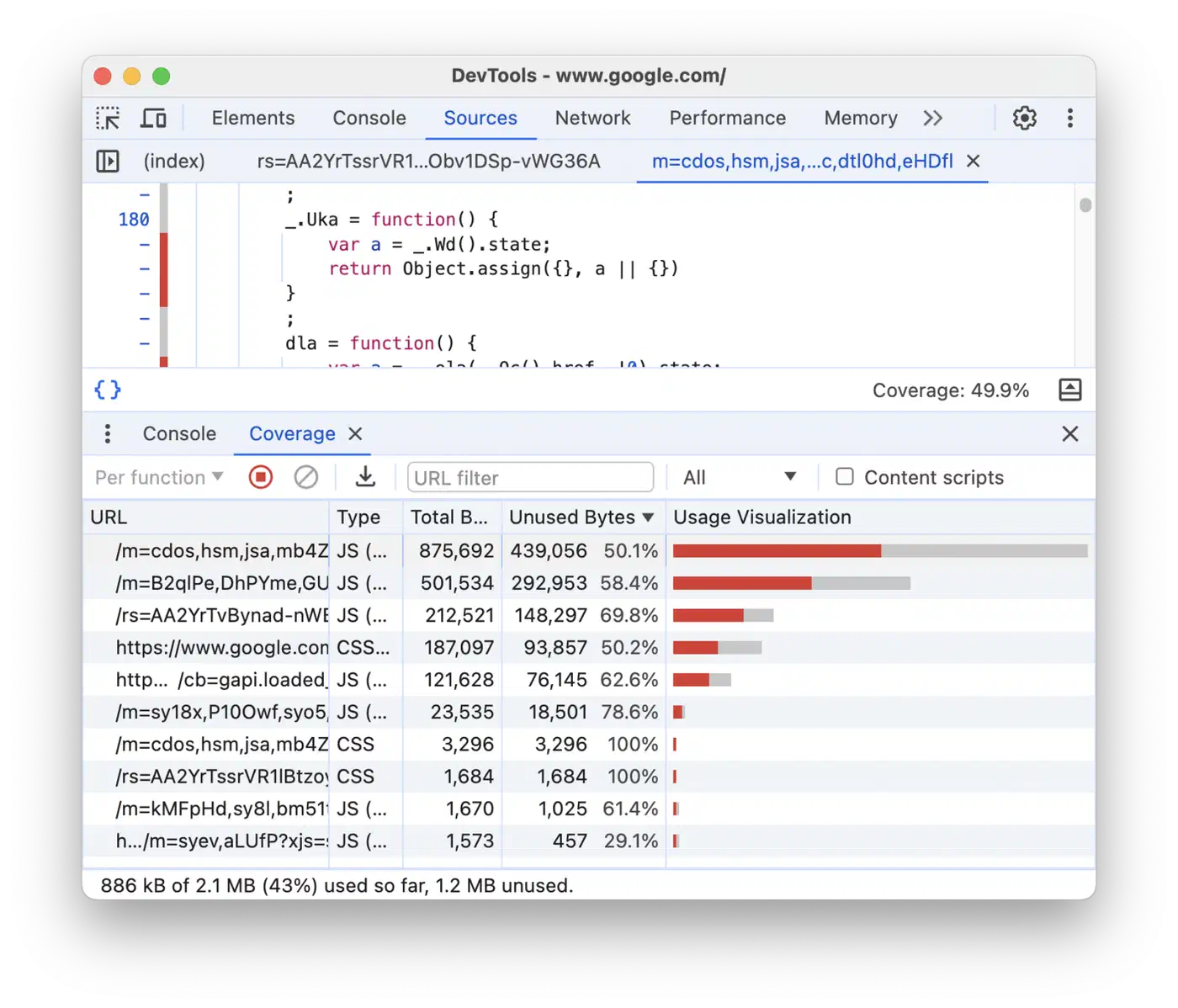
Sane production targets: LCP under 2.5s on a mid-range phone, first-load JavaScript under 200KB compressed, and unused JavaScript under 10% of total bytes shipped. Some tools bake the rule in at the publishing layer. The Instatic visual editor writes pages to disk and defers only the bits that change per visitor, so the first load starts near zero.
Common mistakes and anti-patterns
Lazy loading misapplied turns into a regression. The repeat offenders:
- Lazy loading the hero image. Defers your LCP candidate behind a network round trip. Eager-load above-the-fold images and consider
fetchpriority="high"for the LCP element. - Splitting too aggressively. Every chunk is an HTTP request, and twenty 10KB chunks are slower than one 200KB chunk on a high-latency connection. Group related components, especially the ones that always load together.
- No loading state. A component that pops in unannounced feels broken. Give it a
Suspensefallback or a skeleton, and shape the skeleton like the final layout so you do not cause a second round of CLS. - Waterfall dependencies. If a lazy component imports another lazy component, the user pays two sequential round trips. Either
modulepreloadthe inner chunk or merge them into one. - Forgetting SEO. Search crawlers and social-card scrapers do not always run JavaScript. Lazy-loaded content you need indexed has to be in the server-rendered HTML, which means SSR, SSG, or pre-rendering.
- Ignoring caching. Lazy chunks should have content-hashed filenames and long
Cache-Controlheaders. Re-downloading the same chunk on every visit defeats the purpose. Go further and cache previously loaded chunks with a service worker so repeat visits serve them instantly.
The working rule: defer everything the user does not need yet, and nothing beyond that. Start with route splitting, then lazy load the images below the fold, then hold back the heavy widgets that only wake on interaction. Measure after each step and go again. A focused weekend can take a 2MB first payload down to 300KB and a 4-second LCP down to 1.5, for a few dozen lines changed.