 Botmonster Tech
Smooth page animations with the View Transitions API

The short answer
The View Transitions API is a native browser feature that animates the change between two page states with CSS. The browser takes a snapshot of the page, runs your DOM update, takes a second snapshot, and cross-fades between the two. You shape that animation with a few lines of CSS. You no longer need React, GSAP or Motion for smooth transitions. Same-document transitions work in every major engine since Firefox 144 (October 14, 2025), which made them Baseline Newly Available. Cross-document transitions work in Chrome 126+, Edge 126+ and Safari 18.2+. Firefox hasn’t shipped them yet.
Key Takeaways
- One call,
document.startViewTransition(), animates any DOM update in Chrome 111+, Safari 18+ and Firefox 144+. - One CSS rule,
@view-transition { navigation: auto; }, animates page loads in Chrome 126+ and Safari 18.2+, but not Firefox yet. - Transition types now work in Firefox 147; nested groups and element-scoped transitions are still Chrome-only.
- Most glitches come from five causes: duplicate names, frozen snapshots, interrupted runs, aspect ratio and clipping.
- Unsupported browsers skip the animation and the page still works, so you can ship it today.
View Transitions API browser support in 2026
Support is the first thing people ask about the View Transitions API, and most pages give stale answers. The table below comes from MDN’s browser compatibility data as of October 2026. Each row is a separate feature, because the API shipped in pieces and the browsers didn’t ship them in the same order.
| Feature | Chrome / Edge | Safari | Firefox |
|---|---|---|---|
Same-document (startViewTransition) | 111+ | 18+ | 144+ |
ready, finished, skipTransition() | 111+ | 18+ | 144+ |
view-transition-class | 125+ | 18.2+ | 144+ |
Transition types (:active-view-transition-type()) | 125+ | 18.2+ | 147+ |
Cross-document (@view-transition) | 126+ | 18.2+ | Not yet |
view-transition-name: match-element | 137+ | 18.4+ | 144+ |
Nested groups (view-transition-group) | 140+ | Not yet | Not yet |
Element-scoped transitions (transitionRoot) | 147+ | Not yet | Not yet |
Firefox cross-document support is tracked in Bugzilla bug 1860854. View transitions are also a focus area of Interop 2026, the yearly effort where all three engines agree to fix the same features. Until Firefox ships, Firefox users on a multi-page site get a normal page load with no animation, and nothing else changes for them.
So can you use it in production? Yes. A browser that doesn’t know startViewTransition never calls it if you feature-detect. A browser that doesn’t know @view-transition ignores the rule. Nothing breaks. The remaining risk is a transition that looks wrong, and the pitfalls section below covers how to avoid that.
What each animation library did, and what replaces it
Web navigation always had a visual problem. Click a link on a multi-page site and you get a white flash and a sudden swap. Update the DOM in a single-page app and the old content just vanishes. Native apps have had card morphs and page slides for years. The web made do with JavaScript libraries, and each one added its own weight and quirks.
| Library | What it did | Native replacement | What the library still does better |
|---|---|---|---|
| Barba.js | Intercepted clicks, fetched the next page, swapped it in with an animation | @view-transition { navigation: auto; } on a plain multi-page site | Works in Firefox today |
| React Transition Group | Enter and exit classes tied to React’s render cycle | startViewTransition() around the state update, or React’s own <ViewTransition> | Fits older React code with no refactor |
| Motion (formerly Framer Motion) | Layout and shared-element animation inside JS | view-transition-name on both elements | Springs, smooth interruption, stagger |
| GSAP | Timelines and hand-rolled FLIP capture | Browser snapshots plus @keyframes on pseudo-elements | Complex timelines and scroll-driven sequences |
The native API covers the common case: fade the page, slide the content and morph a shared element. The libraries still win on physics and fine control. The native API has no spring easing, no built-in stagger, and animations that snap when you start a new one mid-run. If you need those, wrap the native API with a small library rather than drop it.
How the View Transitions API works
The API moves the animation work from your JavaScript into the browser. The browser takes a picture of the current state, runs your DOM update, takes a picture of the new state and animates between them on the compositor thread. You write CSS to change the animation. The JavaScript side is usually one function call.
The API has two modes. Same-document transitions animate a DOM update inside one HTML document. That covers single-page apps (SPA), SPA router navigation, and any in-place change, like a tab switch or a filter. Cross-document transitions animate a full navigation between two HTML pages. That covers classic multi-page apps (MPA) and static sites. Both modes use the same CSS, so a SPA and a multi-page site can share one stylesheet of transition rules.
Same-document transitions for SPA updates
The core API is a single method on document:
document.startViewTransition(() => {
  renderNewContent();
});
Everything inside that callback runs between the “before” and “after” snapshots. The default animation is a 250ms cross-fade on the root. That already looks better than an instant swap for almost any content change.
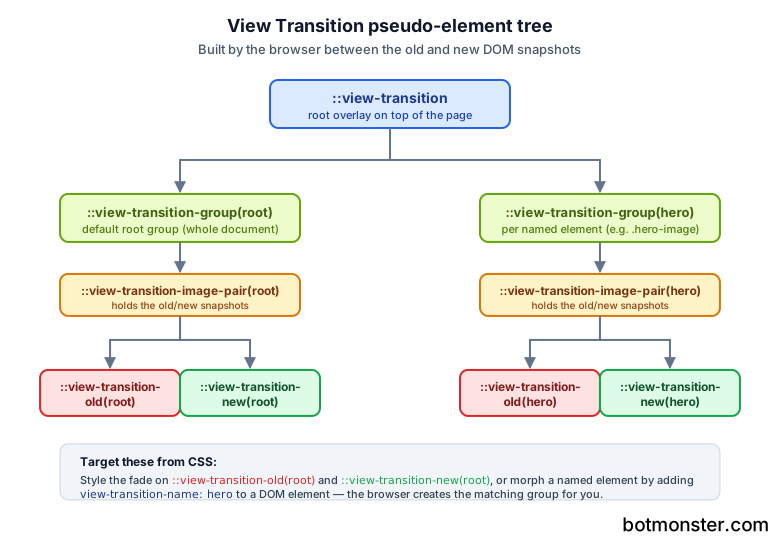
Changing the cross-fade is a CSS job. While the transition runs, the browser builds a tree of pseudo-elements on top of the page. You target the parts you care about:
::view-transition-old(root) {
  animation: 300ms ease-out both fade-out;
}
::view-transition-new(root) {
  animation: 300ms ease-out both fade-in;
}

@keyframes fade-out {
  to { opacity: 0; transform: translateX(-30px); }
}
@keyframes fade-in {
  from { opacity: 0; transform: translateX(30px); }
}
That gives you a slide-and-fade on every transition with no JavaScript animation code. The root name means the whole page. To animate one element on its own, give it a view-transition-name:
.hero-image {
  view-transition-name: hero;
}
Now the hero image is its own transition group. If its position, size or shape changes between the two states, the browser animates between them. Morphing a thumbnail into a full-size image used to need a shared-element library. Now it’s one CSS property. Vector assets hold up best here, since the browser scales the snapshot during the morph and an SVG stays sharp at every size. If a logo or diagram only exists as a PNG, trace it into a vector first before you wire up the transition.
The startViewTransition call returns a ViewTransition object with three promises. updateCallbackDone resolves when your DOM callback finishes. ready resolves when the pseudo-elements exist and the animation is about to start. finished resolves when the animation ends. Use them to time other work, like running analytics after the animation. There is also skipTransition(), which drops the animation but still runs your DOM update.
A complete tab switcher looks like this:
document.querySelectorAll('.tab').forEach(tab => {
  tab.addEventListener('click', () => {
    if (!document.startViewTransition) {
      switchTab(tab.dataset.target);
      return;
    }
    document.startViewTransition(() => switchTab(tab.dataset.target));
  });
});
The feature check on the first line is the fallback. Old browsers get the instant swap they had anyway. New browsers get the animation, and your SPA code doesn’t fork. The same pattern works for paged lists. If you let people page through rows with a jQuery pager such as bootpag, wrap the handler that replaces the rows in startViewTransition and each page change fades instead of snapping.
Cross-document transitions for MPA navigation
Cross-document transitions are why I started paying attention to this API. They let a classic multi-page site animate between page loads with no JavaScript at all. Add one rule to the stylesheet of both pages:
@view-transition {
  navigation: auto;
}
Both pages must share the same origin. On each navigation the browser captures the old document, loads the new document, captures it and animates between them. Back and forward navigation run the animation too. Shared-element morphs work the same way as in the SPA case, except the matching view-transition-name values live in two different HTML files. Two events give you hooks on each side: pageswap fires on the old page just before capture, and pagereveal fires on the new page as it appears.
Cross-document transitions have a cost on slow phones. In field data they add about 70ms to LCP on mobile repeat page views, and around 5ms on desktop. Pair them with prerendered instant navigations and the load delay mostly disappears, since the next document is ready before the click.
Advanced techniques
Once the basics work, a few newer features make transitions feel native. view-transition-class lets you group many named elements under one class and style them together. That beats writing a ::view-transition-group selector for each item. A grid of cards becomes:
.card { view-transition-class: card; }

::view-transition-group(.card) {
  animation-duration: 400ms;
  animation-timing-function: cubic-bezier(0.2, 0, 0, 1);
}
Chrome DevTools understands these pseudo-elements too, so you don’t debug them blind. From Chrome 139 on, the Styles pane shows ::view-transition-group rules that target a view-transition-class next to regular element styles. You can debug transition CSS the same way you debug any other rule. The Animations panel can also catch a running transition and replay it at slow speed.
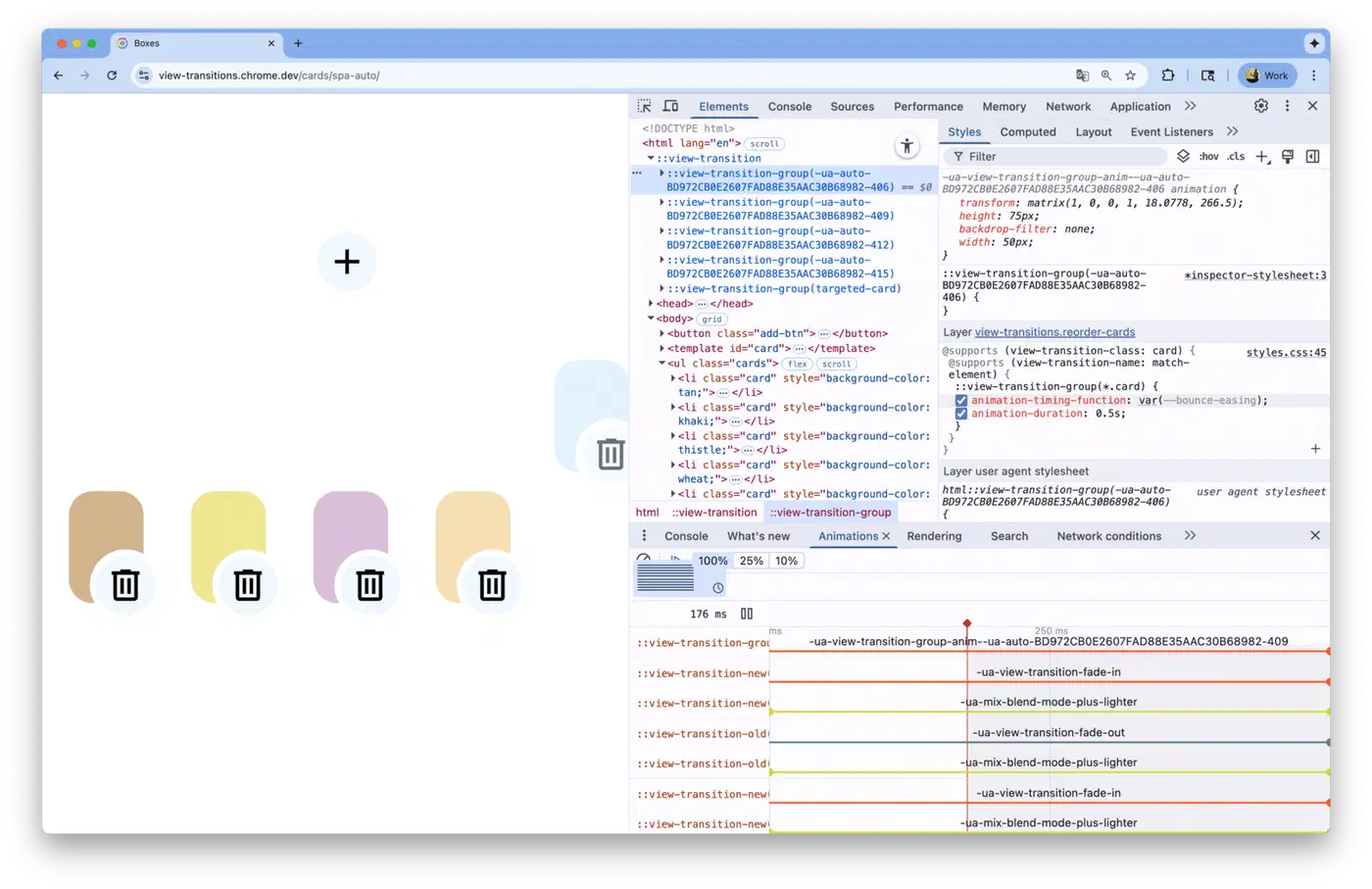
The view-transition-name: match-element value creates a unique name for each element by itself. Before it, animating a list of 50 items meant writing 50 unique names in JavaScript and cleaning them up after. Now one CSS rule replaces that script. The browser matches items across the old and new DOM:
.todo-item { view-transition-name: match-element; }Transition types let you run different animations for different kinds of change. Pass a type into startViewTransition, then target it in CSS with :active-view-transition-type(forward). A wizard can slide left when you move forward and slide right when you go back, all from CSS.
The API doesn’t respect user motion settings for you. Animation can make people with motion sensitivity feel sick, and the browser animates anyway unless you tell it not to. Wrap your transition styles in a prefers-reduced-motion query so the animation drops to almost nothing:
@media (prefers-reduced-motion: reduce) {
  ::view-transition-group(*),
  ::view-transition-old(*),
  ::view-transition-new(*) {
    animation-duration: 0.01ms;
  }
}
Screen readers still announce content changes as they would without transitions. Don’t rely on the animation to carry meaning, though. If a user can’t see the morph, the content change still has to make sense on its own. The same rule drives form state that screen readers can reach: every state change has to surface through markup, not visuals.
View transition pitfalls and how to fix them
Most “it looks broken” reports about view transitions trace back to the same five causes. Each one has a short fix.
Duplicate names skip the whole transition
Every view-transition-name must be unique in the page at capture time. If two visible elements share a name, the browser skips the transition. The DOM update still runs and the ready promise rejects. A card template that hard-codes view-transition-name: card is the usual culprit. Use match-element, a view-transition-class plus unique names, or set the name inline only on the one element you are morphing.
The page stops taking clicks
During the animation the old state is a flat picture laid over the page. It can’t be clicked. Setting pointer-events: none on ::view-transition lets clicks pass through to the live page. The simpler fix is short durations. Keep them between 200ms and 400ms. Element-scoped transitions in Chrome 147 go further: they limit the transition to one subtree, so the rest of the page stays live.
A second transition snaps the first one
Start a new transition while one is running and the running one jumps to its end state. On fast double clicks this looks like a glitch. Guard the trigger: keep a reference to the current ViewTransition, and either wait for its finished promise or call skipTransition() on it before you start the next.
Images stretch during a morph
When a square thumbnail morphs into a wide hero, the old and new snapshots are stretched to fit the moving box. Tell them to crop instead:
::view-transition-old(hero),
::view-transition-new(hero) {
  height: 100%;
  object-fit: cover;
}
Named children escape their parent’s clip
A named element inside a card with overflow: hidden breaks out of the card as soon as the transition starts. That happens because every named element becomes a flat top-level layer. Chrome 140 added view-transition-group: contain, which nests the layers like the DOM and keeps the clip. Safari and Firefox don’t have it yet, so test there with fewer named children.
Using view transitions with React, Astro and other frameworks
You don’t need a framework, but most frameworks now wrap the View Transitions API for their router navigation.
- React: the
<ViewTransition>component animates whatever it wraps when React commits an update. Next.js exposes it behind an experimentalviewTransitionconfig flag. - Astro: for plain page-to-page fades, the native
@view-transitionrule is enough. Astro’s<ClientRouter />adds a client-side router on top for Firefox fallbacks and state that survives navigation. - Angular: add
withViewTransitions()toprovideRouter()and route changes run insidestartViewTransition. - SvelteKit: call
document.startViewTransitioninside theonNavigatehook and resolve it when the new page is ready. - Vanilla JS: wrap any DOM update in
startViewTransition.
Chrome’s team keeps a set of live demos that show each pattern in both SPA and MPA form. Pagination slides pages by direction. Stack Navigator copies a mobile chat app. Cards adds and removes items with view-transition-class. Each demo lists the browser versions it needs, so they double as a support check.
Performance and best practices
The compositor does most of the work, which is why transitions feel smooth even on modest hardware. Snapshots are GPU textures, the animation changes opacity and transform, and the main thread stays free.
Keep durations in the 200-400ms range. Shorter feels like a glitch. Longer feels slow and blocks input. The default 250ms is the sweet spot.
Be frugal with named elements. Each view-transition-name creates its own capture layer, and capturing dozens of layers on a complex page can stutter at the start. Name the few elements that need to morph and let the rest fade with the root.
Test on real phones. Mobile GPUs vary a lot, and a transition that feels smooth on a flagship can stutter on an older Android phone. Record it with the Chrome DevTools Performance panel on that device to see where the frames drop.
FAQ
Can I use the View Transitions API in production?
Yes. Same-document transitions are Baseline across Chrome, Edge, Safari and Firefox. Cross-document transitions work in Chrome, Edge and Safari, and Firefox falls back to a normal page load. Feature-detect document.startViewTransition and nothing breaks.
Does Firefox support the View Transitions API?
Partly. Firefox 144 shipped same-document transitions, view-transition-class and match-element. Firefox 147 added transition types. Cross-document view transitions aren’t in Firefox yet; follow bug 1860854.
Do I need JavaScript for view transitions?
Not for page-to-page navigation on a multi-page site, where one CSS rule is enough. Chrome and Safari read it with no script on the page. You need one JavaScript call for same-document updates, since the browser has to know when your DOM change starts and ends.
Is the View Transitions API the same as CSS transitions?
No. A CSS transition animates one property on one element. A view transition animates the change between two whole states of the page, including elements that move, resize or appear.
The same zero-JavaScript idea goes further. The HTML popover attribute replaces most modal and dropdown scripts with one attribute, and the CSS anchor API pins those popups to their triggers. Both follow the same progressive-enhancement pattern as view transitions.