 Botmonster Tech
React 19 server actions delete your whole API layer

React 19 Server Actions let you mark an async function "use server" and hand it straight to a form. That one function replaces your REST endpoint, your fetch wrapper, and your React Query mutation. Three new hooks add loading states, errors, and optimistic UI. Both Next.js App Router and TanStack Start ship it, so forms rarely need an API layer.
Key Takeaways
- Your forms submit even before the page’s JavaScript finishes loading.
- One server function replaces three separate files of plumbing code.
- A typical form drops from about 80 lines to about 20.
- Each action stays open to the public, so check permissions inside it.
- They need a real server, so static-only sites cannot use them.
What Server Actions are and how “use server” works
Server Actions are small server endpoints that React wires up for you. The "use server" directive tells the bundler to keep that code out of the client bundle. It then exposes the function as a reference the browser can call.
You can place the directive in two ways. At the file level, every exported function in that module becomes a Server Action:
"use server";

export async function createPost(prevState: any, formData: FormData) {
  const title = formData.get("title") as string;
  const body = formData.get("body") as string;
  await db.posts.create({ data: { title, body } });
  revalidatePath("/posts");
  return { error: null };
}
Or inline, inside a Server Component:
function EmptyNote() {
  async function createNoteAction() {
    "use server";
    await db.notes.create();
  }
  return <form action={createNoteAction}>...</form>;
}
What happens on the wire
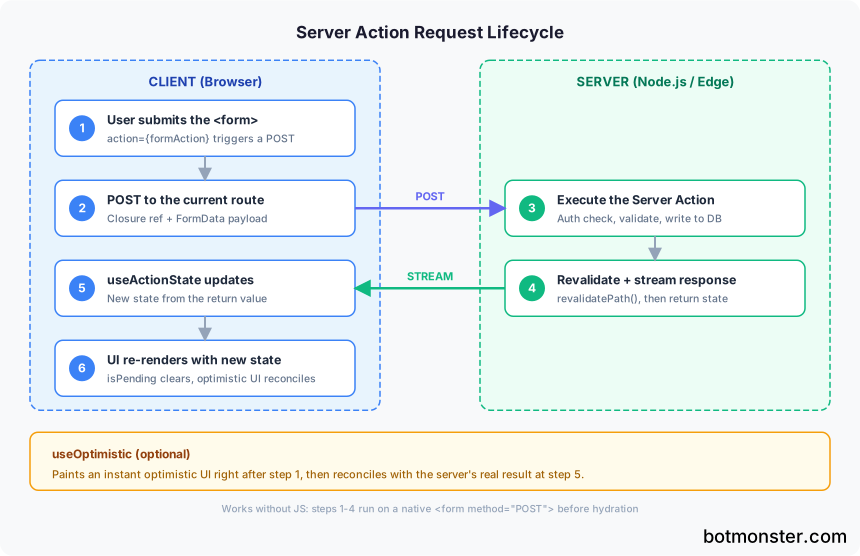
When a client calls a Server Action, the browser sends a POST to the current route. It carries a closure reference and a FormData payload. The “no API layer” claim means you did not write the endpoint, not that one is missing. React and your framework handle the routing, the decoding, and the response for you.
Serialization rules
Server Actions accept a fixed set of argument types: primitives, plain objects, FormData, Date, Map, Set, typed arrays, and URL. That list still means legacy Date, so anything built on the Temporal API has to be serialized on the way over. Class instances, functions, and React elements will not cross the wire. They throw at runtime if you pass them. Most people hit this the first time they send a callback or a component ref.
Return values follow the same rules. What you return from a Server Action comes back as the new state in useActionState. You can also call revalidatePath() or revalidateTag() inside the action. That refreshes server-rendered content in the same response.
The React 19 turning point
Server Actions sat in canary builds and behind framework flags for nearly two years. React 19 made them stable in December 2024. The same release marked useActionState, useFormStatus, and useOptimistic as stable. useActionState took over from the short-lived useFormState in ReactDOM. After that, teams stopped treating Server Actions as a beta toy and shipped them as the default way to save data.
Framework hosts in 2026
Two mainstream options run Server Actions in production:
Next.js App Router was the first proving ground for Server Actions. Next.js 16.2 uses the standard "use server" directive. It ties tightly into revalidatePath, revalidateTag, and redirect.
TanStack Start takes a different route. Instead of "use server", you call createServerFn from the @tanstack/start package. The team skipped the directive on purpose. They worried about hidden network boundaries and the attack surface that comes with them. You still get server-run writes, but you have to ask for each one by name.
Plain Vite SPAs and old Create React App setups still need a server. Without one, Server Actions do not run at all.
The new hooks: useActionState, useFormStatus, and useOptimistic
On their own, Server Actions only give you a function. The three hooks added in React 19 turn them into a real form. You get loading states, error messages, and instant updates.
useActionState
useActionState(action, initialState) returns three things: [state, formAction, isPending]. It wraps your Server Action so what the action returns becomes component state.
"use client";
import { useActionState } from "react";
import { createPost } from "./actions";

export function NewPostForm() {
  const [state, formAction, isPending] = useActionState(createPost, {
    error: null,
  });
  return (
    <form action={formAction}>
      <input name="title" required />
      <textarea name="body" required />
      <button disabled={isPending}>
        {isPending ? "Publishing..." : "Publish"}
      </button>
      {state.error && <p role="alert">{state.error}</p>}
    </form>
  );
}
A common gotcha: useActionState calls your action with (prevState, formData), not just formData. Your action must take the prior state first, even if you ignore it. Skip that, and formData lands in the wrong slot, producing runtime errors that make no sense.
useFormStatus
useFormStatus() runs inside a child component and hands you pending, data, method, and action. No need to pass isPending down the tree. It’s handy for shared submit buttons and design system parts:
import { useFormStatus } from "react-dom";

function SubmitButton() {
  const { pending } = useFormStatus();
  return (
    <button type="submit" disabled={pending}>
      {pending ? "Saving..." : "Save"}
    </button>
  );
}
You must call the hook from a child of the <form>. It won’t work from the same component that renders the form.
useOptimistic
useOptimistic(state, updateFn) shows a local update right away, before the Server Action finishes. It then fixes itself when the real state lands. Pair it with a list so the new row shows up the moment the user clicks Publish:
const [optimisticPosts, addOptimisticPost] = useOptimistic(
  posts,
  (current, newPost) => [...current, newPost]
);
Composition pattern
The three hooks have separate jobs and stack cleanly. useActionState owns the real server state, useOptimistic holds the fake state you show while you wait, and useFormStatus tracks the pending look of a single button. Mix them up, and you end up passing props down five levels and re-rendering for nothing.
Progressive enhancement: forms that work before JavaScript
Server Actions bring back something the React world dropped around 2015: a form that submits correctly on the very first paint, before hydration finishes, and with JavaScript fully turned off.
How it works
Pass a Server Action straight to <form action={...}> and React emits a real HTML <form method="POST"> during SSR. If JavaScript has not loaded, the browser submits the form on its own. React 19 also replays forms for you. Submit while the page is still hydrating, and the framework holds the request, then sends it once hydration ends.
The real-world impact
A slow form still drags down Interaction to Next Paint on cheap phones. Users on poor networks often tap submit before the JS bundle parses. A form built this way turns that tap into a real server request instead of a dead click.
Testing it
You can verify progressive enhancement in under a minute:
- Open DevTools and disable JavaScript
- Load the page with the form
- Fill in the fields and submit
- Confirm the server processes the action and returns an SSR-rendered success state
Limits
useOptimistic and client-side checks don’t work without JavaScript, though the write itself still lands. The core job works everywhere, and the nicer parts layer on top when JS is on.
What the old world looked like
A typical 2023 React form used onSubmit={e => { e.preventDefault(); mutate(...) }}. It broke without JS, and it needed a third-party spinner to feel quick. Server Actions delete both problems. A native form also gives you browser behavior for free. Autofill, password managers, required checks, and Enter-to-submit all work with no handler code.
Error handling, validation, and security
Server Actions look simple until bad input shows up and you have to add auth checks. Every Server Action is a public POST endpoint that anyone can call. The same problem shows up when a page exposes tools for AI agents, where the caller is a model rather than a person.
Validation with Zod
Check formData at the top of your action. Return errors when it fails. Then let useActionState push field-level messages back to the UI:
"use server";
import { z } from "zod";

const PostSchema = z.object({
  title: z.string().min(1, "Title is required"),
  body: z.string().min(10, "Body must be at least 10 characters"),
});

export async function createPost(prevState: any, formData: FormData) {
  const result = PostSchema.safeParse({
    title: formData.get("title"),
    body: formData.get("body"),
  });

  if (!result.success) {
    return { error: result.error.flatten().fieldErrors };
  }

  await db.posts.create({ data: result.data });
  revalidatePath("/posts");
  return { error: null };
}
Zod is the most common pick. Valibot and ArkType work the same way here. For the database your action writes to, see how each toolkit handles schema migrations and type inference.
The security reality
Every "use server" function is an endpoint the client can call with any arguments. So check auth and permissions inside the action. Do it the same way you would in a REST controller. A safe skeleton looks like this:
export async function deletePost(prevState: any, formData: FormData) {
  const session = await getSession();
  if (!session) throw new Error("Unauthorized");

  const postId = formData.get("postId") as string;
  const post = await db.posts.findUnique({ where: { id: postId } });

  if (post?.authorId !== session.userId) {
    throw new Error("Forbidden");
  }

  await db.posts.delete({ where: { id: postId } });
  revalidatePath("/posts");
  return { error: null };
}
CSRF protection
Next.js App Router runs an Origin header check on Server Actions by default. TanStack Start follows a similar model. One thing to watch: keep secrets out of the closure. Closure variables get baked into the client bundle as part of the action reference.
Throwing vs returning errors
Thrown errors show up at the nearest error.tsx boundary. Use them for surprise failures like a database outage. Returned errors stay in the state from useActionState. Use them for bad input the user can fix. Pick based on whether the user can act on the failure.
Rate limiting and idempotency
Server Actions run on every submit, and nothing weeds out repeats. For risky actions, wrap them with a rate limiter (Upstash, Arcjet). In payment flows, add a one-use key to the FormData so a double submit charges once.
Comparison with the REST + React Query mutation stack
Line Server Actions up with the 2022-2024 standard. That was a REST or tRPC endpoint plus useMutation from TanStack Query.
| Aspect | REST + React Query | Server Actions |
|---|---|---|
| Files touched per form | Route handler + fetch client + component | Action file + component |
| Lines of code (typical form) | 60-100 | 15-25 |
| Progressive enhancement | None (requires JS) | Built-in (works without JS) |
| Type safety | Requires OpenAPI gen or tRPC | Free from function signature |
| Client bundle impact | ~13 kB gzipped (react-query) | 0 kB added |
| Optimistic updates | Manual onMutate/onError rollback | useOptimistic hook |
| Cache invalidation | queryClient.invalidateQueries() | revalidatePath() / revalidateTag() |
Where React Query still wins
Server Actions replace the write side of the stack, not the read side. TanStack Query is still better for tricky client caches, cross-tab sync, polling, and infinite scroll. If your app already uses React Query for reads, keep it. The two sit side by side in the same tree.
Migration path
Start with one form at a time. Pick the simplest create or update form. Move it to a Server Action with useActionState, and leave the rest alone. You don’t need a big rewrite. Once it feels normal, work through the others at your own pace.
When NOT to use Server Actions
Server Actions need a server. They don’t work in static export sites, React Native apps, or Electron renderer processes. They also don’t fit when the client must talk straight to a third-party API with no server hop. Ship a Vite SPA with no backend of your own, and Server Actions are off the table.
File uploads and size limits
Server Actions handle file uploads through plain FormData with no extra setup. The file shows up as a File object in the action. Do what you like with it: send it to S3, save it to disk, or hand it to an image pipeline. Actions can write files out too, and pdfcn renders a PDF invoice in about 26 ms, so the document is ready before the action returns.
The default body size limit in Next.js is 1 MB. For bigger uploads, set serverActionsBodySizeLimit in next.config.js:
module.exports = {
  experimental: {
    serverActions: {
      bodySizeLimit: "10mb",
    },
  },
};
In Next.js 15.5+, a separate proxy layer has its own cap (proxyClientMaxBodySize). Raise both, or the file data gets dropped with no error, which makes the cause hard to find.
Testing Server Actions
Server Actions run on the server. So unit tests for them look nothing like tests for client-side writes.
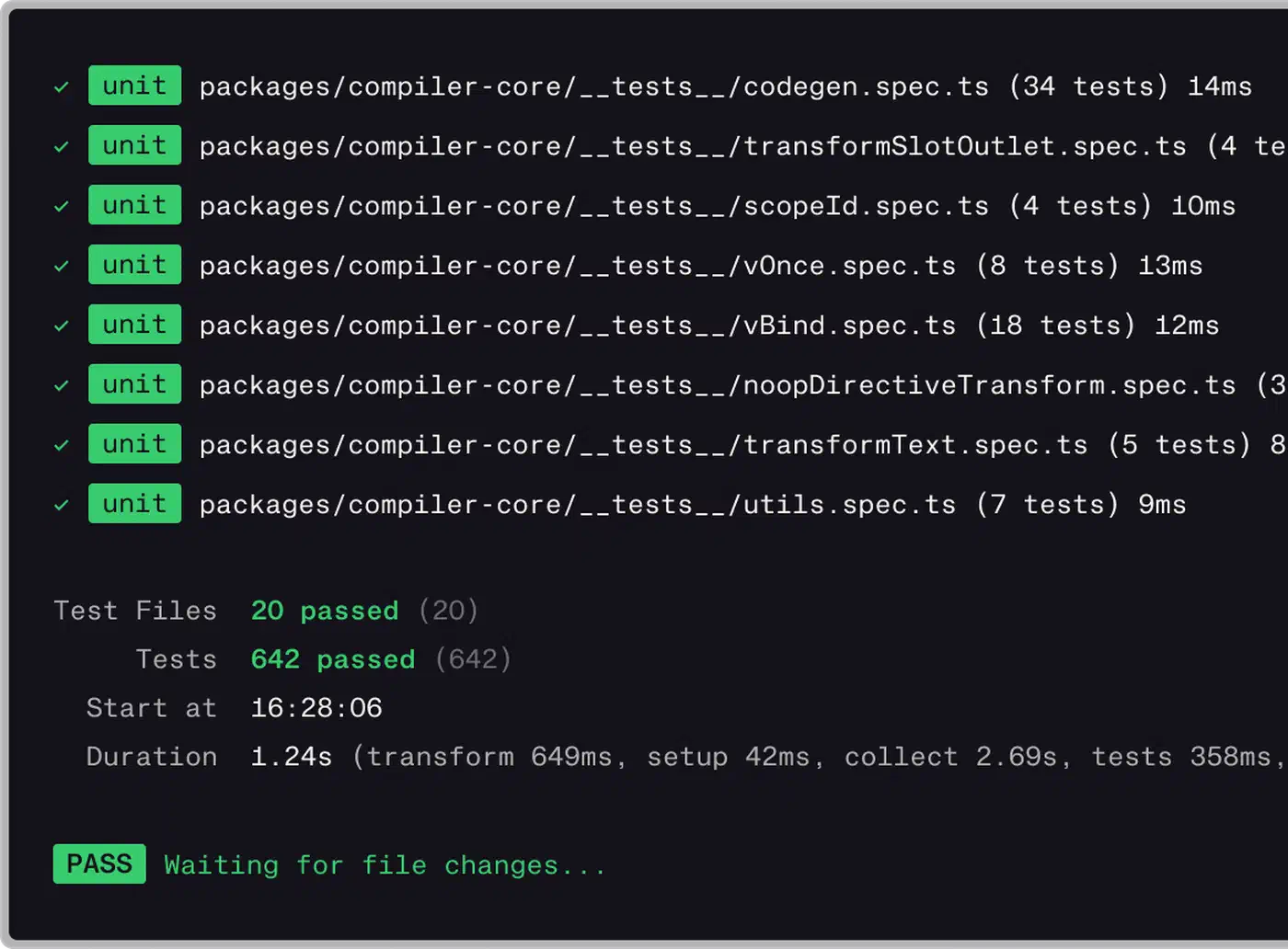
For unit tests, call the action directly in Vitest with mocked deps. The action is just an async function that takes (prevState, formData). Build a FormData object and check what comes back.
For end-to-end tests, Playwright is the standard pick. Write a test that fills the form, clicks submit, and checks the page that comes back. Then run the same test with JavaScript turned off. The form should still work.
A handy middle ground: Vitest’s browser mode runs component tests in a real DOM backed by Playwright. You skip the limits of JSDOM and keep test runs fast.
Common errors and troubleshooting
A few errors show up again and again when teams pick up Server Actions.
The most common is Functions cannot be passed directly to Client Components. It means you passed a plain function, not a Server Action, from a Server Component to a Client Component. Mark the function with "use server" to fix it. Or move things around so the Client Component owns its own handler. One common trap: wrapping a Server Action in an arrow function (() => deletePost(id)) makes a brand new function that cannot cross the wire. Use .bind() instead.
Broken arguments come up next. Pass a class instance, a React element, or a function to a Server Action and it fails at runtime. Stick to plain objects, primitives, and FormData.
The “where did my console.log go?” question catches people off guard. Server Actions run on the server. The output lands in the server terminal, not the browser console. Devs used to client-side code go looking in DevTools and find nothing.
Stale closures are trickier. Say your Server Action grabs a variable from a Server Component’s scope. That value freezes at render time and rides along with the action reference. Later renders won’t update it. To fix it, pass fresh values through FormData instead.
Finally, revalidatePath sometimes fails to refresh the page. Call it inside a Server Action fired from an intercepting route, and the routing state can break. This is a known Next.js issue. The workaround is to call redirect() right after, which forces a clean navigation.
React Router v7 actions: a different approach
React Router v7 is the successor to Remix, and it has its own server action model. React Router actions are tied to routes. Each route can define an action function that runs on the server. It fires when a form aimed at that route is submitted. After it returns, all loader data on the page refreshes for you.
The key difference is scope. React Router actions live at a URL and belong to one route. React 19 Server Actions are plain functions any component can call, with no routing. React Router refreshes the whole page’s data for you. React 19 lets you pick what refreshes, with revalidatePath and revalidateTag.
React Router v7 is also adding RSC and Server Action support, which pulls the two models closer. For a new project, the pick between Next.js, TanStack Start, and React Router usually comes down to routing style and where you deploy. Server Action features rarely decide it.