 Botmonster Tech
Jenkins is still relevant, just not for new projects
Is Jenkins still relevant? Yes, though not to the people asking. The project ships a release most weeks, has reached version 2.575, and carries roughly 3,610 open issues at the same time. Almost nobody picks it for a new project, yet it runs a surprising amount of production software anyway.
Key Takeaways
- Jenkins still ships a new release almost every week.
- It runs on hardware you own, which is why regulated shops keep it.
- The plugin ecosystem is its best feature and its worst risk.
- Nobody picks it for new projects, yet it still runs plenty of them.
- If you inherit one, learn it properly before planning a migration.
Is Jenkins still relevant, honestly
The reason it survives is narrower than either side admits. The release list for Jenkins shows versions 2.567 through 2.575 landing seven days apart, week after week. That cadence has held for more than a decade.
The bad news sits in the same repository. The jenkinsci/jenkins tracker carries roughly 3,610 open issues, and the number doesn’t go down. A project that ships every week and never clears its backlog is a specific kind of alive. No “Jenkins is dead” post describes that state.
Adoption data splits the same way. JetBrains’ State of Developer Ecosystem survey puts Jenkins at 28% of organizations, behind GitHub Actions at 33%. On personal projects the gap flips hard: 13% for Jenkins against 39% for GitHub Actions.
Jenkins keeps the estate it already has and wins almost nothing new.
Jenkins requires more specialized knowledge, and the configuration is accessible to fewer people.
Location is the reason it survives. Jenkins runs on hardware you own. For a bank, a defence contractor, or an air-gapped network, that is a hard requirement, and no hosted service can meet it.
It also reaches almost anywhere. If a task can be scripted, there is a plugin or a shell step for it. That flexibility is why Jenkins ended up attached to licence dongles, hardware test rigs, and build machines that nobody dares rebuild.
Jenkins publishes its own usage telemetry , and the shape of it is a plateau. About 280,000 installations report home, down from a peak near 301,000 in 2022. They cover roughly 84 million jobs across 1.2 million build nodes.
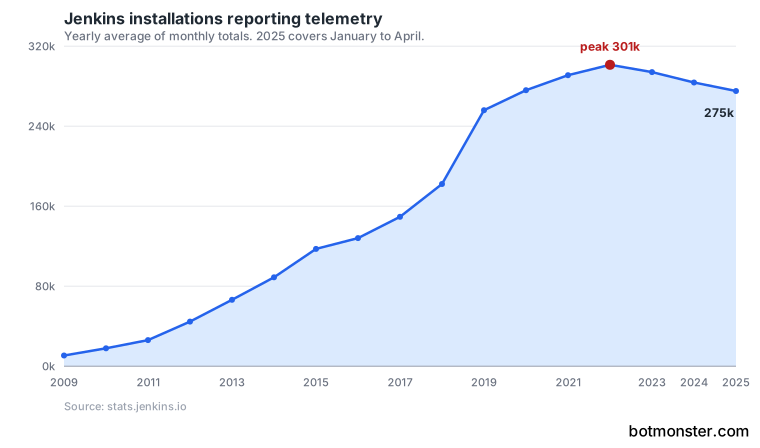
If your code can leave the building and your stack is ordinary, Jenkins solves a problem you don’t have.
What the plugin ecosystem gives and takes
plugins.jenkins.io lists 2,090 plugins, contributed over fifteen years by people who needed an integration and built it. The Windows cleaner FluentCleaner leans on the same model, writing no cleaning rules of its own and reading a community-maintained rule file instead.
Only 518 of those plugins shipped a release in 2026, and another 314 last shipped in 2025. That leaves 1,258 plugins, 60% of the directory, with no release since the start of 2025. Of those, 734 have shipped nothing since 2019.
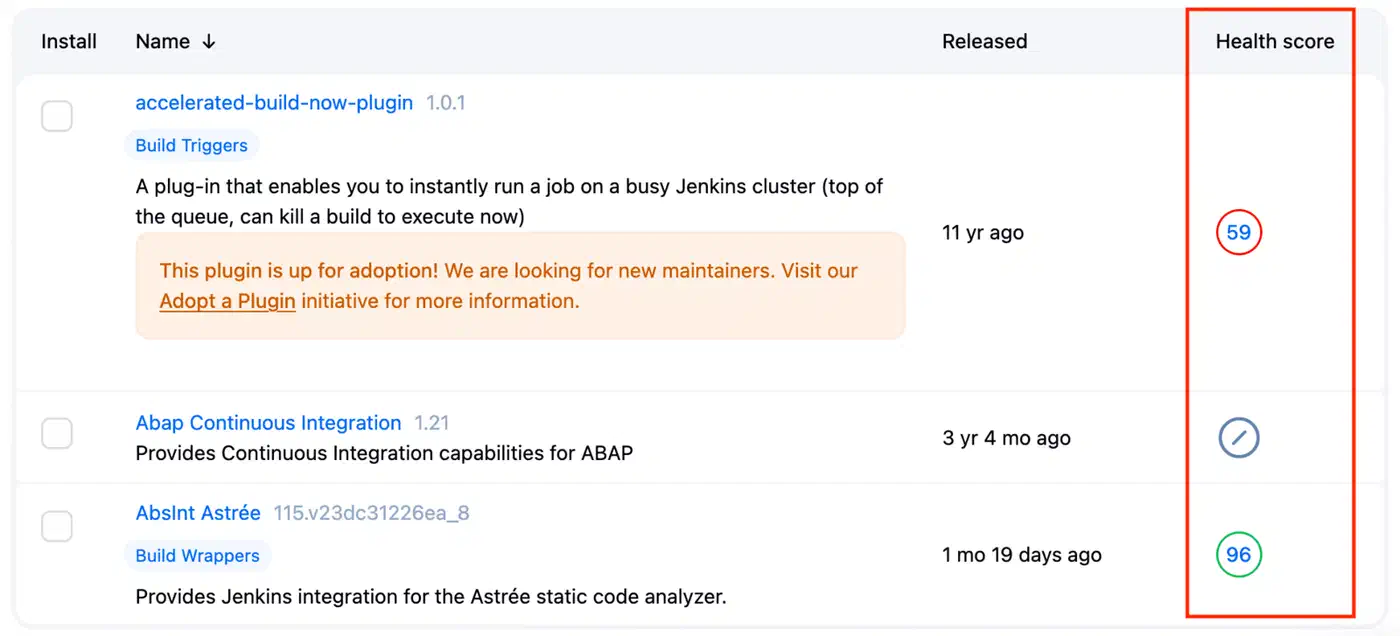
Every plugin is code running inside your controller, with its own release cycle and its own risk of going stale. So the classic Jenkins failure is an upgrade blocked by one dead plugin, found the week a security advisory lands.
Plugin conflicts are the subtler failure. Two plugins both work, disagree about something, and produce behaviour the docs never describe. You debug that by reading source code.
The controller runs plugin code with its own privileges. The Jenkins security advisories bear this out. Six landed in 2026 and twelve in 2025, and most name plugins rather than core, so an out-of-date plugin is a security problem as much as a maintenance one.
Install the smallest set of plugins that does the job, and audit that list on a schedule instead of when something breaks.
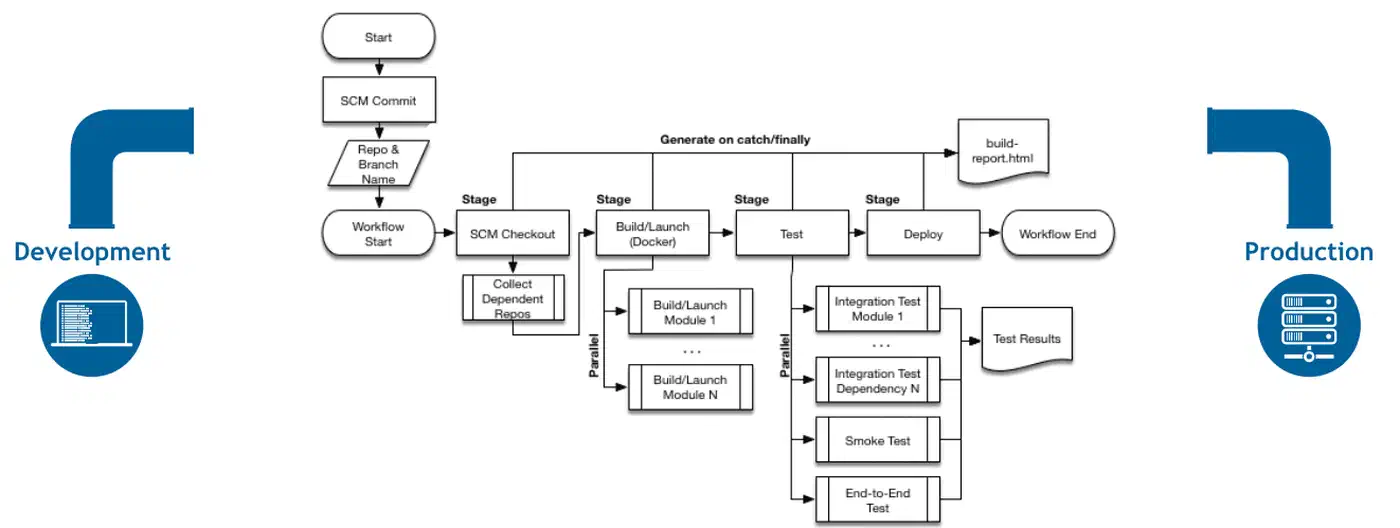
Pipelines now live in a Jenkinsfile in the repository rather than in forms clicked into the web interface. The Jenkins documentation
treats that file as the default. Configuration became code, and that makes the rest of this manageable.
What the alternatives actually replaced
Hosted CI won one specific competition, which is running a test suite and a deploy step from a single config file with no server to maintain. That is what most teams need. They also absorb newer work such as automated pull request reviews, which nobody is building on a Jenkins controller.
What they gave up is control over where the build runs. That is exactly the constraint Jenkins exists for. Container-native tools improved on both counts, with repeatable build environments and cleaner isolation. Some even let you write pipelines in real code rather than YAML. Still, none of them solved the fifteen-year-old build that needs one machine with one licensed tool attached.
| Tool | Org adoption | Where builds run | Config |
|---|---|---|---|
| Jenkins | 28% | Your hardware | Jenkinsfile plus plugins |
| GitHub Actions | 33% | Hosted or self-hosted runners | YAML workflow |
| GitLab CI | 19% | Hosted or self-hosted runners | YAML pipeline |
| Dagger | Not surveyed | Containers anywhere | Go, Python or TypeScript |
Hosted is not always the cheap option. GitHub bills a standard Linux runner at about $0.006 a minute once the free allowance runs out. A team burning 200,000 minutes a month pays over $1,000 for compute. A controller on hardware you own costs power and attention.
For a new project on a normal stack, don’t choose Jenkins. On an existing estate with unusual constraints, none of the alternatives may actually fit.
Assess an inherited Jenkins server before you touch it
Work out what the server runs and what it depends on before you decide whether to fix it or replace it. Do all eight steps before you change a single setting.
Find out what actually runs on it
List every job, then split the list in two. Separate the jobs that ran in the last 30 days from the ones that haven’t run in a year. The second pile is usually larger than anyone expects, and it’s free to delete.
Check the version
Compare what you run against the current weekly release and the current long-term support line. Jenkins publishes both, and the LTS line ships roughly quarterly with backported fixes. The size of that gap predicts how painful the upgrade will be.
Inventory the plugins
List every installed plugin, its version, and when it last shipped upstream. Expect to find at least one abandoned plugin. Those are the real migration blockers.
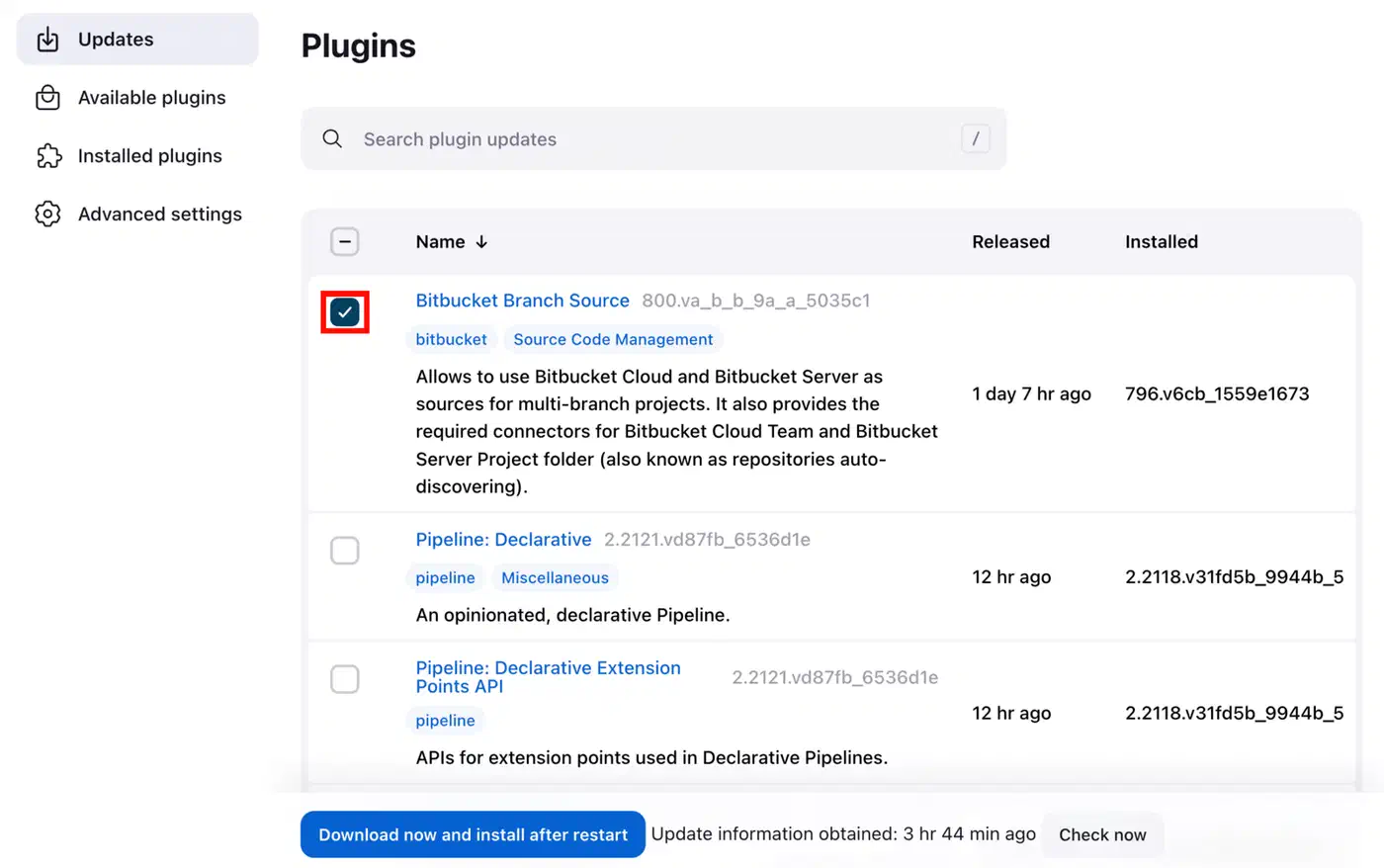
Find the configuration that lives outside the repository
Credentials, node definitions, and job settings clicked into the web interface are the pieces that vanish in a rebuild. Write them down now. Anything not in the repository is knowledge that exists in one place only.
Look at the agents
Find out where builds actually execute. Then check whether those machines are managed by a team or were set up once by somebody who left in 2019. Unmanaged agents are the most common hidden dependency in an old install.
Back up the home directory
The entire state of a Jenkins controller lives in its home directory. Back it up, then restore it onto a second machine and confirm it boots. A backup you’ve never restored is a guess.
Decide honestly between fixing and replacing
A server with ten pipelines and current plugins is worth keeping. One with two hundred jobs and abandoned plugins is a migration project whichever route you pick, so choose the route with a deadline attached.
If you migrate, freeze first
Stop adding jobs to the old server on the day you decide. Otherwise the old server keeps growing while you move things off it, and the migration never finishes.
What to do with the one you already have
The first decision is whether the server is maintained or merely running. Those are different states, and only one of them is safe. A machine nobody has logged into for two years is only running.
Keep it and modernise when the pipelines already live in files, the plugin list is short, and upgrades apply cleanly. That server is fine. Give it a patching schedule and move on.
Migrate when nobody knows what half the jobs do, upgrades are blocked by a plugin, and the person who built it left. Move pipelines one at a time, and delete each old job the day its replacement runs green.
Without a deadline, both servers keep running, work moves across whenever somebody has time, and you maintain two of them indefinitely.
Whichever way you go, hold the security baseline. Keep the controller off the public internet, keep plugins current, and treat every build agent as untrusted.
Jenkins started in 2010, is MIT licensed, and is written in Java. It has an enormous installed base and a backlog it will never clear. Neither of those is going to change.