 Botmonster Tech
Kimi Code watches a screen recording and writes code

Kimi Code CLI is a terminal coding agent from Moonshot AI, and its one unusual trick is video input. Drop a screen recording into the chat and the agent watches the clip instead of asking you to describe what broke. No other mainstream terminal agent takes video.
Key Takeaways
- Kimi Code watches a screen recording and works from what it sees.
- Video only runs on Moonshot’s own models, so a plugged-in provider loses it.
- Your editor can drive the agent, but video does not travel over that link.
- One install command, no Node.js setup to get wrong.
- Four releases landed in five days, so expect rough edges.
What video input changes for a terminal coding agent
Describing a visual bug in words is slow and lossy. You type three sentences about a dropdown that closes too early, and the one detail that would have solved it never makes it in. Video skips that translation step.
The obvious use is a repro. Record the broken interaction, paste the clip, and the agent sees the sequence for itself. Timing and cause are baked into a video in a way a screenshot cannot carry.
Moonshot names three more uses in the Kimi Code README: turning a reference clip into a colour grading table, cutting a long video down to a short one, and handing over a screen recording of an app to get code that behaves the same way. That last one is what developers will actually reach for.
Pasting takes one keystroke. The interaction guide puts it on Ctrl-V for macOS and Linux, Alt-V on Windows. The input box shows a placeholder you can edit like text, and the real content swaps in when you send.
Video only works when the model behind the session accepts it. The providers reference lists video upload as an extra capability of the Kimi provider alone. Configure Anthropic or OpenAI instead and video stops working.
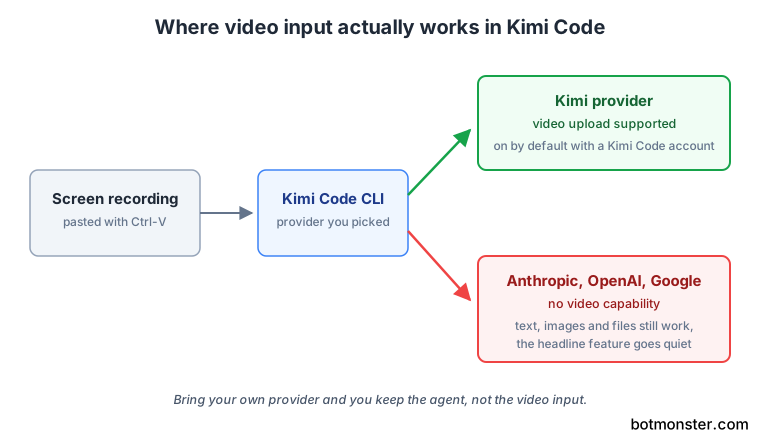
Cost is the second caveat. A video is a lot of tokens, and nobody has published what a two-minute screen recording burns next to a written bug report of the same problem. Measure it on your own quota before you build a habit around it.
How to install Kimi Code and give it a video to work from
Install it with npm
Run npm install -g @moonshot-ai/kimi-code. The getting started guide documents this path alongside upgrade and uninstall, and it needs Node.js 22.19.0 or later. Prefer it over the script the front page pipes into your shell.
Check it is on your path
Open a new shell and run kimi --version. A new session is the point: the installer edits your PATH, and the shell you installed from will not see it.
Prepare Windows first, if that is your system
Install Git for Windows before the first launch, because the agent uses the bundled Git Bash as its shell environment. If Git Bash lives somewhere unusual, set KIMI_SHELL_PATH to the absolute path of bash.exe.
Start it in a project
Run cd your-project, then kimi to open the interactive interface. Adding -c resumes your previous session, and -p "your question" runs a single instruction without entering the interface at all.
Sign in
Type /login and pick either Kimi Code OAuth, which uses a device code you approve in a browser, or a Kimi Platform API key. Video is enabled by default on a Kimi Code account, so this choice decides whether the headline feature works.
Try a plain task first
Ask it to explain the project’s main directories. It is a cheap way to watch how the agent explores a codebase. Read-only tool calls run without asking permission, so nothing gets written while you look.
Then give it a video
Record the bug or the interaction you want, paste the clip into the chat, and ask for the change. Judge the agent on this before you judge it on anything else.
Add MCP servers by talking
Run /mcp-config and add or authenticate a server by talking to the agent. Most other terminal agents still make you hand-edit JSON for this.
The parts that make it feel like a native tool
The install script drops one executable on your PATH, which spares you the usual Node.js setup and the global module conflicts that come with it. The “single binary” has a Node runtime bundled inside it. The CLI is written in TypeScript, which is why the npm route still asks for Node 22.19.0. Startup is fast, and that adds up when you open an agent forty times a day.
Subagents keep the main thread clean. Built-in coder, explore, and plan agents run in their own contexts, so a big investigation does not flood the conversation you are reading.
Lifecycle hooks run local commands at defined points, configured in ~/.kimi-code/config.toml. A hook exits 0 to allow and 2 to block. The hooks guide is honest that the design is fail-open: if your script errors or times out, the action goes through. Use hooks for alerts and light gates, and leave the real gatekeeping to permission approvals.
The plugin marketplace covers skills, MCP servers, and data sources. You can install them from the catalog or from any GitHub repository. Each install shows a trust badge of kimi-official, curated, or third-party. Anything outside the official address asks you to confirm, with cancel already selected. The badge tells you where the code came from and nothing about what it does.
Driving it from your editor over ACP
Kimi Code speaks the Agent Client Protocol, a shared standard for editors to drive agents over a plain stdin and stdout stream. The practical effect is that Zed, JetBrains IDEs, and any other compliant client can run a session with no bespoke plugin. Setup is one subcommand, kimi acp, which your editor’s settings point at once you have logged in.
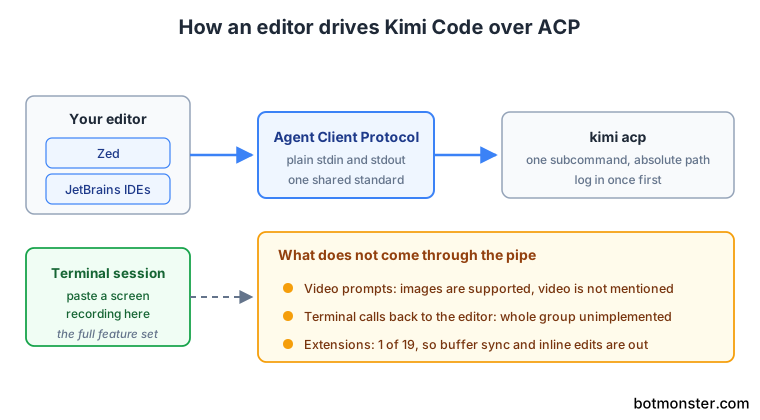
The Model Context Protocol standardised how agents reach tools; ACP standardises how editors reach agents. Editors implement it once and every compliant agent works, instead of every agent shipping an extension for every editor.
Support is young everywhere, though, and Moonshot publishes its own scorecard.
| ACP surface | Implemented | What is missing |
|---|---|---|
| Stable, editor to agent | 10 of 12 | session/close, logout |
| Stable, agent back to editor | 4 of 9 | The whole terminal group |
| Unstable extensions | 1 of 19 | Buffer sync, inline-edit prediction, provider management |
Terminal reverse-RPC is not connected, so shell commands run locally instead of inside your editor’s terminal panel. The kimi acp reference declares image prompts as supported and says nothing about video. The feature this whole tool is known for stays in the terminal.
JetBrains needs extra care. The IDE guide requires an absolute path in the command field. Without a JetBrains AI subscription, you also have to flip llm.enable.mock.response in the Registry just to open the AI chat panel. On macOS, a GUI-launched editor will not inherit your shell PATH either. Test your exact editor rather than trusting the compatibility list.
Should this replace the agent you already use?
The models decide the answer. Kimi Code works out of the box with Moonshot’s Kimi models. You can also point it at Anthropic, OpenAI, Google, or any OpenAI-compatible endpoint through config.toml or the /provider picker. If you already pay for a Kimi plan, this is the first-party client and the obvious choice.
If you are happy with your current agent, video is the only reason to install this one. The interface will not win you over on its own. And even the video reason weakens if you planned to bring your own provider, since it rides on the Kimi side only. A reader who is already inside Zed all day does get a real editor agent here without buying a second product. Phone control is a different story. Kimi Code is not one of the five agents T3 Code drives, so you can’t steer it from a handset that way.
Running it as a second agent is cheap and often useful. A different model reading the same bug frequently lands on a different answer, and the switching cost is one install command. A free tier makes that trial cheaper still, though only some free AI coding tools can carry a whole task on one.
Read the maturity numbers the way you would for any three-month-old agent with a big audience. The repository carries 518 open issues, on a 0.x release line under the MIT licence. The changelog shows 0.29.2, 0.30.0, 0.31.0, and 0.31.1 shipping across five days. That pace buys you fixes quickly, but it also means behaviour moves between releases, so pin a version if you automate anything on top of it.
For the security-minded, the Kimi Code documentation covers both install routes, and the npm package is the same software through a channel you can inspect before you run it.