 Botmonster Tech
Postgres queues thousands of jobs a second, skip Kafka

PostgreSQL
already stores your app data, runs your transactions, and enforces your constraints. For most teams, it can also replace your message broker. Pair FOR UPDATE SKIP LOCKED for atomic job pickup with LISTEN/NOTIFY for push wake-ups, and you get a durable job queue that handles thousands of messages per second. No Kafka, no RabbitMQ, no Redis.
Why Most Teams Don’t Need Kafka
In software, the tool picked often fits the resume more than the problem. Kafka draws this kind of choice often. Teams that move 500 messages per minute reach for a distributed streaming platform. It needs ZooKeeper or KRaft, topic partitions, consumer group rebalancing , and broker disk checks. All to move a few hundred rows of data.
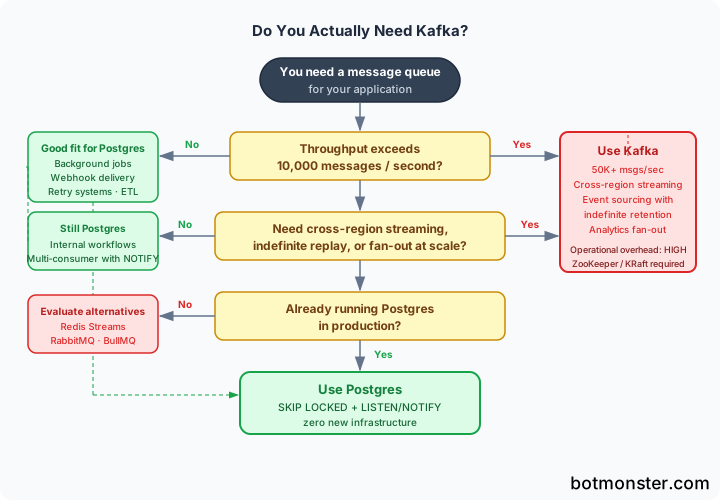
Kafka does earn its keep, but only for a narrow set of jobs. Cross-region event streams. Event sourcing with open-ended retention. Analytics pipelines past 50,000 messages per second. Fan-out to many consumers at true scale. If your job is background work, webhooks, retries, internal flows, or a small ETL pipeline, Postgres is the better tool.
One team swapped RabbitMQ for a Postgres SKIP LOCKED queue in production. P95 latency dropped from 340ms to 210ms, a 38% cut. They also stopped running two systems side by side. Queue draining during deploys, message loss from network blips, and a second monitoring stack all went away.
How SKIP LOCKED Works
SELECT ... FOR UPDATE locks the rows it reads so no other transaction can grab them. On its own, that blocks: if two workers try to grab the same job, one sits and waits. SKIP LOCKED changes that. Workers skip past locked rows and go to the next free one.
The basic dequeue pattern looks like this:
SELECT id, queue_name, payload
FROM jobs
WHERE status = 'pending'
ORDER BY created_at
FOR UPDATE SKIP LOCKED
LIMIT 1;
Postgres MVCC (Multi-Version Concurrency Control) gives each worker a steady view of the table when the query runs. No two workers grab the same row. The locks stay at row level. The ROW SHARE table lock is still taken, but it does not block other reads or writes.
One key contrast: NOWAIT is the other way out of blocking. SKIP LOCKED quietly moves past locked rows. NOWAIT raises an error right away on any lock clash. For queues with many workers, SKIP LOCKED is almost always the right pick.
Handling Crashed Workers
A worker that grabs a job and then crashes would leave that job locked, except the lock releases when the database connection closes. But what if the worker dies mid-job without closing its connection cleanly? Add a locked_until timestamp column. When you pull a job, filter on locked_until < now(). When a worker claims a job, it sets locked_until = now() + interval '5 minutes'. Jobs from crashed workers become free again once the timeout expires.
Building a Complete Job Queue
Here is a schema that covers the full life of a job, with retry logic and dead-letter handling:
CREATE TABLE jobs (
    id          BIGSERIAL PRIMARY KEY,
    queue_name  TEXT NOT NULL DEFAULT 'default',
    payload     JSONB NOT NULL,
    status      TEXT NOT NULL DEFAULT 'pending'
                CHECK (status IN ('pending', 'processing', 'completed', 'failed')),
    attempts    INT NOT NULL DEFAULT 0,
    max_attempts INT NOT NULL DEFAULT 3,
    created_at  TIMESTAMPTZ NOT NULL DEFAULT now(),
    locked_until TIMESTAMPTZ NOT NULL DEFAULT now(),
    completed_at TIMESTAMPTZ
);

-- Partial index for efficient dequeue queries
CREATE INDEX idx_jobs_dequeue
    ON jobs (queue_name, created_at)
    WHERE status = 'pending';
The partial index on status = 'pending' is key. Without it, every pickup query scans done and failed jobs for no reason. The index stays small as jobs leave the pending state. Define this table and its index in an Alembic migration
so the queue schema ships and rolls back with the rest of your app.
Enqueuing is a plain INSERT:
INSERT INTO jobs (queue_name, payload)
VALUES ('email', '{"to": "user@example.com", "template": "welcome"}');
Pickup runs in a transaction, claims the row, and marks it as processing in one step:
BEGIN;
  UPDATE jobs
  SET status = 'processing',
      attempts = attempts + 1,
      locked_until = now() + interval '10 minutes'
  WHERE id = (
      SELECT id FROM jobs
      WHERE status = 'pending'
        AND queue_name = 'email'
        AND locked_until <= now()
      ORDER BY created_at
      FOR UPDATE SKIP LOCKED
      LIMIT 1
  )
  RETURNING *;
COMMIT;
On success, mark the job done:
UPDATE jobs SET status = 'completed', completed_at = now() WHERE id = $1;On failure, either requeue with exponential backoff or move to failed status:
UPDATE jobs
SET status = CASE
    WHEN attempts >= max_attempts THEN 'failed'
    ELSE 'pending'
END,
locked_until = now() + (interval '30 seconds' * power(2, attempts))
WHERE id = $1;
Here is a small Python worker built on psycopg3 with an async pool:
import asyncio
import psycopg
from psycopg_pool import AsyncConnectionPool

DEQUEUE_SQL = """
    UPDATE jobs
    SET status = 'processing',
        attempts = attempts + 1,
        locked_until = now() + interval '10 minutes'
    WHERE id = (
        SELECT id FROM jobs
        WHERE status = 'pending'
          AND queue_name = %(queue)s
          AND locked_until <= now()
        ORDER BY created_at
        FOR UPDATE SKIP LOCKED
        LIMIT 1
    )
    RETURNING id, payload;
"""

async def process_job(pool: AsyncConnectionPool, queue: str):
    async with pool.connection() as conn:
        async with conn.cursor() as cur:
            await cur.execute(DEQUEUE_SQL, {"queue": queue})
            row = await cur.fetchone()
            if row is None:
                return  # nothing to do
            job_id, payload = row
            try:
                await handle_job(payload)
                await cur.execute(
                    "UPDATE jobs SET status='completed', completed_at=now() WHERE id=%s",
                    (job_id,)
                )
            except Exception:
                await cur.execute(
                    """UPDATE jobs
                       SET status = CASE WHEN attempts >= max_attempts THEN 'failed' ELSE 'pending' END,
                           locked_until = now() + (interval '30 seconds' * power(2, attempts))
                       WHERE id = %s""",
                    (job_id,)
                )
To test this worker against a real Postgres without a shared test setup, lean on throwaway database containers per test run . They spin up a fresh instance on demand. Your pickup logic and retry paths run against the real engine, not a mock.
Adding Real-Time Push with LISTEN/NOTIFY
Polling the jobs table every second burns connections and adds lag. LISTEN/NOTIFY turns your Postgres queue into a push system. Workers sleep until the database wakes them up.
When a new job is inserted, a trigger fires NOTIFY:
CREATE OR REPLACE FUNCTION notify_new_job() RETURNS trigger AS $$
BEGIN
    PERFORM pg_notify('jobs_' || NEW.queue_name, NEW.id::text);
    RETURN NEW;
END;
$$ LANGUAGE plpgsql;

CREATE TRIGGER jobs_notify_insert
    AFTER INSERT ON jobs
    FOR EACH ROW EXECUTE FUNCTION notify_new_job();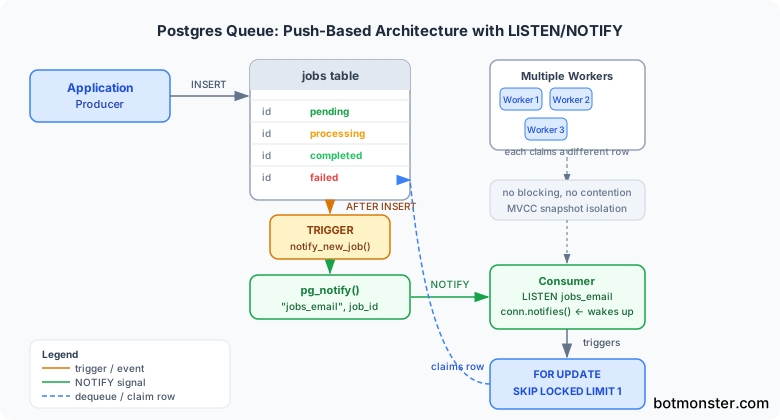
The consumer holds a persistent connection with LISTEN active:
async def listen_and_work(conninfo: str, pool: AsyncConnectionPool, queue: str):
    channel = f"jobs_{queue}"
    async with await psycopg.AsyncConnection.connect(
        conninfo, autocommit=True
    ) as listen_conn:
        await listen_conn.execute(f"LISTEN {channel}")
        # Also process any jobs that arrived before we started listening
        await process_job(pool, queue)
        async for notify in listen_conn.notifies():
            await process_job(pool, queue)
The NOTIFY payload is capped at 8KB, so the trigger sends only the job ID, not the full body. The worker fetches the rest with the pickup query. NOTIFY fires after the inserting transaction commits, so the job is sure to be visible when the worker queries for it. If the LISTEN connection drops on a network hiccup or a Postgres restart, fall back to slow polling as a safety net until the listener comes back.
PGMQ: The Batteries-Included Extension
If you want these patterns without writing the SQL by hand, PGMQ ships them as a Postgres extension. Its API looks a lot like Amazon SQS. It works with Postgres 14 through 18.
Install it as a Docker container for local development:
docker run -d \
  --name pgmq-postgres \
  -e POSTGRES_PASSWORD=postgres \
  -p 5432:5432 \
  ghcr.io/pgmq/pg18-pgmq:v1.10.0
Then enable it and create a queue:
CREATE EXTENSION pgmq;
SELECT pgmq.create('my_queue');
The core API:
-- Enqueue a message
SELECT pgmq.send('my_queue', '{"task": "send_email"}');

-- Dequeue with a 30-second visibility timeout (at-least-once delivery)
SELECT * FROM pgmq.read('my_queue', 30, 1);

-- Acknowledge completion
SELECT pgmq.delete('my_queue', msg_id);

-- Archive instead of delete (keeps message history)
SELECT pgmq.archive('my_queue', msg_id);

-- Pop (read + delete atomically, at-most-once delivery)
SELECT * FROM pgmq.pop('my_queue');
PGMQ also offers pgmq.read_with_poll() for long polling. It waits up to a set number of seconds before it returns if the queue is empty. That avoids tight polling loops and skips the need for a second LISTEN connection.
When should you use raw SQL vs. PGMQ? PGMQ fits teams that want a turnkey setup with built-in metrics (queue depth, oldest message age, worker throughput) and no need for custom retry rules. Raw SQL is better when you want tight control over retries, many-tenant queue splits in one table, or a snug fit with your current transactions.
Python support is psycopg3 only (the tembo-pgmq-python package). Community clients exist for Go, Node.js, Elixir, Java, Kotlin, Rust, and more.
Performance Tuning and Scaling Limits
A single Postgres 17 box on modest gear (4 vCPU, 16GB RAM) runs roughly 3,000 to 5,000 pickup ops per second with SKIP LOCKED. That covers most workloads teams call “high throughput” before they ever measure.
Here is how Postgres queues stack up against the common picks on the axes that count:
| Postgres SKIP LOCKED | RabbitMQ | Redis Streams | Kafka | |
|---|---|---|---|---|
| Throughput | 3-5K ops/sec (single node) | 20-50K msgs/sec | 100K+ msgs/sec | 1M+ msgs/sec |
| P95 Latency | 5-50ms | 5-20ms | 1-5ms | 5-100ms |
| Durability | Full ACID | Durable (with mirroring) | Optional AOF | Durable |
| Ordering | Per-queue FIFO | Per-queue FIFO | Per-stream | Per-partition |
| Operational overhead | Minimal (already running Postgres) | Medium (broker + admin) | Low | High (broker cluster) |
| Message replay | Manual (archive table) | Limited | Yes (consumer groups) | Yes (indefinite) |
Key Tuning Parameters
Put PgBouncer in transaction mode between your workers and Postgres. Each pickup only needs a connection for the length of the transaction, not for the worker’s whole run. So you can run far more workers than Postgres can keep open at once.
High-churn queue tables make dead tuples fast. The default autovacuum_vacuum_scale_factor of 0.2 means autovacuum waits until 20% of the table is dead tuples before it runs. For a jobs table, set it much lower:
ALTER TABLE jobs SET (
    autovacuum_vacuum_scale_factor = 0.01,
    autovacuum_analyze_scale_factor = 0.01
);
Instead of deleting done jobs (which makes dead tuples), partition the table by created_at and drop old partitions whole. Partition drops are instant and add no vacuum work.
If you can live with job loss on a Postgres crash, UNLOGGED tables skip WAL writes and cut WAL volume roughly 30x, with a matching speed gain. This is fine for some cache or dedup workloads, but not for most job queues.
When to Move On
You have likely outgrown the Postgres queue pattern when: pickup latency stays above 50ms after tuning, your worker count hits pool limits even with PgBouncer, or you need cross-region replication with its own consumer groups at each site. At that point, Kafka earns its cost. Until then, the database you already run is the queue you need. On the other end, if Postgres itself feels like too much, see how SQLite handles production workloads . The same “use what you have” rule applies, just one tier lighter.