 Botmonster Tech
superfile looks stunning but Windows support is unfinished
The superfile terminal file manager is the best-looking thing you can run in a shell, and on Linux and macOS it earns that praise. Windows is where it stumbles: the project’s own supported-systems list still marks it “Not fully supported yet,” and ten open issues sit behind that label.
Key Takeaways
- superfile is a file manager that runs in your terminal and looks like a real app.
- Linux and macOS are solid, while the project itself still labels Windows unfinished.
- The mouse works, which almost no other terminal file manager offers.
- Two maintainers carry the project, with 118 people contributing code.
- It checks GitHub for updates once a day unless you turn that off.
What the superfile terminal file manager does differently
superfile puts a readable screen in front of you where most terminal file managers hand you a wall of text and a manual. A sidebar down the left holds pinned directories and mounted drives. File panels sit side by side in the middle. A process bar along the bottom shows copy and delete jobs ticking along while you work.
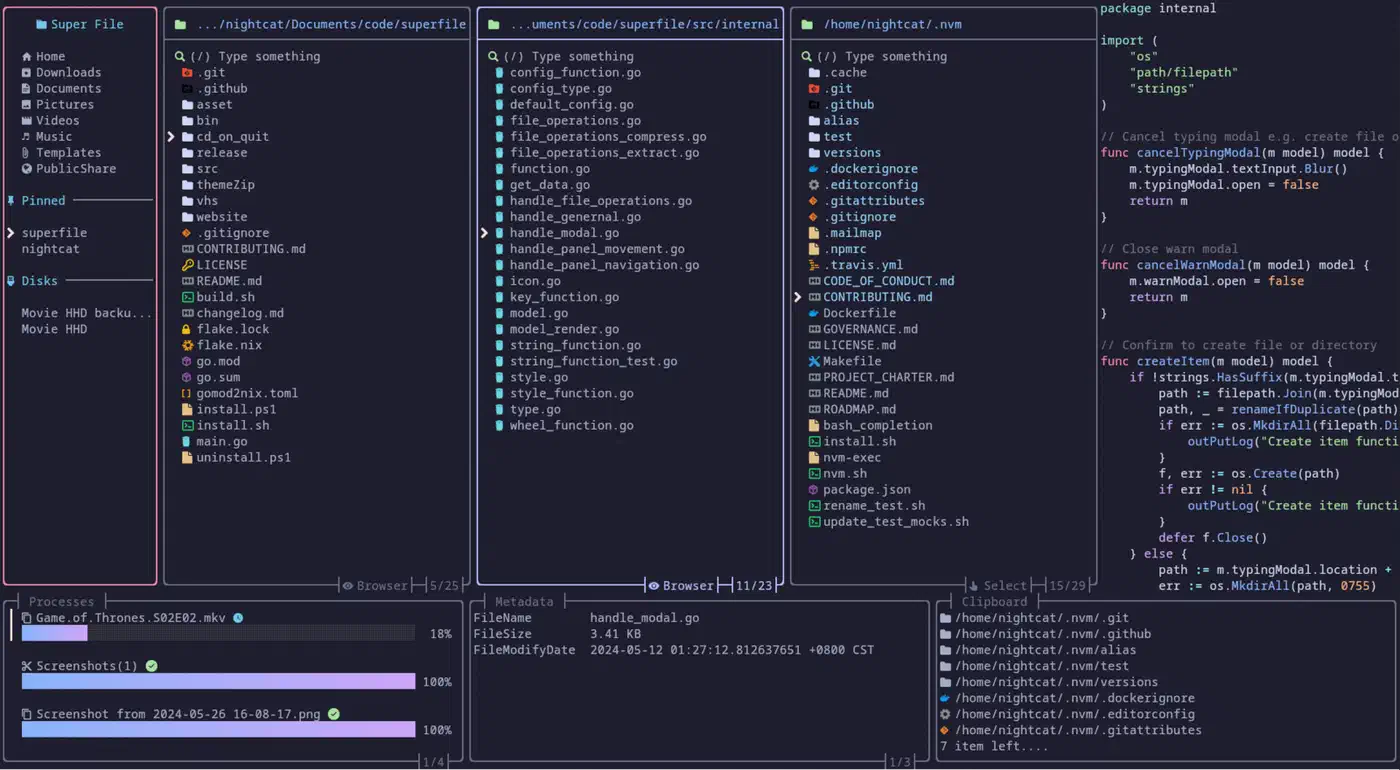
The mouse works, and that is the thing people notice in the first ten seconds. Clicking a panel focuses it, clicking a file selects it, and the scroll wheel moves the list. Hardly any other file manager in this category supports it.
That polish comes from Bubble Tea , the Go framework behind a lot of the prettier terminal apps of the last few years. It handles the redraw loop and the animation, which is why superfile feels closer to a desktop app than to a curses program. The same framework is what you reach for to build a dashboard in Go , and the Python world has its own answer in Textual .
Themes are first-class. The project ships a set and also reads custom theme files. superfile can then match whatever colour scheme your terminal already uses, whether you run fish, zsh, or nushell . Hotkeys are remappable through a config file. There is a Vim preset you are expected to switch to, because the defaults are not modal.
Plugins are the one place where the marketing runs ahead of the shipping. The plugin list
holds exactly three entries. There is a metadata panel that needs exiftool, an MD5 checksum display, and zoxide integration for fast directory jumping. Three is a short list, so choose superfile for what it does out of the box.
Image previews depend on your terminal. The image preview docs list kitty, WezTerm, and Ghostty as working through the Kitty graphics protocol. iTerm2, foot, and Black Box are marked as not supported. No Windows terminal appears on that table at all.
Installing superfile without piping a script into your shell
The project’s front-door install method is a script fetched over the network and executed, on both Unix and Windows. You do not need it. Every platform has a package-manager route in the installation docs .
| Platform | Command |
|---|---|
| macOS, Linux | brew install superfile |
| Arch Linux | sudo pacman -S superfile |
| NixOS | nix profile install github:yorukot/superfile#superfile |
| Windows (winget) | winget install --id yorukot.superfile |
| Windows (Scoop) | scoop install superfile |
Building from source is straightforward if you already have Go. Clone the repository, run the build script, and move the resulting spf binary somewhere on your PATH. Windows builds with a plain go build instead.
Launch it with spf. There is no first-run wizard and no setup questions. It behaves the same over a remote session, so you can drive it on a home server from your phone with an SSH app like Termius
.
One default is worth changing on day one. superfile contacts GitHub every 24 hours to check for a newer release and prints a prompt when it finds one. Set auto_check_update to false in the config file
if you would rather your file manager stayed off the network.
Where the Windows build still falls short
The supported-systems section of the project README ticks all three platforms, then bolts “(Not fully supported yet)” onto the Windows row. That parenthesis has survived release after release, and it was still there through v1.4.0, v1.5.0, and v1.6.0.
Someone finally filed an issue about the label itself. Issue #1240 asks the maintainers to re-affirm Windows support and delete the caveat. It lists what needs testing first: permissions, symlinks, hidden-file attributes, drive letters, UNC paths, backslash separators, the Recycle Bin, and Windows Terminal. It has been open since late 2025.
One user in the thread put it bluntly:
Completely buggy on windows. I opened it and the layout was completely broken inside of the modern terminal in powershell 7 windows 10 22H2.
A core maintainer replied within two days, asking for the version and debug logs. That is a fair answer. It also suggests nobody on the team can reproduce Windows problems in-house.
Ten open issues carry the OS-Windows label, and they cluster where you would expect. superfile chokes on junction directories, disk names do not show up in the sidebar, and one user reports huge lag on a single drive. A specific file breaks the layout, and so does a failed shell command. A file-deletion test sits skipped on Windows, and Defender has flagged the Windows package as a Trojan.
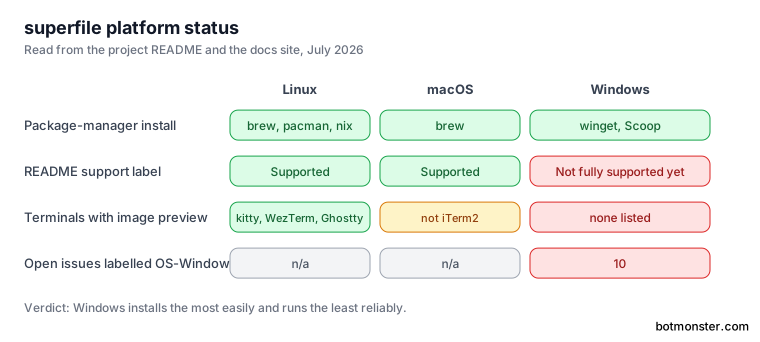
Windows also has the best install story of the three platforms: both winget and Scoop packages are ready, so the runtime caveat is easy to walk straight past.
Credit where it belongs, though. “Not fully supported yet” is a maintainer being honest on the front page. Plenty of projects ship a Windows binary and say nothing about how well it works. Install it, but keep your current file manager, and treat superfile as a second tool until it behaves on your machine.
The issue backlog, counted
superfile has 713 merged pull requests from 118 contributors, against 42 that are still open. That is a healthy amount of work landing for a project this age.
The queue is the other half. There are 188 open issues against 396 closed ones, so roughly 32 percent of everything ever filed is still sitting there. For a tool this size that is high, and the cause is limited review capacity.
The maintainer structure explains most of it. The README names two people: the original author and one core maintainer, with an open invitation for anyone else who wants the job. Two people cannot triage a queue fed by a user base this size. The project runs an automated code-review bot on incoming pull requests, which is one way a small team keeps things moving. A bot can review code, but reproducing a Windows bug still needs a human with a Windows machine.
In practice: file the issue, then expect it to wait. Check the project Discord for a workaround rather than waiting on the tracker.
Should you switch from ranger, yazi, or nnn?
| Tool | Strength | Trade-off |
|---|---|---|
| superfile | Best-looking, mouse support, readable layout | Windows unfinished, only three plugins |
| ranger | Years of scripting and preview integrations | Slower start, plainer interface |
| yazi | Faster, stronger previews, deeper plugins | Less visual hand-holding |
| nnn | Tiny footprint, minimal by design | No sidebar, no process bar, no polish |
Leave ranger if you want the better interface, and stay if your workflow is welded to a decade of ranger config and preview scripts.
Yazi is the harder call. superfile wins on the sidebar and the process bar, the two features that make it legible to a newcomer, and yazi wins almost everywhere else. If you chose nnn deliberately, superfile is not your upgrade.
The verdict: superfile is the one to hand someone who has never used a terminal file manager. It explains itself on screen, with no manual required. On Windows, treat it as a preview. That call changes when the supported-systems line loses its caveat and the open-issue ratio drops below a quarter.