Botmonster Tech
Superpowers stops your AI from coding until you talk
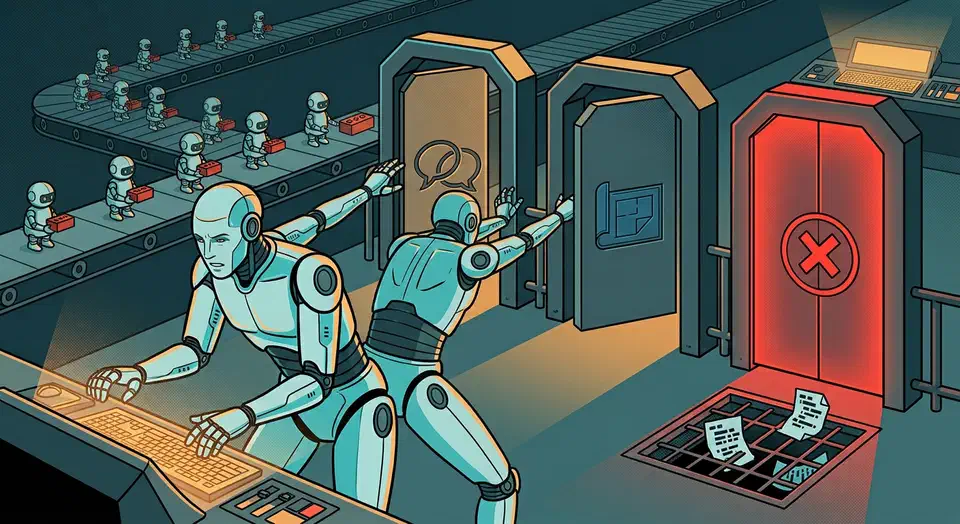
The Superpowers skills framework for coding agents refuses to write a line of code until you have agreed a spec and a plan. It ships just 14 skills, fewer than most collections. The product is the fixed order of operations bolted around them, and that discipline has a price in tokens and patience.
Key Takeaways
- Your agent asks what you are building before it writes any code.
- The plan gets split into tasks small enough to finish in minutes.
- A fresh subagent handles each task, then a reviewer checks it.
- Tests come first, and code written before its test gets deleted.
- It installs on Claude Code, Codex, Cursor, Gemini CLI, and seven more.
What the Superpowers skills framework for coding agents changes
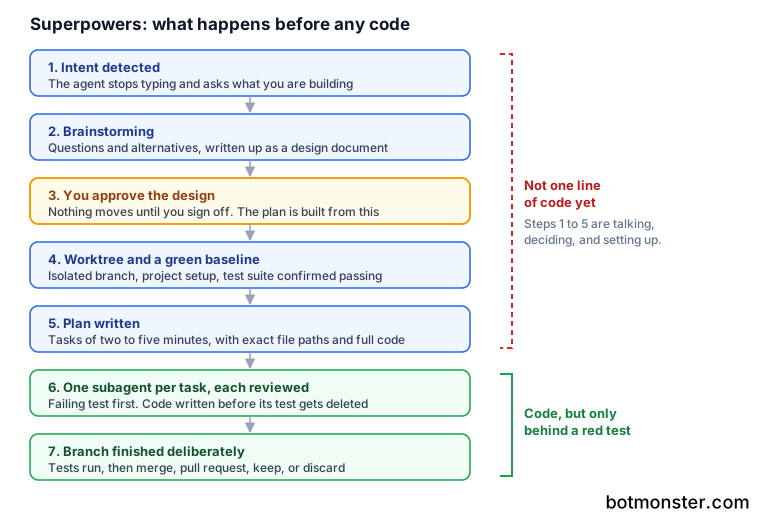
Intent is what sets it off. The moment your agent works out that you are building something, it stops typing and asks what you are really trying to do. So the first thing obra/superpowers gives you after install is a conversation.
That conversation produces a design document. You get it in chunks short enough to read, and you sign off before anything else happens. Everything after it inherits what you approved, so a lazy answer here costs you later.
Then the agent writes a build plan. The project sets a strange bar for it. The plan has to be clear enough for an eager junior engineer with bad taste, no judgement, no context, and a hatred of testing. That bar is why the plans carry exact file paths and full code.
After you say go, subagent-driven development takes over. Each task gets a fresh subagent, and each result gets reviewed. The project reports agents working on their own for a couple of hours without drifting off the plan.
The skills fire automatically, so there is no command to remember. Jesse Vincent and the team at Prime Radiant built it and ship it under the MIT licence. The launch was timed to land with Claude Code’s plugin system in October 2025.
The original release announcement tells the origin story. Vincent had Claude quiz subagents to check whether the skills held up. The first round of results was useless.
The first time we played this game, Claude told me that the subagents had gotten a perfect score. After a bit of prodding, I discovered that Claude was quizzing the subagents like they were on a gameshow. This was less than useful.
All 14 skills, and why so few
Anyone comparing skill collections will see the small number and assume the project is thin.
| Group | Skills |
|---|---|
| Testing | test-driven-development |
| Debugging | systematic-debugging, verification-before-completion |
| Collaboration | brainstorming, writing-plans, executing-plans, dispatching-parallel-agents, requesting-code-review, receiving-code-review, using-git-worktrees, finishing-a-development-branch, subagent-driven-development |
| Meta | writing-skills, using-superpowers |
A skill for every capability grows to hundreds and turns into a search problem. Skills built around the stages of a build stay few, because a build only has so many stages. Collaboration is by far the biggest group, which tells you where the design effort went.
The trade-off is stated openly. The project says it does not generally take new skills from outside. Any change also has to work on every supported harness. That is odd for an open project, and it is why the count holds at 14.
Taking on Superpowers means adopting somebody else’s method whole. In exchange, you can read the whole thing in an afternoon before you install it. Matt Pocock makes the opposite bet with 22 small skills you wire together yourself.
The test rule that deletes your code
The cycle is the usual one: write the failing test, watch it fail, write the minimal code, watch it pass, commit. Code written before its test gets deleted.
Deleting the code is the part other setups leave out. Every coding agent will happily claim it followed test-driven development, and this one throws away the code that proves otherwise.
The rule also lands better on agents than on people. An agent has no ego about deleted code and no deadline pushing it to skip the test, so it will actually follow a rule humans break every week.
A review layer sits alongside the tests. The requesting-code-review skill runs between tasks and sorts issues by severity. Critical ones stop the run. The README describes a two-stage review inside subagent-driven development: spec first, code quality second. Version 6.0.0 merged those into one reviewer that returns both verdicts, because the extra loop cost time and added no quality.
Either way, the spec-compliance check catches the common agent failure: beautiful code that solves the wrong problem.
What the discipline costs in tokens
All 14 skills load the moment a session starts, and one user measured the bill. Issue #190 on the repo put it at about 22,000 tokens burned before any work began. That is roughly 11 percent of a 200,000-token context window, against an expected 1,400. The writing-skills skill alone took 5.6k.
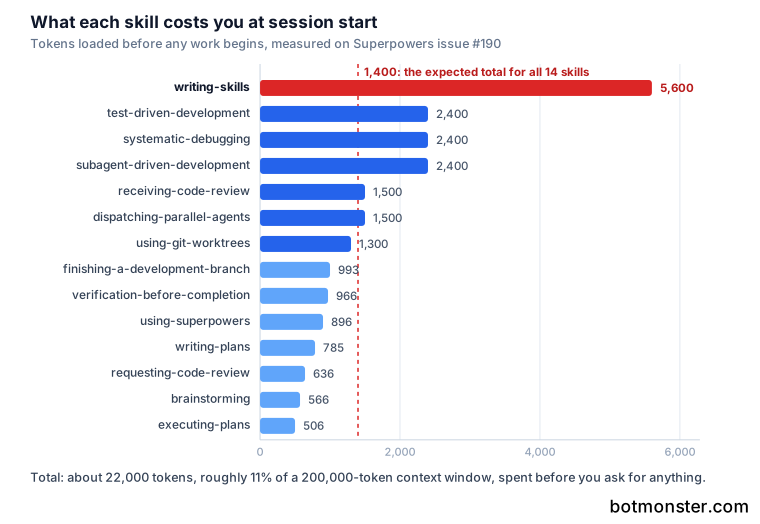
One skill, writing-skills, accounts for a quarter of it on its own, and it is the one skill most users will never trigger. Every other skill sits under 2.5k.
The project has been trimming. Version 6.0.0 rewrote subagent-driven development to pass diffs and task text as files rather than pasted text, and it merged the reviewer prompts. The v6.0.0 release notes claim Claude Code and Codex now reach similar quality about twice as fast, on almost 50 percent fewer tokens.
The baseline there is an older Superpowers version, so the numbers say nothing about how the workflow compares with a plain agent run.
Put your coding agent through the Superpowers workflow
Install the plugin, pick a real feature, and let the agent run brainstorm, plan, and build from start to finish.
Install for the harness you use
On Claude Code, run /plugin install superpowers@claude-plugins-official from the official plugin marketplace. Codex, Cursor, Gemini CLI, GitHub Copilot CLI, Antigravity, Factory Droid, Kimi Code, OpenCode, and Pi each have their own command. Installing for one harness does not cover the others.
Start with a real task
Describe something you actually want built. The skills trigger on intent, so a vague prompt gets you the brainstorming skill rather than code.
Answer the brainstorming questions
The agent sharpens your rough idea through questions and walks you through other options. Do not skim this part.
Approve the design document
The brainstorming skill saves the design to disk. Read it and fix it now, because the build plan comes straight out of it.
Let it create a worktree
The using-git-worktrees skill makes a separate workspace on a new branch and runs your project setup. It then checks that the test suite is green before any change lands. Since version 6.0.0 the worktrees live in a local .worktrees/ folder rather than a global one.
Review the plan before saying go
The writing-plans skill splits the work into tasks of two to five minutes each. Every task names exact file paths, full code, and how to check it. Fix a bad plan here rather than halfway through the run.
Say go and let it run
The subagent-driven-development skill dispatches a fresh subagent per task and reviews each one before moving on. Expect a long stretch of work without you.
Finish the branch deliberately
The finishing-a-development-branch skill runs the tests, then offers merge, pull request, keep, or discard. It clears up the worktree so you are not left with stray branches.
Before you install, check these two things
First, the telemetry. The optional visual companion in the brainstorming skill pulls a Prime Radiant logo from the maintainers’ website, and that request carries the Superpowers version you run. The project says it sends nothing about your project, your prompt, or your coding agent, and no click data. Turn it off by setting SUPERPOWERS_DISABLE_TELEMETRY to any true value. It also honours DISABLE_TELEMETRY and CLAUDE_CODE_DISABLE_NONESSENTIAL_TRAFFIC.
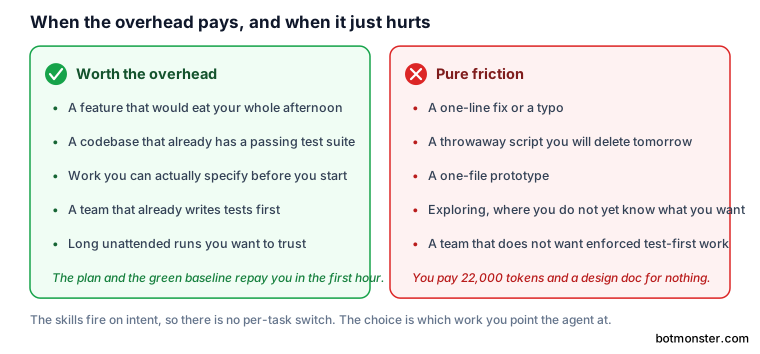
Second, the opinions, and the project enforces them. If your team does not want test-first work and a design doc before every feature, the tool will fight you every session. There is a commercial side too. Prime Radiant sells support, extra tooling, and managed spending for enterprise use.
The workflow fits best on a multi-hour feature in a codebase that already has tests. There, a plan and a green baseline pay for themselves inside the first hour. Throwaway scripts and one-file prototypes get nothing out of it. The same goes for work where you do not yet know what you want, and the fastest way to find out is to build the wrong thing quickly.