 Botmonster Tech
systemd-sysupdate can replace your package manager

systemd-sysupdate is a block-level, A/B image-based update tool shipped as part of systemd that replaces traditional package managers like dpkg and rpm for whole-system updates. It downloads signed transfer artifacts (root filesystem images, kernels, or Unified Kernel Images) into an alternate partition slot, then atomically switches boot entries on the next reboot, with automatic rollback if the new slot fails to boot. It is the update mechanism behind immutable distributions like ParticleOS, custom mkosi-built appliances, and embedded Linux devices, and it primarily benefits operators of kiosks, IoT fleets, homelab hypervisors, and any deployment where reproducibility and unattended rollback matter more than granular package control.
If you run a fleet of devices that should behave like firmware rather than a mutable workstation, sysupdate is probably what you want, and on any recent systemd install it is already sitting on disk.
Why Atomic Updates Exist: The Failure Modes of dpkg and rpm
Package managers were designed in an era when the typical Linux machine was a university workstation someone logged into and maintained by hand. That assumption is still baked into dpkg and rpm, and it breaks down badly on unattended devices.
Transactions are not atomic. dpkg and rpm apply changes file-by-file, so if power is cut mid-upgrade or a post-install scriptlet crashes, you are left with a half-upgraded system. The package database thinks a package is installed, the files on disk disagree, and the device either fails to boot or boots into a subtly wrong state. Anyone who has run dpkg --configure -a on a rack of devices after an electrical hiccup knows the feeling.
Configuration drifts over time. /etc files merge interactively, and even with dpkg --force-confnew you accumulate small differences across a fleet. After a year of operation, every device has a slightly different userland, which makes reproducing bugs nearly impossible. “Works on device 47, not on device 112” is a debugging nightmare that starts here.
There is no rollback primitive. apt has no “undo last upgrade” button. The community has invented workarounds - btrfs snapshots, ZFS boot environments, LVM thin snapshots - but none of them cover the bootloader or initrd cleanly, and none are standard. When the upgrade bricks the device, you are usually on-site with a serial cable.
Maintenance windows are unbounded. A full dist-upgrade pulls thousands of packages with no way to pre-stage them and commit atomically. On battery-powered or intermittently connected devices this is unworkable. The update either completes within the short window when the device is plugged in and online, or it does not happen.
The immutable-distribution answer is to ship the OS as a single signed artifact, apply it to an alternate slot, reboot into the new slot, and roll back if a health check fails. That model is exactly what sysupdate implements, and the machines that need it are the ones you rarely touch: digital signage, industrial control, homelab Kubernetes nodes, point-of-sale terminals, and any appliance where the OS should behave like firmware rather than a playground.
Architecture: Slots, Transfer Files, and the Update Flow
sysupdate has three moving parts worth naming explicitly: resources, transfer files, and slots.
A resource is anything that gets versioned and swapped atomically. In practice that means a root partition, a /usr partition, a kernel image, a Unified Kernel Image in the EFI System Partition, or a directory tree. Each resource is governed by one or more transfer files.
Transfer files live in /etc/sysupdate.d/*.transfer (or /usr/lib/sysupdate.d/ for distribution defaults). Each file declares a [Source], a [Target], and a [Transfer] section. The source specifies where new versions come from - typically an HTTPS URL serving a directory of compressed images, but also local directories or tar archives. The target specifies where the new version lands on the device - a partition discovered by GPT type UUID, a file at a given path, or a directory tree.
The A/B slot model uses the Discoverable Partitions Specification. Two partitions share the same GPT type UUID (for example, the x86-64 root UUID 4f68bce3-e8cd-4db1-96e7-fbcaf984b709), and sysupdate automatically picks the inactive one as the install target. The active one keeps running unchanged, so the worst case of a catastrophic update failure is a device that reboots back into the still-working slot.
Version matching uses a pattern with @v as the placeholder, for example myimage_@v.root.x86-64.raw.xz. Given that pattern, sysupdate can list the server directory, extract version strings from filenames, compare them with the version already installed locally, and pick the newest one not yet present.
The end-to-end run looks like this. systemd-sysupdate list enumerates versions available remotely and shows which are installed locally. systemd-sysupdate check-new returns exit status 0 and prints the new version string if an update exists. systemd-sysupdate update downloads the artifact, decompresses it, writes it to the inactive slot, and updates the GPT attributes so that the bootloader will try the new slot next. A reboot then activates it, and the boot counter logic decides whether to commit or revert.
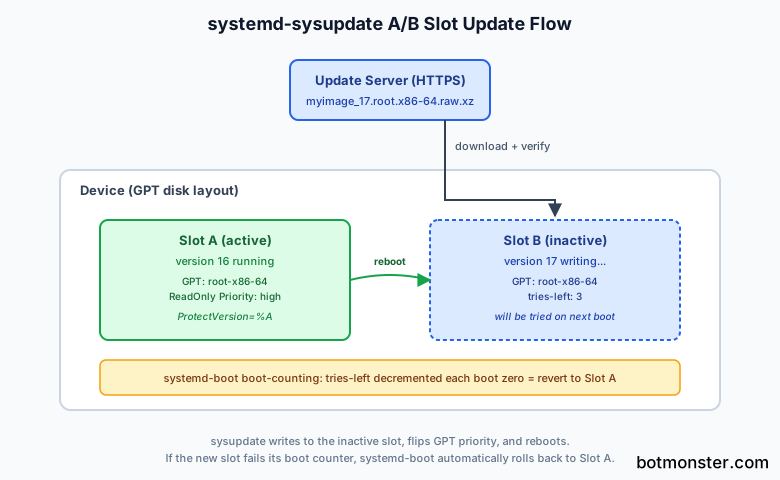
GPT partition attributes do the heavy lifting. Bit 48 marks a partition as read-only. Bit 55 marks it for first-boot filesystem growth. The upper bits encode boot-counting state defined by the Boot Loader Specification: a tries-left counter that systemd-boot decrements on each boot attempt, and a priority field that selects which slot the bootloader tries first. If tries-left reaches zero before userspace confirms the boot succeeded, the bootloader moves on to the other slot on the next try. That is how automatic rollback works without any extra daemons or management plane.
A Real Transfer File, Annotated
Abstract documentation only gets you so far with sysupdate; the shape of a real transfer file is what makes the model click. The example below covers the root partition of an A/B image built with mkosi, followed by a walk-through of every key.
[Transfer]
MinVersion=16
ProtectVersion=%A

[Source]
Type=url-file
Path=https://updates.example.com/myimage/
MatchPattern=myimage_@v.root.x86-64.raw.xz

[Target]
Type=partition
Path=auto
MatchPattern=myimage_@v
MatchPartitionType=root-x86-64
PartitionFlags=0
ReadOnly=1
InstancesMax=2
MinVersion=16 rejects any image older than version 16, which is how you prevent downgrade attacks once you have shipped a fix for a signed CVE. ProtectVersion=%A expands to the version currently running and prevents sysupdate from ever overwriting that slot. This is the safety interlock that keeps the system bootable even if the server serves a broken image.
The [Source] section tells sysupdate to fetch from an HTTPS URL (Type=url-file) and to recognize files matching myimage_@v.root.x86-64.raw.xz. The @v placeholder is the version extractor: given a filename like myimage_17.root.x86-64.raw.xz, sysupdate extracts 17 as the version string. Over the same directory, it lists files, sorts by version, and picks the newest.
The [Target] section writes to a partition (Type=partition) discovered automatically (Path=auto). MatchPartitionType=root-x86-64 uses the symbolic name from the Discoverable Partitions Spec rather than a raw UUID, which keeps the configuration portable across architectures. InstancesMax=2 enforces the A/B behavior by keeping exactly two versioned slots. Set it to 3 if you want an extra slot for staged rollbacks, or to 1 if you only use this transfer file for the ESP kernel where retention is less interesting.
ReadOnly=1 sets GPT bit 48, so the kernel refuses to mount the partition writable. On an image whose userland expects an immutable /usr and a mutable /var, this is correct and cheap tamper protection.
Additional transfer files for /usr, the ESP kernel, and the UKI live alongside and are applied together in a single systemd-sysupdate update invocation. sysupdate treats the whole set as one transaction: all resources are written to their inactive slots, and only after every transfer succeeds does it flip the GPT attributes to activate them.
Building the A/B Image with mkosi
sysupdate only works if the image on the other end was built correctly - with the right GPT type UUIDs, dm-verity signatures, and a UKI layout that the bootloader understands. The natural toolchain is mkosi for image construction, systemd-repart for first-boot partition management, and systemd-boot for the boot entries.
mkosi is the systemd project’s declarative image builder. A single mkosi.conf plus a mkosi.repart/ directory produces a bootable, signed, reproducible image. It can emit raw block images (with .raw.xz being the format sysupdate transfer files typically consume), tar archives, or directory trees. The server side of sysupdate just needs a directory of versioned .raw.xz files served over HTTPS.
systemd-repart handles the asymmetry between what the factory ships and what the device needs at runtime. You ship a minimal image with one root slot, and on first boot repart expands the filesystem to fill the disk, creates the second (empty) slot with the same GPT type UUID, and sets up /var. This keeps factory images small while still giving you a full A/B layout on every deployed device.
The UKI is where sysupdate gets its security story. mkosi can emit a signed UKI - a single PE binary that bundles the kernel, initrd, kernel cmdline, splash, and os-release - with a dm-verity root hash baked into the kernel cmdline. sysupdate updates the UKI as a separate file in the ESP with its own transfer file, and systemd-boot picks up new UKIs automatically via the Boot Loader Specification. The boot-counting logic that enables automatic rollback is implemented by systemd-boot itself, so there is no extra daemon to configure on the device.
In practice the workflow is short. Run mkosi build to produce myimage_17.root.x86-64.raw.xz and the matching myimage_17.efi UKI. Copy both to your updates bucket alongside a signed SHA256SUMS manifest. Devices in the field see the new version on their next systemd-sysupdate check-new, download the artifacts, verify signatures, write them to the inactive slots, and reboot. ParticleOS exercises this exact flow with mkosi -B -ff sysupdate -- update --reboot, which is a useful reference to read end-to-end.
For layered content that does not justify a full image update, systemd-sysext and systemd-confext are the complements. A sysext is a squashfs image mounted over /usr at runtime, so you can add a package-worth of files without rebuilding the base image. Typical use is a site-specific configuration extension that ships separately from the OS image.
Signing Updates and Verifying on the Device
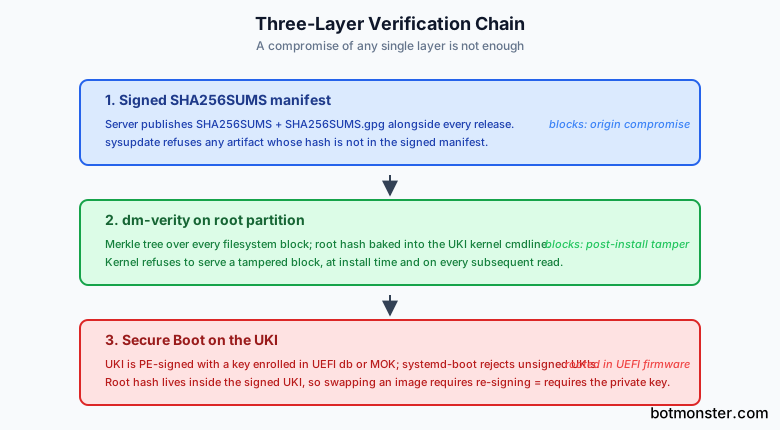
An update system without cryptographic verification is a remote-code-execution backdoor. sysupdate chains three independent verification steps so that a compromise of any single one is not enough.
The first is a signed manifest. The server publishes SHA256SUMS and SHA256SUMS.gpg alongside the artifacts. sysupdate fetches both and refuses any file whose hash is not listed in the signed manifest. If an attacker compromises the HTTP origin but not the signing key, the device will simply refuse the update.
The second is dm-verity on the root partition. The image is built with a Merkle tree and a root hash embedded in the UKI kernel cmdline. The kernel itself refuses to mount a tampered root partition, and it checks individual blocks on every read rather than just at install time. A flipped bit on the flash, a malicious write after install, or a corrupted download all produce the same result: the kernel returns an I/O error rather than handing off tampered data.
The third is Secure Boot on the UKI itself. The UKI is signed with a key enrolled in the platform’s Secure Boot database or in MOK. systemd-boot refuses to load an unsigned UKI. Because the dm-verity root hash lives inside the UKI kernel cmdline, and the UKI is Secure Boot signed, an attacker cannot swap in a valid-looking image with a different root hash - that would require re-signing the UKI, which requires the private key. The verification chain is rooted all the way down in UEFI firmware.
Offline update bundles work without weakening any of this. Swap the Type=url-file source for Type=regular-file or a local directory, and sysupdate will still verify the signed manifest before applying the update. For air-gapped sites, dropping a signed .raw.xz onto a USB stick is a legitimate deployment path.
Key rotation is the main weak spot. sysupdate has no built-in rotation flow, so you either ship a new UKI with the new key bundled (which then becomes the only path to newer updates), or you rely on external infrastructure such as TPM2-sealed keys and a fleet management system. For high-assurance deployments, pairing sysupdate with measured boot and TPM-sealed secrets is worth the extra complexity.
sysupdate vs. rpm-ostree vs. OSTree vs. Mender vs. RAUC
Anyone picking an update system today has at least half a dozen serious options, and the right choice depends on what you are shipping. The table summarizes where each one sits on the spectrum from file-level content-addressed to block-level image swap.
| System | Update model | Granularity | Delta updates | Fleet server | Package layering |
|---|---|---|---|---|---|
| systemd-sysupdate | A/B partitions | Whole image | No (not native) | No | No (use sysext) |
| rpm-ostree | Content-addressed | File-level | Yes (static deltas) | No | Yes |
| OSTree | Content-addressed | File-level | Yes | No | Via rpm-ostree |
| Mender | A/B partitions | Whole image | Paid tier only (Xdelta) | Yes | No |
| RAUC | A/B + recovery | Whole image or slots | Yes (adaptive, 4 KiB blocks) | No (Pengutronix hawkBit) | No |
| SWUpdate | Flexible | Block, file, custom | Yes (zchunk) | No | No |
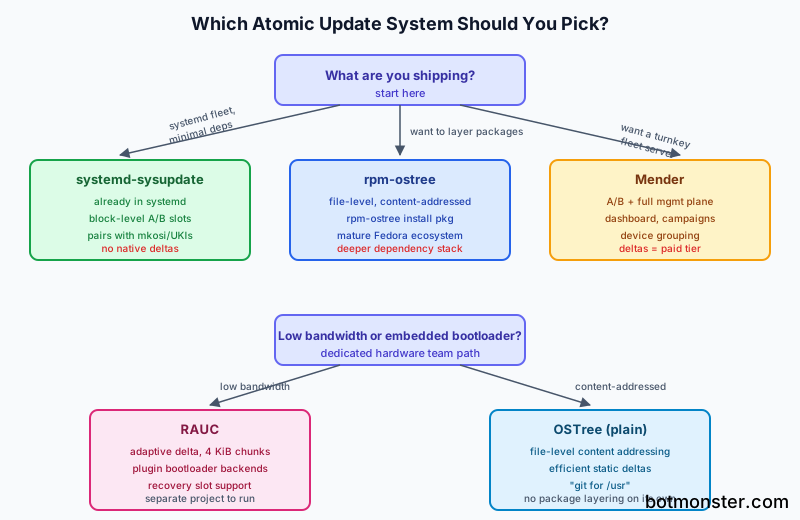
sysupdate is block-level and whole-partition. You get exactly what the build produced, byte-for-byte identical across the fleet. Rollback is trivial because the old slot is still on disk. The trade-off is no delta updates - as of systemd 260, sysupdate downloads the full compressed image every time, and a GitHub issue tracking delta support has been open for years. On a 30 MB/s link this is fine. On a 512 kbps LTE link with a 1.5 GB image, it matters.
rpm-ostree and plain OSTree are file-level and content-addressed. The /usr tree behaves like a git repository where each commit is a tree of file objects, deployments are hardlinked checkouts, and rollback is instant because the old deployment is still on disk. Delta updates are efficient because only changed file objects move across the network. rpm-ostree adds the ability to layer arbitrary packages on top of a base commit (rpm-ostree install vim), which sysupdate does not offer. The price is a deeper dependency stack (libostree, a repo format, and commit-based invariants) and a /usr that is mutable-ish in ways that can surprise you.
Mender is architecturally similar to sysupdate at the device level but ships a full management plane: a server, a dashboard, deployment campaigns, device grouping, artifact signing, and audit logs. If you need turnkey fleet management and do not want to run your own Prometheus, Grafana, and release pipeline, Mender gets you there fastest. Delta updates are not in the open-source tier; you pay for that feature.
RAUC is the most flexible of the whole-image tools. It supports A/B, recovery slots, adaptive block-level delta updates with a 4 KiB chunk size, a plugin-based bootloader abstraction (Barebox, EFI, U-Boot, Raspberry Pi tryboot), and a bundle format with rich metadata. For embedded devices with a dedicated hardware update team, RAUC is often the right answer. The cost is that it is a separate project to integrate, not something already present on every systemd host.
Choosing between them comes down to what you already run and what you are willing to operate. sysupdate fits when you already run systemd everywhere, your fleet is small to medium, you control both client and server, and you want as few moving parts as possible. rpm-ostree fits when you want package layering and a mature Fedora base. Mender fits when you need a turnkey fleet server without building one. RAUC fits when you need delta updates or complex bootloader scenarios on an embedded device.
When Not to Use sysupdate
A few use cases genuinely do not fit. Developer workstations that need to install arbitrary packages benefit from apt or dnf and will fight sysupdate’s immutable root every day. Multi-tenant servers where different teams need different toolchains are better served by containers or rpm-ostree layering. Deployments on very low bandwidth links where a full image download is infeasible should look at RAUC’s adaptive delta format or OSTree’s static deltas instead.
For everything in between, the appliance, the kiosk, the edge node, the homelab hypervisor, the Raspberry Pi embedded in something physical, sysupdate is the right tool and it is already sitting in your systemd install waiting for a transfer file. The first time you watch a device atomically flip between two slots after a reboot, the distinction between “OS” and “firmware” starts to blur in a useful way.