 Botmonster Tech
mkinitcpio or Dracut, which initramfs tool fits you?
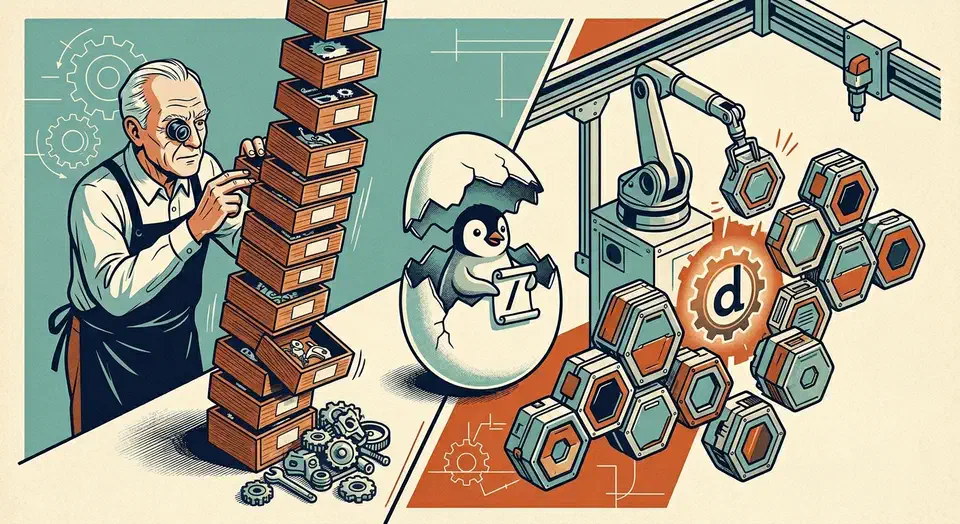
mkinitcpio and Dracut both build the initial RAM filesystem that mounts your real root. They go about it in opposite ways. mkinitcpio runs an ordered list of hooks, small shell snippets you declare in /etc/mkinitcpio.conf. Dracut uses self-contained modules that probe your system and lean hard on systemd.
Pick by distro. On an Arch-family distro (Arch, EndeavourOS, Manjaro, CachyOS), stay with mkinitcpio. It is the default, every Arch wiki page assumes it, and the hook model is easy to follow. On Fedora, RHEL, Rocky, Alma, openSUSE, or Ubuntu 26.04 LTS and later, use Dracut. It is the upstream default everywhere outside Arch, and it has the best UKI and Secure Boot story in 2026.
What an initramfs is and why you need a generator
The Linux kernel has a chicken-and-egg problem. To mount your real root, it needs drivers like dm-crypt, lvm, btrfs, or nvme. It also needs helpers such as cryptsetup, lvm2, and mount.btrfs. All of them sit on the root filesystem the kernel has not mounted yet. The initramfs breaks that cycle. It is a compressed cpio archive holding a small /init (or systemd), a tiny /bin, kernel modules, firmware, udev rules, and whatever it takes to unlock and pivot to the real root.
Distros ship a generator instead of a prebuilt image. Kernels update, hardware changes, and disk layouts differ on every machine. So each kernel upgrade rebuilds the image on the box itself, and that is the generator’s whole job.
Two tools lead in 2026. mkinitcpio comes from Arch. It is written in Bash, built on hooks, and default on Arch, EndeavourOS, Manjaro, CachyOS, and Garuda. Dracut comes from Red Hat. It is also mostly Bash, but built on modules, and it is now the default for Fedora, RHEL, openSUSE, and Ubuntu 26.04 LTS.
Other tools live on at the edges. initramfs-tools, the old Debian and Ubuntu one, is deprecated in Ubuntu 26.04 per the release notes. genkernel stays a Gentoo niche. booster, the Go-based Arch option, builds smaller and faster images, but the rest of the Arch world is too tied to mkinitcpio for it to take over.
The hand-off from the bootloader is the part most people picture right. GRUB, systemd-boot, rEFInd, or a UKI-aware EFI stub loads vmlinuz-linux and initramfs-linux.img. The kernel unpacks the archive into a tmpfs, and /init takes over as PID 1. Break the initramfs and the machine does not boot, so knowing which tool you have is core sysadmin literacy.
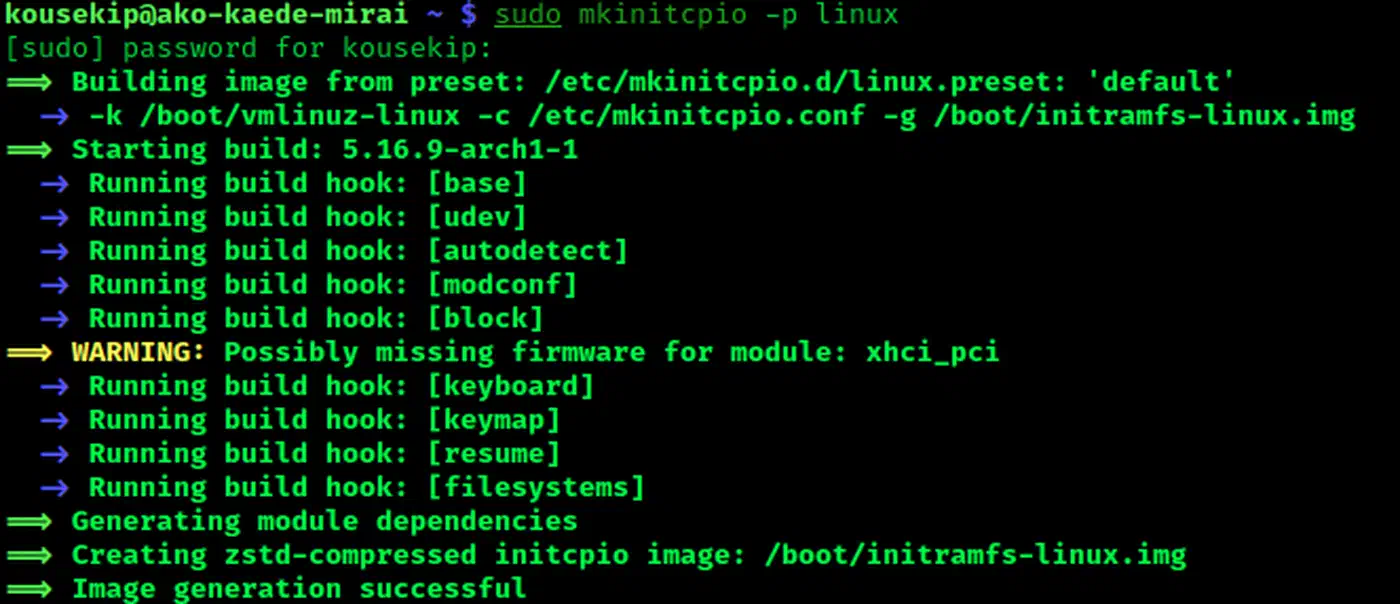
mkinitcpio architecture and the four arrays
Think of mkinitcpio as an ordered list of Bash functions, each one adding files to the archive. The whole setup lives in four arrays in /etc/mkinitcpio.conf:
MODULES=()for kernel modules to force-include.BINARIES=()for extra userspace binaries to ship.FILES=()for arbitrary files to copy in.HOOKS=()for the ordered build-script list, which is where most of the action happens.
A typical Arch HOOKS line looks like this:
HOOKS=(base udev autodetect microcode modconf kms keyboard keymap consolefont block encrypt lvm2 filesystems fsck)Each word is a script under /usr/lib/initcpio/install/ that adds files, paired with a runtime script under /usr/lib/initcpio/hooks/. Order is the first foot-gun. encrypt has to come before lvm2 and filesystems. keyboard has to come before encrypt, or you cannot type your LUKS password. autodetect has to come early, or it never shrinks the image. Put autodetect last and you end up with a 300 MB fallback-sized image by accident.
Presets live in /etc/mkinitcpio.d/linux.preset. They set which images get built (default, fallback), with what config, and where they land. pacman fires them through the mkinitcpio hook on every kernel upgrade.
The commands you actually type are short:
mkinitcpio -P                                   # rebuild every preset for every kernel
mkinitcpio -p linux                             # rebuild just the linux preset
mkinitcpio -g /boot/test.img -k 6.13-arch1     # one-off image for a specific kernel
It is all Bash, so you can read it end to end, and builds are quick. The Arch Wiki mkinitcpio page covers every hook in painful detail, and the hook list fits on one line you can diff across machines.
Dracut architecture and module-based configuration
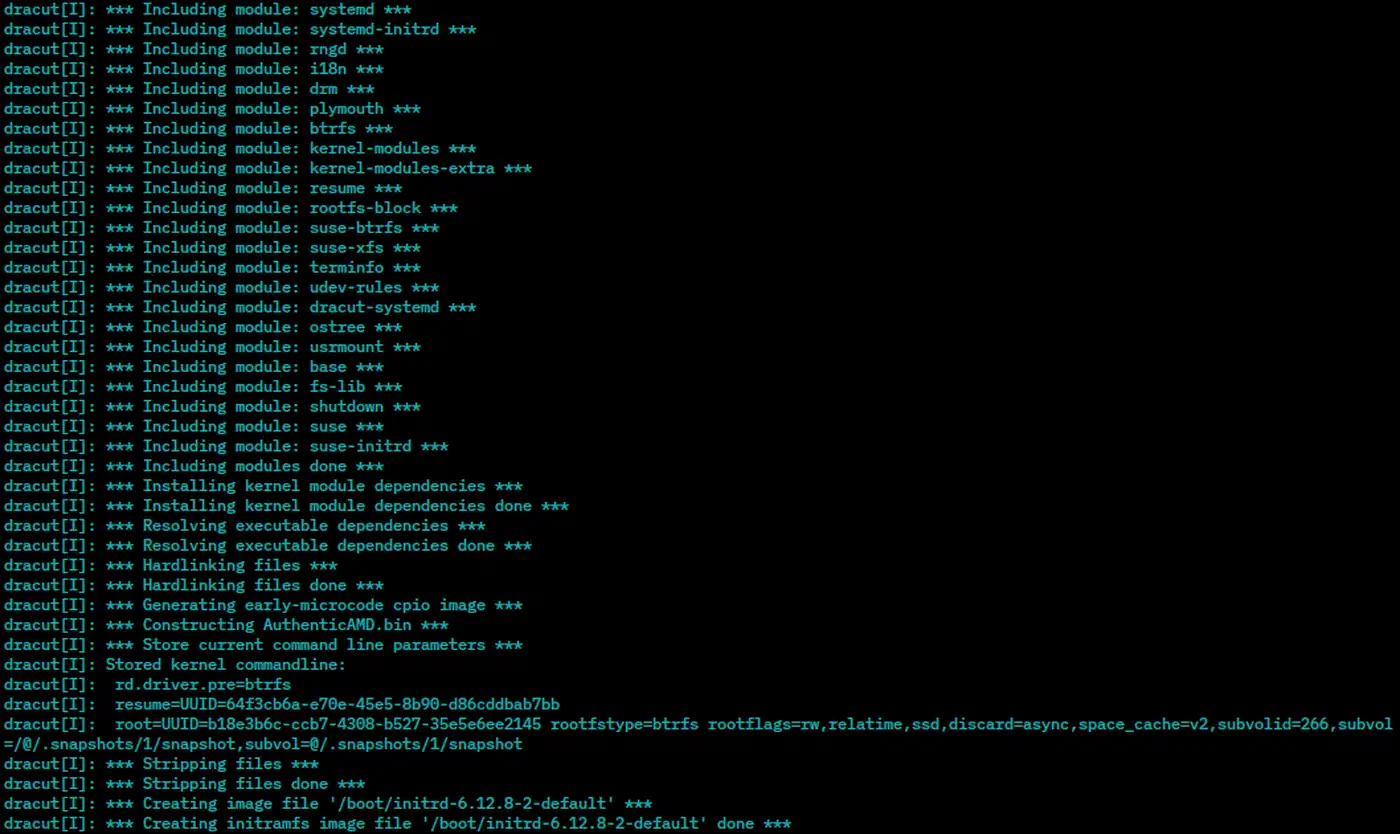
Dracut goes the other way. It does not ask you to order anything. It ships about 100 modules under /usr/lib/dracut/modules.d/, and each one states its own dependencies and probes the host. You get smaller, self-configured images that are harder to predict.
Every module is its own subdirectory: 90crypt/, 90lvm/, 95udev-rules/, 98systemd/. Each holds a module-setup.sh with check, depends, and install functions. Run Dracut and it walks the list, asks each module “do I need you?”, then pulls in everything those answers require.
There are two build modes. hostonly=yes, the Fedora and RHEL default, probes your real hardware and filesystems and packs only what you use, so images land near 20 MB. hostonly=no packs everything, which suits installer media, rescue USB sticks, or a VM you plan to clone.
Configuration happens through drop-in files in /etc/dracut.conf.d/*.conf:
# /etc/dracut.conf.d/10-local.conf
add_dracutmodules+=" crypt lvm "
omit_dracutmodules+=" plymouth "
compress="zstd"
hostonly="yes"
The real Dracut advantage is systemd. The systemd module pulls it into the initramfs. You get proper unit ordering, systemd-cryptsetup for LUKS unlock, systemd-networkd when the root is on the network, and journal logs you can read after boot with journalctl -b -1. When the pre-pivot phase goes wrong, Dracut tells you why. mkinitcpio drops you in a bare Bash shell with no log.
The daily-use commands:
dracut --force                                  # rebuild for the running kernel
dracut --regenerate-all --force                 # rebuild for every installed kernel
dracut --print-cmdline                          # print the kernel cmdline Dracut expects
lsinitrd /boot/initramfs-$(uname -r).img        # list the contents
Upstream is now dracut-ng, a community fork. It has replaced the original dracutdevs/dracut, last tagged in 2022, across every major distro. Releases 102 through 110 and up in 2026 added fixes for kernels to 6.9 and above, systemd 256 and above, a new net-lib module, and better UKI handling.
Ubuntu 25.10 switched to Dracut as the default, and 26.04 LTS finishes the job by dropping initramfs-tools from a default install. Canonical wanted UKI support, systemd alignment with the rest of the world, and less Debian-only code to maintain. Fedora Silverblue and other immutable Linux distributions go further. They pair Dracut with atomic image updates and a read-only root, which makes the rebuild part of the deploy pipeline.
Hooks vs modules: LUKS-on-LVM side by side
LUKS-on-LVM is the most common Linux encryption layout in 2026, and it shows the difference between the two tools line by line.
With mkinitcpio you edit /etc/mkinitcpio.conf, run the generator, then update your bootloader cmdline:
# /etc/mkinitcpio.conf
HOOKS=(base udev autodetect microcode modconf kms keyboard keymap consolefont
       block encrypt lvm2 filesystems fsck)

# then:
mkinitcpio -P

# bootloader kernel cmdline:
cryptdevice=UUID=<luks-uuid>:cryptroot root=/dev/mapper/vg-root
With Dracut you drop a config file, run the generator, and update the cmdline:
# /etc/dracut.conf.d/10-crypt.conf
add_dracutmodules+=" crypt lvm "   # often unnecessary; hostonly auto-detects
compress="zstd"

# then:
dracut --force

# bootloader kernel cmdline:
rd.luks.uuid=<luks-uuid> rd.lvm.lv=vg/root root=/dev/mapper/vg-root
The cmdline is where the split shows most. mkinitcpio reads one cryptdevice=UUID=...:name pair inside its encrypt hook. Dracut uses the rd.luks.* namespace it inherits from systemd-cryptsetup-generator: rd.luks.uuid, rd.luks.name, rd.luks.options, rd.luks.key. The Dracut style takes more typing, but it stacks better with other systemd generators.
| Scenario | mkinitcpio | Dracut |
|---|---|---|
| Keyfile on rootfs | cryptkey=rootfs:/etc/keyfile + FILES=(/etc/keyfile) | rd.luks.key=/etc/keyfile |
| TPM2 auto-unlock | sd-encrypt hook (systemd flavor) | rd.luks.options=tpm2-device=auto |
| Detached LUKS header | :header=/path/to/hdr | rd.luks.hdr=/path/to/hdr |
| Remote SSH unlock | AUR mkinitcpio-netconf + mkinitcpio-dropbear | built-in 90crypt-ssh module |
| Emergency shell | break=premount, break=postmount | rd.break=pre-pivot (or pre-udev, pre-mount, mount) |
TPM2 unlock through systemd-cryptenroll is where Dracut pulls ahead. It ships the real systemd-cryptsetup, so rd.luks.options=tpm2-device=auto works with no glue. mkinitcpio needs the sd-encrypt hook, the systemd-flavored stand-in for plain encrypt. To use it you drop the encrypt hook and add sd-vconsole for keymaps.
Debugging feels different too. When an mkinitcpio boot fails, you land in a Bash emergency shell at whatever break= you set, with whatever binaries made it into the image. Dracut hands you a real systemd rescue shell with journalctl, so you scroll back through the logs instead of guessing.
Image sizes and the compression story
The size gap is real, though forum threads blow it out of shape. On a normal laptop with LUKS, LVM, and Btrfs, a fresh install measures about this:
| Configuration | Typical size |
|---|---|
mkinitcpio default (autodetect) | 10-18 MB |
| mkinitcpio fallback (no autodetect) | 100-180 MB |
Dracut hostonly=yes | 20-35 MB |
Dracut hostonly=no | 80-150 MB |
Arch sets mkinitcpio to zstd -19, the highest setting. Dracut sits closer to zstd -15. Boot time barely notices, since modern CPUs unpack zstd faster than an SSD can feed them. Build time is where you feel it: dracut --regenerate-all takes 20 to 40 seconds per kernel upgrade, mkinitcpio -P takes 5 to 10. Rebuild ten times in a debugging session and that gap adds up. To see how much the unpack really costs you at boot, systemd-analyze is the place to start pinpointing which boot phase is the real culprit.
Arch forums report Dracut images three times bigger. That almost always means hostonly=yes was never set, or Dracut pulled in modules mkinitcpio skips, such as plymouth or full systemd. A tuned Dracut config lands within 2x of mkinitcpio on the same machine, and you get the systemd tooling inside the image for it.
UKI support and Secure Boot in 2026
A Unified Kernel Image packs the kernel, the initramfs, the cmdline, and sometimes a splash and devicetree into one signed PE binary. The EFI firmware loads it directly. No separate GRUB entry, no loose initramfs on an unsigned ESP, one signature to check. Both generators build UKIs on their own in 2026, which is why the choice of tool stopped being an argument.
UKIs exist for the security model. Split the boot into vmlinuz, initramfs.img, and a bootloader cmdline, and only the first two tend to be signed. Anyone who can write to the ESP swaps the initramfs and walks past Secure Boot. One signed PE binary closes that hole, and measured boot with TPM2 PCR sealing depends on it.
For mkinitcpio, UKI generation is driven by presets. Since mkinitcpio 38+, /etc/mkinitcpio.d/linux.preset can declare:
default_uki="/efi/EFI/Linux/arch-linux.efi"
fallback_uki="/efi/EFI/Linux/arch-linux-fallback.efi"
Then mkinitcpio -P builds a UKI ready to sign. With systemd-ukify installed, mkinitcpio hands the assembly to ukify. Without it, mkinitcpio builds the PE itself.
For Dracut, UKI generation is a flag on the command line:
dracut --force --uefi --kernel-cmdline "root=UUID=... rw quiet"That writes a UKI to /boot/efi/EFI/Linux/. The --uefi-stub flag picks a different stub, such as sd-stub from systemd-boot.
Neither tool signs the .efi for you, and that is the right call. Keys are a separate job from building images, and enrolling your own keys with sbctl and mokutil comes first. You sign after the fact with sbctl sign -s /efi/EFI/Linux/arch-linux.efi, or sbsign --key db.key --cert db.crt --output ... ..., ideally from a pacman or dnf hook that runs after the generator.
Microcode is easy to get wrong. A UKI carries CPU microcode (amd-ucode.img, intel-ucode.img) in its own .ucode PE section, so you drop the separate initrd /amd-ucode.img line from the bootloader config. mkinitcpio 38 and up and dracut-ng 060 and up both do this right. Older configs that still list microcode as a second initrd either load it twice or skip it, depending on the loader.
If you are setting up Secure Boot today, UKIs are the path of least resistance with either generator.
Migrating between the two without breaking boot
People move in both directions. Arch users try Dracut after seeing systemd integration on a Fedora work laptop. Ex-Fedora users on Arch want the hook model back. The move is not hard, and it has one rule. Never delete the old generator’s images until you have booted a new one.
Before you start, boot the rescue or fallback image once, keep a live USB nearby, and know how to arch-chroot (or chroot) into your root. A bad initramfs is the top cause of “I broke my boot” forum posts, and every recovery runs through one of those three.
For Arch moving to Dracut:
pacman -S dracut
cat > /etc/dracut.conf.d/10-arch.conf <<EOF
hostonly=yes
compress=zstd
EOF
dracut --force --regenerate-all
Then edit /etc/mkinitcpio.d/linux.preset to stop building images, or install the dracut-hook package, which swaps the mkinitcpio pacman hook for a Dracut one.
Going back from Fedora or Ubuntu to mkinitcpio only makes sense if you moved to Arch as well. Staying on Fedora? Leave the default alone. On Arch, install mkinitcpio (it is already in base), fill in the HOOKS= line, run mkinitcpio -P, and pull out any Dracut pacman hooks you added.
A short cmdline translation table covers most real moves:
| mkinitcpio | Dracut |
|---|---|
cryptdevice=UUID=X:root | rd.luks.uuid=X |
cryptkey=rootfs:/path/key | rd.luks.key=/path/key |
resume=UUID=Y | resume=UUID=Y (identical) |
root=UUID=Z | root=UUID=Z (identical) |
rootflags=subvol=@ | rootflags=subvol=@ (identical) |
Check before you reboot. Run lsinitrd /boot/initramfs-$(uname -r).img | grep -E 'crypt|lvm' on Dracut, or lsinitcpio /boot/initramfs-linux.img | grep -E 'crypt|lvm' on mkinitcpio, to prove the crypto tooling is in there. dracut --print-cmdline prints the cmdline Dracut expects from your running system.
Update the bootloader last. Re-run grub-mkconfig -o /boot/grub/grub.cfg on GRUB, bootctl update on systemd-boot, or rebuild your UKI. The image name or path may have moved, and the boot entry has to match.
If it breaks, pick the previous kernel from the boot menu, or boot a live USB, chroot in, and rebuild with the tool that worked last. That only saves you if you kept the old images.
The practical recommendation
The 2026 answer is boring. Use what your distro uses. Both tools are mature, both build UKIs, both handle LUKS with TPM2, and both are well documented once you know where to look. Fighting the default costs you extra work on every kernel update.
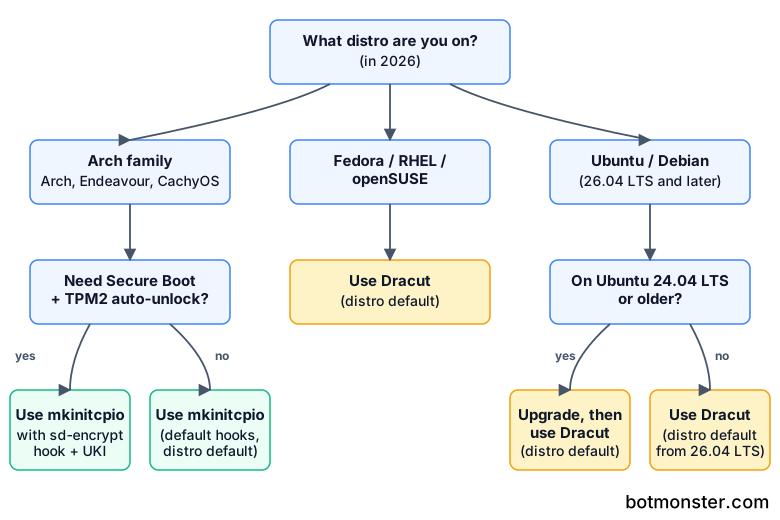
The harder question is what to pick with no distro to follow, on something like mkosi or a custom image of your own. There the answer leans Dracut. Its systemd integration is what the rest of the modern Linux stack already expects, and the rd.* namespace stacks cleanly with other systemd generators. On Arch, mkinitcpio still wins, because everything around it assumes mkinitcpio. AUR packages that touch boot, wiki pages, and support threads are all written for it, and swimming against that is thankless work.
Pick the default, read the man page once, and spend the saved time on something more interesting than your initramfs.