 Botmonster Tech
Build a serverless API with Cloudflare D1

Cloudflare D1 is a serverless SQLite database that a Cloudflare Worker queries through a binding, with no server, pool or connection string to manage. This tutorial builds a full REST API on D1 with Hono: Wrangler setup, migrations, CRUD routes, and read replicas through the Sessions API. Then it turns the free tier and the paid rates into request budgets, so you know before launch whether the D1 database fits your application.
Key Takeaways
- Without the Sessions API, every D1 query goes to one primary database in one region.
- Read replicas live in six regions and cost nothing extra, but only
withSession()reaches them. - The free tier reads 5 million rows a day: about 1,000 unindexed scans of a 5,000-row table.
- The REST API shares the account-wide limit of 1,200 requests per five minutes.
- Time Travel restores any minute of the last 7 days on Free and 30 days on Paid.
How Cloudflare D1 works: one primary, optional replicas
SQLite is a C library that opens a file on disk, with no network protocol. D1 is one of several ways to run SQLite at the edge. It wraps the library in a database service. Each D1 database is backed by a single Durable Object, and your Worker reaches it through env.DB. You get SQLite’s SQL dialect, plus database backups and an HTTP API you’d otherwise have to build.
By default, D1 routes every query, read or write, to one primary database instance in one location. A visitor near that location gets fast reads. A visitor on the other side of the planet pays the full round trip on every query. Pick the location when you create the database with a hint such as --location=weur, near most of your users and data.
Global read replication changes that. Once you turn it on, D1 keeps a read-only copy in each of six regions: ENAM, WNAM, WEUR, EEUR, APAC and OC. Writes still go to the primary, which pushes changes out to the replicas. The replicas add no storage or compute charge. But D1 only uses them for queries sent through the Sessions API. Code that calls env.DB.prepare() directly keeps hitting the primary database, replicas or not.
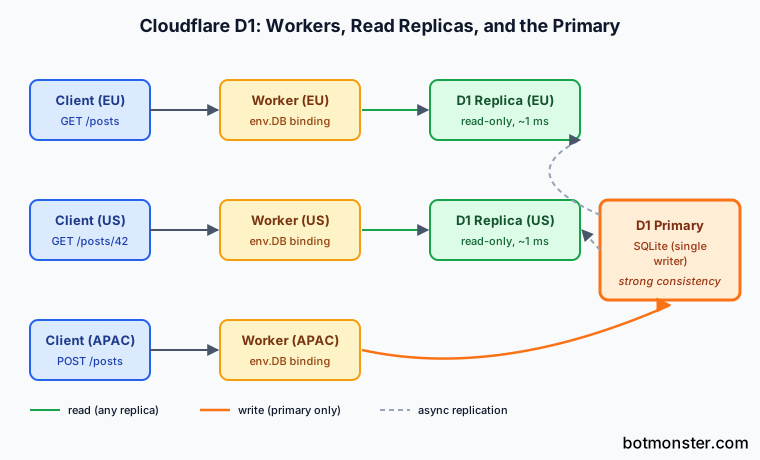
Each database also processes one query at a time. With indexed lookups that take under a millisecond, the ceiling is about 1,000 queries per second per database. Slower queries lower that number. When the queue fills, D1 returns an “overloaded” error. A single hot table with heavy write traffic is the wrong fit for D1.

Setting up D1 and your first Worker
The Wrangler CLI handles the whole setup. Install it, log in, and create the database:
npm install -g wrangler
wrangler login
wrangler d1 create my-api-db --location=weur
Wrangler prints a config snippet with the new database ID, or adds the binding to your config file for you. New projects get wrangler.jsonc; the same keys work in TOML:
name = "posts-api"
main = "src/index.ts"
compatibility_date = "2026-07-01"

[[d1_databases]]
binding = "DB"
database_name = "my-api-db"
database_id = "xxxxxxxx-xxxx-xxxx-xxxx-xxxxxxxxxxxx"
The binding = "DB" line is the contract between config and code. Inside the Worker, env.DB is a D1Database object, whatever name you gave the database when you created it.
Manage the schema with D1 migrations instead of loose SQL files. Each migration is a numbered .sql file, and D1 records the applied ones in a d1_migrations table:
wrangler d1 migrations create my-api-db create_postsPut the schema in the new migrations/0001_create_posts.sql file:
CREATE TABLE IF NOT EXISTS posts (
  id INTEGER PRIMARY KEY AUTOINCREMENT,
  title TEXT NOT NULL,
  content TEXT NOT NULL,
  created_at INTEGER NOT NULL DEFAULT (unixepoch())
);

CREATE INDEX IF NOT EXISTS idx_posts_created_at ON posts(created_at DESC);
Apply it to the local database first, then to production. Follow the same order for every later migration:
wrangler d1 migrations apply my-api-db --local
wrangler d1 migrations apply my-api-db --remote
wrangler dev runs the Worker against that local database, and the data persists between runs. Nothing you do there touches the remote database.
Import an existing SQLite database
D1 imports SQL text, not a raw .sqlite3 file. To import an existing database, follow three steps. Dump it with sqlite3 app.sqlite3 .dump > app.sql. Delete the BEGIN TRANSACTION and COMMIT lines. Then import the file with wrangler d1 execute my-api-db --remote --file=app.sql, after a test import with --local. A “Statement too long” error means one INSERT is over the 100 KB statement limit, so split it into smaller batches of rows. MySQL and PostgreSQL dumps won’t import, because their types and syntax differ. If tables have foreign keys, import them in order, since a table can’t refer to one that doesn’t exist yet.
Building a REST API with Hono
Routing five HTTP methods across three URL patterns in one fetch handler gets ugly fast. Hono is a small, web-standards web framework that adds a familiar router on top of the Workers runtime.

Install it and write the API:
npm install honoimport { Hono } from 'hono';
type Env = { DB: D1Database };
const app = new Hono<{ Bindings: Env }>();
app.get('/posts', async (c) => {
const { results } = await c.env.DB
.prepare('SELECT id, title, content, created_at FROM posts ORDER BY created_at DESC LIMIT 20')
.all();
return c.json(results);
});
app.get('/posts/:id', async (c) => {
const id = c.req.param('id');
const row = await c.env.DB
.prepare('SELECT id, title, content, created_at FROM posts WHERE id = ?')
.bind(id)
.first();
if (!row) return c.json({ error: 'not found' }, 404);
return c.json(row);
});
app.post('/posts', async (c) => {
const body = await c.req.json<{ title: string; content: string }>();
if (!body.title || !body.content) {
return c.json({ error: 'title and content required' }, 400);
}
const result = await c.env.DB
.prepare('INSERT INTO posts (title, content) VALUES (?, ?) RETURNING id')
.bind(body.title, body.content)
.first<{ id: number }>();
return c.json({ id: result?.id }, 201);
});
app.put('/posts/:id', async (c) => {
const id = c.req.param('id');
const body = await c.req.json<{ title: string; content: string }>();
const result = await c.env.DB
.prepare('UPDATE posts SET title = ?, content = ? WHERE id = ?')
.bind(body.title, body.content, id)
.run();
if (result.meta.changes === 0) return c.json({ error: 'not found' }, 404);
return c.json({ updated: result.meta.changes });
});
app.delete('/posts/:id', async (c) => {
const id = c.req.param('id');
const result = await c.env.DB
.prepare('DELETE FROM posts WHERE id = ?')
.bind(id)
.run();
if (result.meta.changes === 0) return c.json({ error: 'not found' }, 404);
return c.json({ deleted: result.meta.changes });
});
export default app;The .bind() call is the only safe way to put user input into a query. D1 hands bound values to SQLite as prepared statement parameters. That rules out SQL injection. The RETURNING clause on the INSERT is standard SQLite from version 3.35, and it saves a follow-up SELECT. Use .first() for one row or null, .all() for the full result set, and .run() on writes when you want meta.changes and meta.last_row_id.
Deploy with wrangler deploy. The Worker shows up at posts-api.<your-account>.workers.dev. A route in the config file maps it to your own domain. If you’d rather use an ORM than raw SQL, Drizzle has a D1 driver that keeps the same binding.
Turn on read replicas with the Sessions API
Enable read replication in the dashboard under the database’s Settings, or with a PUT to the database’s REST endpoint that sets read_replication.mode to auto. Then route every query through a session. A short Hono middleware does it for the whole application:
type Vars = { db: D1DatabaseSession };
const app = new Hono<{ Bindings: Env; Variables: Vars }>();

app.use('*', async (c, next) => {
  const bookmark = c.req.header('x-d1-bookmark') ?? 'first-unconstrained';
  const session = c.env.DB.withSession(bookmark);
  c.set('db', session);
  await next();
  c.res.headers.set('x-d1-bookmark', session.getBookmark() ?? '');
});

app.get('/posts', async (c) => {
  const { results, meta } = await c.get('db')
    .prepare('SELECT id, title, created_at FROM posts ORDER BY created_at DESC LIMIT 20')
    .all();
  console.log({ rowsRead: meta.rows_read, region: meta.served_by_region, primary: meta.served_by_primary });
  return c.json(results);
});
A session gives you sequential consistency. Every query in it sees a database version at least as new as the last one it saw, including your own writes. The bookmark carries that version across requests. The client sends back the x-d1-bookmark header it received, and the following request starts no older than that point. first-unconstrained lets the first query hit the nearest replica. first-primary sends it to the primary, for pages that must show the latest data, like an admin view after an edit.
The meta object shows whether it worked. served_by_region names the region that answered and served_by_primary says whether it was the primary. Both are undefined under wrangler dev, so check them against the deployed Worker. Sessions only exist on the Worker binding; the REST API cannot use replicas.
Querying D1 effectively
Each .run() or .all() is a round trip from the Worker to the database. The per-request overhead counts against the 1,000-queries-per-second ceiling. Batch related statements into one call:
const stmts = [
  c.env.DB.prepare('INSERT INTO posts (title, content) VALUES (?, ?)').bind(title, content),
  c.env.DB.prepare('INSERT INTO tags (post_id, name) VALUES (last_insert_rowid(), ?)').bind('hono'),
  c.env.DB.prepare('INSERT INTO tags (post_id, name) VALUES (last_insert_rowid(), ?)').bind('d1'),
];
await c.env.DB.batch(stmts);
batch() runs the statements in order as one transaction. If any statement fails, the whole sequence rolls back.
Use keyset pagination instead of OFFSET. ORDER BY id LIMIT 20 OFFSET 10000 makes SQLite read and discard 10,000 rows. D1 bills every one of them. WHERE id < ? ORDER BY id DESC LIMIT 20, with the last id from the previous page, reads 20. Page 500 costs the same rows as page 1.
FTS5 is built in, so one virtual table gives you ranked text search:
CREATE VIRTUAL TABLE posts_fts USING fts5(title, content, content='posts', content_rowid='id');Triggers on the base table keep the index fresh. But wrangler d1 export does not support databases that contain virtual tables. To export, drop the FTS table, export, and rebuild it.
JSON data works too, with json_extract, json_each and json_set. Large int64 values pass through JavaScript numbers, so store IDs above 2^53 as TEXT.
Read-only queries that hit a transient error are retried automatically, up to two times, and meta.total_attempts records it. Data writes are never retried for you. Wrap idempotent writes in your own retry with backoff, and treat “overloaded” as a signal to batch more or split the data.
Cloudflare D1 pricing, limits, and Time Travel
D1 bills rows read, rows written and storage, with no charge for idle time, egress or replicas. These are the published rates and limits, both last updated April 21, 2026:
| Limit | Workers Free | Workers Paid ($5/month) |
|---|---|---|
| Rows read | 5 million per day | 25 billion per month included, then $0.001 per million |
| Rows written | 100,000 per day | 50 million per month included, then $1.00 per million |
| Storage | 5 GB total | First 5 GB included, then $0.75 per GB-month |
| Databases per account | 10 | 50,000 |
| Max database size | 500 MB | 10 GB |
| Max storage per account | 5 GB | 1 TB |
| Time Travel retention | 7 days | 30 days |
| Queries per Worker invocation | 50 | 1,000 |
A row read is a row SQLite scans, not a row it returns. That turns the free tier into a request budget, and the number of rows each query touches sets its size. If each request reads 20 rows through an index, 5 million rows covers 250,000 requests a day. If each request scans a 5,000-row table because the filter column has no index, the same budget covers 1,000 requests. After that, every D1 query fails with a limit error until the counter resets at 00:00 UTC.
Paid plans show the same gap in dollars. Scan a 100,000-row table one million times in a month and you read 100 billion rows. The first 25 billion are included, and the other 75 billion cost 75,000 × $0.001 = $75. With an index that touches 10 rows per lookup, the same traffic reads 10 million rows and costs nothing beyond the $5 plan. Indexes decide whether you stay inside the free tier. Each index on a written column adds one more row written. An insert into the posts table above, with one index, counts as two rows, so the free tier allows 50,000 new posts a day. Log meta.rows_read and meta.rows_written in development to see the real numbers per query.
A row or BLOB tops out at 2 MB, so put file data in R2. A statement tops out at 100 KB. One query can bind at most 100 parameters, which breaks a long IN (?, ?, ...) list. Tables are capped at 100 columns, and queries stop after 30 seconds. On the Free plan, a Worker that runs one query per item in a loop hits the 50-query limit fast. Batch those queries instead.
Time Travel is always on, at no cost. wrangler d1 time-travel restore my-api-db --timestamp=<unix-time> rewinds the database to any minute in the retention window. The restore overwrites the database in place and cancels queries in flight. It also prints a bookmark that undoes the restore. D1 allows 10 restores per 10 minutes per database.
The D1 REST API and API tokens
Scripts, CI jobs and backends on other hosts can query a D1 database over Cloudflare’s REST API. You need a token with D1:Read, plus D1:Edit for any write:
curl -X POST "https://api.cloudflare.com/client/v4/accounts/$ACCOUNT_ID/d1/database/$DATABASE_ID/query" \
  -H "Authorization: Bearer $CLOUDFLARE_API_TOKEN" \
  -H "Content-Type: application/json" \
  -d '{"sql": "SELECT id, title FROM posts WHERE id = ?", "params": ["42"]}'
It works as an admin tool. Every call counts against the global API rate limit of 1,200 requests per five minutes per user. That’s four requests a second, shared with the dashboard and every other API client on the account. Go over it and all API calls fail with HTTP 429 for the next five minutes. For application traffic from outside Cloudflare, put the Worker API above in front of the D1 database and protect it with your own key.
When D1 is the right choice and when it isn’t
D1 fits content APIs, side projects, internal tools and most read-heavy work. It also fits multi-tenant SaaS, if you split the data. Paid accounts can create 50,000 databases. One Worker script can bind about 5,000 D1 databases. A database per tenant keeps each one under the 10 GB cap and gives each tenant its own query queue. You can also restore one tenant’s data without touching the others.
A single database with heavy write traffic stalls on the one-at-a-time queue. Analytics over large tables runs far cheaper on a column store like ClickHouse. Search at scale belongs on Meilisearch or Typesense. And an app that needs writes accepted in several regions at once needs something else. If your app runs on one server with its own disk, plain SQLite in WAL mode is simpler. It has no row-based bill.
The serverless alternatives worth comparing:
- Turso runs on libSQL, an open fork of SQLite, with embedded replicas that sync into a local SQLite file inside your process.
- Neon is serverless Postgres with scale-to-zero and Git-style database branching.
- Supabase bundles Postgres with auth, storage and realtime subscriptions.
Lock-in is mostly in the code. The binding API is Cloudflare-only, but the data is plain SQLite. wrangler d1 export my-api-db --remote --output=dump.sql gives you a SQL file you can import into sqlite3 or another D1 database as-is. A running export blocks other queries, so run it off-peak. If you later self-host the API, the three JavaScript runtimes each give it a different speed profile. The request object that routes a D1 query also knows the caller’s location. That’s how a bare Worker can show a visitor’s IP and region.
Cloudflare D1 FAQ
Is Cloudflare D1 SQLite?
Yes. D1 runs the SQLite engine and accepts SQLite’s SQL, including FTS5 and the JSON functions. You reach a D1 database through the Worker binding or the REST API, never by opening a file.
Is the Cloudflare D1 database free?
Yes, up to a point. The Workers Free plan lets you create 10 databases of up to 500 MB each, with 5 GB of storage in total. It allows 5 million rows read and 100,000 rows written per day. Production apps usually move to the $5 Workers Paid plan, where most small APIs pay nothing more.
What are the limitations of Cloudflare D1?
Each database holds 10 GB and runs one query at a time. A query binds 100 parameters at most and runs for 30 seconds at most. A row holds 2 MB. Replicas only answer through the Sessions API. Plan for many small databases rather than one large database.
For a small read-heavy API, D1 is the path of least resistance. Create the database, apply one migration, deploy the Hono Worker, and add the Sessions middleware once users arrive from more than one continent. Keep an index on every column you filter by, and the monthly bill for a small project rounds to zero.