 Botmonster Tech
Mise replaces asdf, nvm, pyenv, and direnv with one file

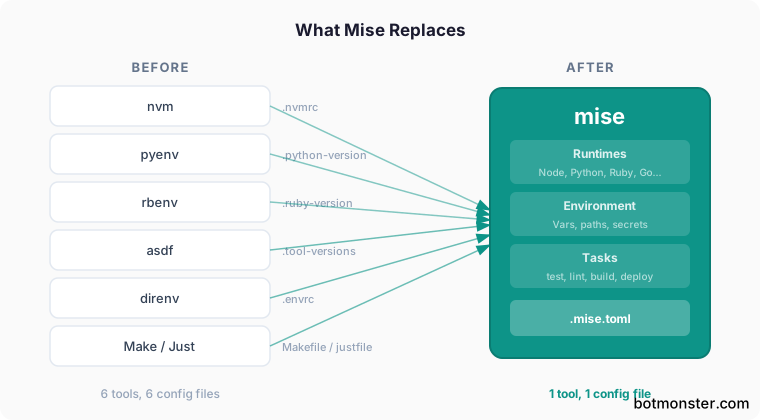
Mise (pronounced “meez”) is a polyglot development tool manager. It replaces asdf, nvm, pyenv, rbenv, and direnv with one binary and one config file. Point it at a project with a .mise.toml (or an existing .tool-versions), and it installs the right Node, Python, Ruby, Go, or Rust runtime. It installs Bun and Deno the same way, so once you pick a JavaScript runtime Mise pins the exact version for the whole team. It also sets project environment variables and runs tasks. Shell overhead drops from asdf’s 120ms+ per command to roughly 5ms. It ships packages for Linux, macOS, and Windows.
Why Another Version Manager?
Most polyglot projects accumulate a small pile of dotfiles: .nvmrc for Node, .python-version for pyenv, .ruby-version for rbenv, .tool-versions for asdf, .envrc for direnv, and .env for application secrets. Each tool needs its own install, its own shell hook, and its own mental model. The load stays manageable when you work in one language. But a monorepo with a Node frontend, a Python ML pipeline, and Go microservices means three or four version managers fighting over your shell’s PATH.
asdf was the first serious attempt at consolidation, and its plugin system let you manage almost any runtime through one CLI. But asdf was written in Bash, and every tool invocation passed through a shim script that added about 120ms of latency. That cost compounds: run node -v a few dozen times in CI and you feel it. Asdf has since been rewritten in Go (v0.16+), which narrows the performance gap. However, the shim architecture is still there.
Mise takes a different approach. Instead of shims, it modifies PATH directly when you cd into a project directory. So calling node or python runs the actual binary with no go-between. Shell prompt activation costs about 5ms on a cache hit and 14ms on a full reload. That’s roughly ten times faster than the original bash-based asdf, and still noticeably faster than asdf-go.
Beyond speed, Mise adds two features asdf never had: built-in environment variable handling (which replaces direnv) and a task runner (which replaces Make or Just for common project commands). All three live in one .mise.toml file.
Installing Mise and Activating the Shell Hook
The universal installer works on any Linux or macOS system:
curl https://mise.run | shOther options: Homebrew (brew install mise), the Arch community repo (pacman -S mise), apt/dnf packages on Debian and Fedora, and on Windows, Scoop (scoop install mise) or winget (winget install jdx.mise).
After installing, add the shell activation hook to your RC file:
# Bash
echo 'eval "$(mise activate bash)"' >> ~/.bashrc

# Zsh
echo 'eval "$(mise activate zsh)"' >> "${ZDOTDIR-$HOME}/.zshrc"

# Fish
echo 'mise activate fish | source' >> ~/.config/fish/config.fish
Run mise doctor to check that everything is wired up right. It flags clashing tools, missing shell hooks, and common setup mistakes. Still picking a shell? Our modern shell comparison covers Bash, Zsh, and Fish on startup time, plugins, and fit.
Already running asdf? Strip its shell hook before you activate Mise. Both tools modify PATH, and running both active will cause unpredictable version resolution. Remove asdf’s activation line from your RC file, source the new config, confirm Mise works, then uninstall asdf.
Mise stores installed runtimes under ~/.local/share/mise/installs/. Each project gets symlinks pointing into this shared cache, so installing Node 22 in one project and reusing it in another costs no extra disk space. The same holds when you spread one repo across several branch directories: every worktree reads the committed .mise.toml and shares the cached runtime. Build folders are another story: node_modules and target directories still pile up per project, and on a Mac a terminal cleaner like Mole clears them in one command.
Managing Node, Python, Ruby, and Go From One Tool
The daily workflow rests on mise use. Run it inside a project folder to create or update a .mise.toml and install the version you ask for:
mise use node@22       # installs Node 22.x, pins it in .mise.toml
mise use python@3.13   # installs Python 3.13.x via python-build
mise use go@1.23       # installs Go 1.23.x
mise use ruby@3.4      # installs Ruby 3.4.x
For global defaults that apply everywhere, add the -g flag:
mise use -g node@lts   # Node LTS as the system-wide fallback
mise use -g python@3.13
Mise supports more than just the old asdf plugins. You can install CLI tools from GitHub releases, Cargo, npm, and the aqua registry:
mise use ubi:sharkdp/bat       # installs bat from GitHub releases
mise use cargo:ripgrep          # builds ripgrep from crates.io
mise use npm:typescript         # installs tsc globally via npm
mise use aqua:cli/cli           # installs GitHub CLI from aqua registry
A typical .mise.toml for a polyglot project looks like this:
[tools]
node = "22"
python = "3.13"
go = "1.23"
"ubi:sharkdp/bat" = "latest"

[env]
DATABASE_URL = "postgres://localhost/myapp_dev"
_.file = ".env.local"

[tasks.test]
run = "pytest -xvs && npm test"
depends = ["lint"]

[tasks.lint]
run = "ruff check . && eslint src/"
Mise also reads existing .tool-versions files natively, so a team using asdf can adopt Mise one developer at a time with no changes to shared config files.
Project Environment Variables - Replacing direnv
direnv loads environment variables from an .envrc file when you enter a directory and unloads them when you leave. It works well. However, it needs its own install, its own shell hook, and that nagging direnv allow prompt each time the .envrc changes.
Mise covers the same use case through the [env] section in .mise.toml:
[env]
NODE_ENV = "development"
API_BASE = "http://localhost:3000"
These variables activate when you cd into the project, with no allow prompt and no second tool involved.
For loading existing .env files:
[env]
_.file = ".env.local"
Path manipulation works too. If your project has local scripts in ./bin or ./node_modules/.bin:
[env]
_.path = ["./bin", "./node_modules/.bin"]
For secrets, Mise plugs into outside vaults. You can point at 1Password items right from the file:
[env]
MY_SECRET = "op://vault/item/field"
To see what vars are live, run mise env. It prints the full resolved env for the current folder. That helps when you need to track down why a value is wrong.
Tasks - Replacing Makefiles and Justfiles
Mise’s task runner gets less attention than its version management, but it is a useful part of the package. The [tasks] section in .mise.toml lets you define project commands that run with the full Mise-managed environment:
[tasks.dev]
run = "npm run dev"

[tasks.test]
run = "pytest -xvs"
depends = ["lint"]

[tasks.lint]
run = "ruff check . && eslint src/"

[tasks.build]
run = "npm run build && go build ./cmd/server"
depends = ["test"]
Run them with mise run test or the shorthand mise test. Task deps run in the right order, so mise build runs lint, then test, then the build itself.
For more complex scripts, drop files in a .mise/tasks/ folder. Any executable file in that folder becomes a runnable task:
mkdir -p .mise/tasks
cat > .mise/tasks/deploy << 'EOF'
#!/usr/bin/env bash
set -euo pipefail
echo "Deploying to $DEPLOY_TARGET..."
rsync -avz public/ "$DEPLOY_HOST:/var/www/"
EOF
chmod +x .mise/tasks/deploy
Now mise run deploy works with all your project’s env vars already loaded.
Mise also has a watch mode. mise watch test re-runs the test task each time source files change. That suits a TDD loop well.
Still, Mise’s task runner is on purpose simple. Projects with complex dep graphs, parallel run needs, or teams already on Make or Just should keep those tools. Mise tasks fit the common case: a handful of commands the whole team runs each day.
Python Virtualenvs: What Mise Does and Does Not Do
People often ask if Mise handles Python virtual envs. It installs Python runtimes, but it does not replace your virtualenv workflow. You still need uv, Poetry, or the stdlib venv module to make and manage virtual envs.
Mise can still take over virtualenv activation, though. For uv projects, set python.uv_venv_auto = "source" in your settings to turn on an existing .venv when you enter the folder. Use "create|source" to make one if it is not there yet.
For non-uv projects, the _.python.venv setting in the [env] block makes and turns on a venv:
[env]
_.python.venv = { path = ".venv", create = true }
Note that these are two split paths in the code. Options like uv_create_args do not apply to _.python.venv, and vice versa.
Mise vs asdf vs Devbox vs Nix: Picking the Right Tool
The polyglot env space has a few real contenders. Here is how they stack up:
| Feature | Mise | asdf (Go) | Devbox | Nix |
|---|---|---|---|---|
| Language | Rust | Go (v0.16+) | Go (wraps Nix) | C++/Nix |
| Shell overhead | ~5ms | ~30-50ms | ~100ms+ | Varies |
| Env var management | Built-in | No (needs direnv) | Built-in | Built-in |
| Task runner | Built-in | No | No | No |
| Reproducibility | Per-project pins | Per-project pins | Nix-level isolation | Full isolation |
| Config format | TOML | .tool-versions | JSON | Nix expressions |
| Windows support | Yes (Scoop/winget) | No | No | WSL only |
| Learning curve | Low | Low | Medium | High |
| Backend ecosystem | asdf plugins, aqua, ubi, cargo, npm | asdf plugins only | Nix packages | Nix packages |
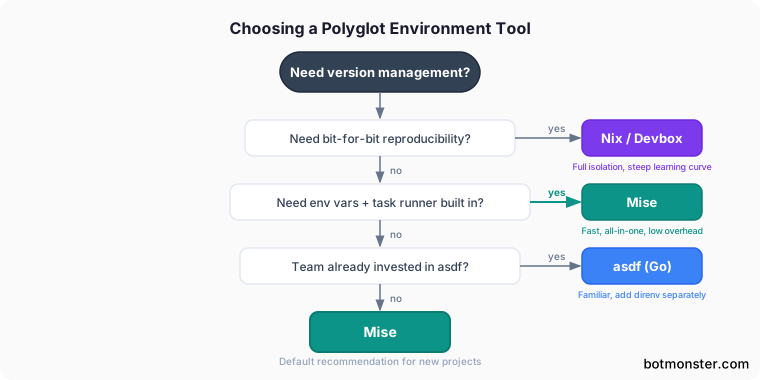
Want fast version control with env vars and task running baked in? Mise is hard to beat. Devbox and Nix offer stronger repro guarantees. Nix can lock bit-for-bit identical envs across machines. But both need more setup and a steeper learning curve. Asdf is still fine if your team is on it and the Go rewrite’s speed works for you. You will still need direnv or a like tool for env vars.
If the Nix path draws you in, our guide on managing dev environments with Nix shells walks through flake setup without Docker.
Windows Support
Mise works on Windows via Scoop (scoop install mise) and winget (winget install jdx.mise). The core parts work as you would expect: install runtimes, manage env vars, run tasks. However, Mise on Windows can only use non-asdf backends (aqua, ubi, cargo, npm). The reason is simple: asdf plugins are shell scripts that assume Unix. For most main languages (Node, Python, Go, Rust), this is fine. Mise has its own core backends for them. But if your workflow leans on niche asdf plugins, Windows will have gaps.
Getting Started: A Five-Minute Migration
Already on asdf, nvm, pyenv, or direnv? Here is the fast path to switch:
- Install Mise:
curl https://mise.run | sh - Add the shell hook to your RC file and source it
- Run
mise doctorto check for conflicts - Remove old tool shell hooks (asdf, nvm, pyenv, direnv) from your RC file
- In each project, run
mise use node@22 python@3.13(or whatever versions you need) to generate.mise.toml - Move any
.envrcvariables into the[env]section of.mise.toml - Uninstall the old tools:
brew uninstall asdf pyenv nvm direnv
Mise reads .tool-versions and .nvmrc files on its own. So step 5 is optional for projects that already have those files. You can switch over slowly, letting Mise pick up old version files while you write .mise.toml for new projects.
You end up with fewer dotfiles, a faster shell, and one tool where you used to need four. A pinned .mise.toml also gives coding agents that run in your terminal a deterministic runtime, so they build against the same Node or Python version you do.