 Botmonster Tech
bcachefs left the kernel, is it still worth switching?
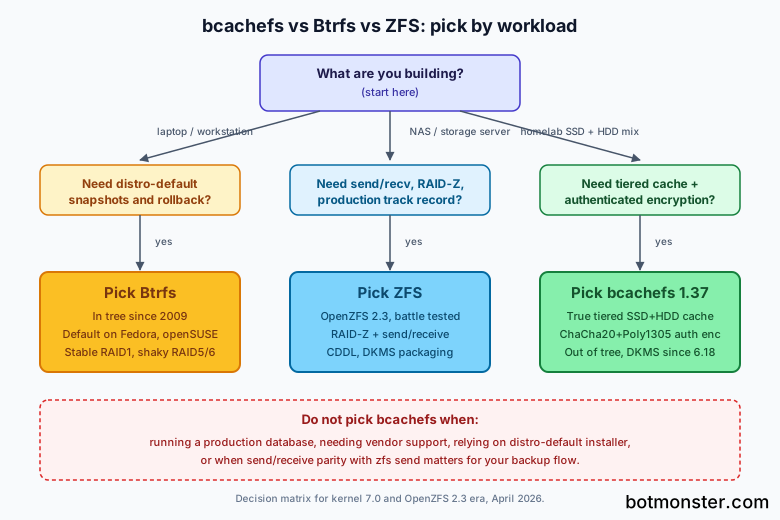
In 2026, with bcachefs 1.37 running on top of Linux 7.0 as an out-of-tree DKMS module, the filesystem is solid enough for homelab experimentation, secondary backup targets, and tiered-cache workloads where its SSD plus HDD writeback shines. It is still not the right default for a production root filesystem. The on-disk format is stable and erasure coding finally graduated from experimental in bcachefs 1.37, yet the fallout from the 2025 maintainer disputes, the mainline removal in kernel 6.18, and the shift to DKMS packaging mean fewer full-time contributors, slower bugfix cadence, and uneven distro support. Pick bcachefs when you want native authenticated encryption plus tiered storage in a single mount; stay on Btrfs for distro-blessed snapshots and rollbacks on a laptop or workstation; stay on ZFS when you need decade-proven reliability with mature send and receive tooling.
What bcachefs Is and How It Got Here
bcachefs started life as a spin-off of the bcache block-layer caching driver, which Kent Overstreet wrote to put a fast SSD in front of a slow array. The design goal drifted: instead of caching in front of a dumb filesystem, why not grow the cache into a real filesystem with copy-on-write, checksums, replication, and snapshots baked in? That pivot, announced in 2015 on bcachefs.org, produced an out-of-tree patch set that lived as a community project for nearly a decade. Patreon funded most of the development, and early testers had to track a custom tree with every kernel bump.
The filesystem reached mainline in Linux 6.7 in January 2024. Linus Torvalds accepted it with the Kconfig entry flagged EXPERIMENTAL and a clear understanding that the on-disk format would not silently break. For about eighteen months that arrangement held. Then, through 2025, a series of disputes between Overstreet and other kernel maintainers erupted over pull-request etiquette, process adherence, and code-of-conduct concerns. In June 2025 Torvalds signalled that bcachefs would be ejected. By August 2025 the MAINTAINERS entry was flipped to “externally maintained.” As of Linux 6.18, released in late September 2025, the core bcachefs code was removed from the mainline kernel outright. LWN’s coverage is still the best factual record of the removal; Phoronix tracked the transition to externally maintained status.
The project did not die. Development continued out of tree, and bcachefs 1.37 shipped in March 2026 with official Linux 7.0 support, erasure coding marked stable, and a fully Rust-based userspace. The filesystem is now distributed as a DKMS module and the bcachefs-tools package. That is a meaningful shift. Users are back to where they were in 2022, except with a stable on-disk format and a more mature feature set. If you subscribe to linux-bcachefs and follow LWN, the project is alive and shipping. If you expect a feature to land in your distro’s stock kernel, it will not.
Architecture: COW, B-Trees, Tiered Storage, and Authenticated Encryption
bcachefs only makes sense as a Btrfs or ZFS alternative once you understand its core design: a copy-on-write filesystem where everything lives in a single unified B-tree namespace. Extents, inodes, dirents, xattrs, and allocation info are all B-tree keys. That is why features like reflinks and snapshots are cheap to add rather than bolted on after the fact; the primitives were there from day one.
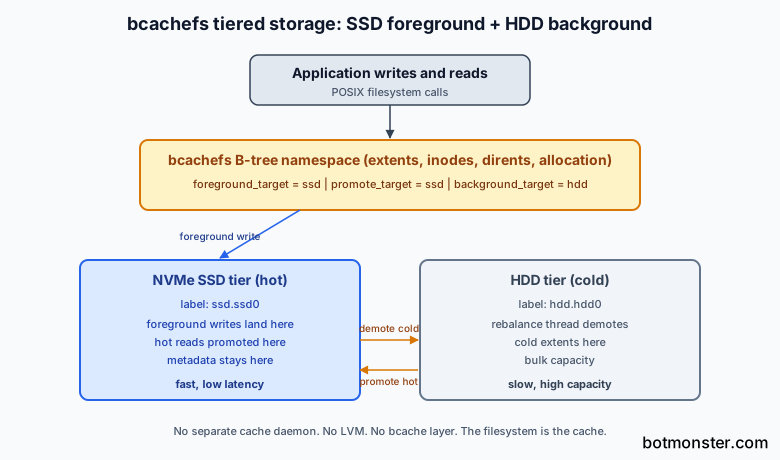
Multi-device support is a first-class citizen rather than an afterthought. You label each device at format time with a target name (such as ssd.ssd0 or hdd.hdd0), then pick foreground, background, and promote targets. Foreground writes hit the fast tier, background rebalance demotes cold extents to slow storage, and reads get promoted back to the fast tier when they become hot again. There is no separate cache daemon. The writeback cache is the filesystem.
Erasure coding landed in the 1.37 release as a stable, non-experimental feature, using Reed-Solomon codes similar to RAID5 and RAID6 but on a per-bucket basis rather than in place. Because bcachefs is copy-on-write, stripes are never updated in place; new writes build new stripes, and old stripes get garbage collected. This sidesteps the infamous RAID5 write hole that Btrfs still warns against. The erasure coding page on bcachefs.org explains the mechanics.
Native encryption uses ChaCha20 for confidentiality and Poly1305 for authentication, keyed at format time with --encrypted. The authenticated part is the interesting bit. Unlike LUKS below Btrfs, which encrypts blocks but does not authenticate them at the filesystem layer, bcachefs binds the MAC into its on-disk checksum format. A tampered block or a bit-rot event is detected as a checksum failure and rejected at read time, not silently returned. That is closer in spirit to ZFS native encryption with AES-256-GCM than to the typical LUKS stack.
Compression is per-extent with zstd, lz4, or gzip. The write path runs in the order compress, then checksum, then encrypt, which means compression ratios stay meaningful while encryption still covers the final bytes on disk. Snapshots and reflinks fall out of the B-tree design: cp --reflink=always is cheap, and snapshots are per-subvolume with a snapshot ID per B-tree node. The model sits closer to ZFS datasets than to Btrfs subvolumes in ergonomics.
bcachefs vs Btrfs vs ZFS: The 2026 Feature Matrix
Most readers are not starting from zero. They already run Btrfs on a laptop or ZFS on a NAS and want to know whether switching is worth the upheaval. The matrix below covers the axes that actually decide this choice.
| Capability | bcachefs 1.37 | Btrfs (kernel 7.0) | ZFS (OpenZFS 2.3) |
|---|---|---|---|
| Copy-on-write | Yes, unified B-tree | Yes, subvolumes | Yes, datasets |
| Snapshots | Per-subvolume, snapshot IDs | Per-subvolume | Per-dataset with clones |
| RAID1 / mirror | Stable | Stable | Stable |
| RAID5/6 equivalent | Erasure coding stable in 1.37 | Still carries write-hole warning | RAID-Z1/Z2/Z3 rock solid |
| In-place array expansion | Yes, via rebalance | Yes, via device add | RAID-Z expansion landed in 2.3 |
| Tiered writeback cache | Native, built in | Not supported | L2ARC plus SLOG, bolt-on |
| Native encryption | ChaCha20 plus Poly1305, authenticated | None, stack on LUKS | AES-256-GCM, send/recv edge cases |
| Compression | zstd, lz4, gzip | zstd, lz4, zlib | zstd, lz4, gzip |
| Send and receive | Present but immature | btrfs send stable | zfs send battle tested |
| Upstream licensing | GPL, out of tree since 6.18 | GPL, in tree since 2009 | CDDL, out of tree via DKMS |
| Distro defaults | None | Fedora Workstation, openSUSE | TrueNAS, Proxmox |
| Bus factor | Small team plus Overstreet | Meta, SUSE, Oracle | OpenZFS with dozens of maintainers |
Tiered storage is the standout capability. ZFS gives you L2ARC as a read cache and SLOG as a ZIL accelerator, both of which sit beside the pool rather than as proper tiers. Btrfs has essentially nothing native. bcachefs is the only one of the three where an NVMe SSD is a genuine part of the filesystem, automatically promoted to and demoted from by the rebalance thread. For mixed-media homelabs, this is the capability most likely to tip the decision.
Encryption is the second axis worth dwelling on. Btrfs outsources to LUKS, which works but adds a layer and authenticates nothing. ZFS native encryption is mature but has a history of send and receive bugs, with fixes landing as recently as OpenZFS 2.2.8 and 2.3.3. bcachefs authenticated encryption is the cleanest design of the three, but it has seen less real-world stress testing.
Licensing and upstream status cuts the other way. ZFS will likely never merge into mainline due to the CDDL and GPL incompatibility, but OpenZFS ships DKMS packages for every distribution that matters, and it has a decade of production scars in its tracker. Btrfs has been in tree since 2009 and is the default root filesystem on Fedora Workstation and openSUSE. bcachefs is now out of tree again, which is the single biggest reason to be cautious.
Setting Up a Tiered SSD + HDD bcachefs Filesystem
The best way to evaluate bcachefs is to run it on the workload it was designed for: a fast NVMe SSD fronting a slow HDD in a single mount. If you are adding NVMe capacity to an existing homelab server, see our guide on adding NVMe drives via PCIe bifurcation. Assume you have /dev/nvme0n1 as the cache and /dev/sda as the capacity tier. The following walkthrough uses the 2026 bcachefs-tools with the DKMS module.
Install the module and userspace tools. On Ubuntu 24.04 or Debian derivatives, the upstream PPA is the cleanest route:
sudo add-apt-repository ppa:bcachefs/ppa
sudo apt update
sudo apt install bcachefs-dkms bcachefs-tools
sudo modinfo bcachefs    # sanity check
On Fedora 42 or 43, the module is available via third-party COPR repositories since the mainline removal. Arch Linux users have bcachefs-dkms-git and bcachefs-tools-git in the AUR, and NixOS tracks the release through boot.kernelModules and the bcachefs-tools package. Debian 13 trixie carries an older version of bcachefs-tools; the Debian package was orphaned in 2024 and has been rough to keep current, so the PPA route is more reliable.
Format the tiered filesystem in a single command:
sudo bcachefs format \
  --encrypted \
  --compression=zstd \
  --label=ssd.ssd0 /dev/nvme0n1 \
  --label=hdd.hdd0 /dev/sda \
  --foreground_target=ssd \
  --promote_target=ssd \
  --background_target=hdd \
  --metadata_target=ssd
The target flags are the interesting part. foreground_target=ssd sends fresh writes to the NVMe. promote_target=ssd caches hot reads on the NVMe after they come back from the HDD. background_target=hdd tells the rebalance thread where to demote cold data. metadata_target=ssd keeps B-tree lookups on the fast tier, which is almost always what you want.
Mount it and prompt for the encryption passphrase:
sudo bcachefs unlock /dev/nvme0n1
sudo mount -t bcachefs /dev/nvme0n1:/dev/sda /mnt/data
An /etc/fstab entry for the same mount looks like this:
/dev/nvme0n1:/dev/sda /mnt/data bcachefs defaults,verbose 0 0For a headless server you will want to wire bcachefs unlock into systemd so the filesystem comes up at boot without a human at the console. The ArchWiki bcachefs page has working unit examples.
Day-two operations are where the tooling starts to feel modern. Adding another HDD is a single call: sudo bcachefs device add --label=hdd.hdd1 /mnt/data /dev/sdb. Evacuating a failing disk is bcachefs device evacuate. Forcing a rebalance after changing replica policy is bcachefs data rereplicate /mnt/data. Health lives in sysfs under /sys/fs/bcachefs/<UUID>/, which exports per-device usage, dirty data counts, and compression ratios. bcachefs fsck handles consistency checks, and from 1.37 onward the online variant is considered safe to run on a mounted filesystem for most recovery paths.
Snapshots work via bcachefs subvolume create and bcachefs subvolume snapshot. The new subvolume list and list-snapshots subcommands in 1.37 finally make snapshot inventory pleasant. Reflink copies via cp --reflink=always are first-class and interact cleanly with the tiered cache: reflinked extents share physical storage until one side is rewritten.
Stability, Tooling, and Distribution Support in 2026
Features are one thing. What really matters is whether you can install the thing, keep it running, and trust the on-disk format. The current picture across major distros in 2026 is mixed.
Linux 7.0 support ships in bcachefs 1.37 as a DKMS module rather than in-kernel code. The module builds against kernels 6.16 and newer, and the project tracks pre-release kernels to keep compatibility current. You will not find bcachefs in the stock Linux 7.0 Kconfig, which means installer support in Fedora Anaconda, openSUSE YaST, and the Debian installer is gone. Any root-on-bcachefs install is now a manual affair, and any initramfs needs explicit inclusion of the module and userspace hooks.
Debian is the worst story. bcachefs-tools was orphaned in Debian in 2024 after the Rust migration made the dependency footprint untenable for Debian stable’s release cadence. The package still exists in experimental but is removed from unstable. Backports is not a reliable channel. In practice, Debian users should use the upstream PPA or compile from github.com/koverstreet/bcachefs-tools directly.
Fedora ships bcachefs-tools in the default repositories, though the in-kernel bcachefs disappeared with 6.18. You will need a DKMS module from a COPR repo to get a working filesystem. Fedora Workstation’s default root filesystem is still Btrfs, and that is not changing.
Rolling-release distros handle bcachefs best. CachyOS offers bcachefs as an installer option. Arch with bcachefs-dkms-git and bcachefs-tools-git tracks upstream tightly. openSUSE Tumbleweed and NixOS both have working community modules. If you want to exercise bcachefs in anger, one of these is the right testbed.
Known sharp edges in 2026 are worth calling out. Erasure coding is stable in 1.37 but stripe allocation optimization is still queued for future releases, so expect slightly suboptimal space usage under rapid churn. bcachefs send and bcachefs receive exist but are nowhere near feature parity with zfs send; assume you need rsync, restic, or borg for offsite backup flows. Container storage integration is present via overlayfs-on-bcachefs and reflink-aware copy semantics, but Proxmox VE, TrueNAS SCALE, and Unraid have not added first-class bcachefs support.
The users who should switch today are homelab NAS builders with mixed NVMe plus HDD hardware, self-hosted backup targets where authenticated encryption matters, and enthusiasts willing to track the module and mailing list. The users who should wait are production database operators, anyone relying on distro-default installs, and teams that need send and receive parity with ZFS for replication. For a single-filesystem solution that combines tiered caching with authenticated encryption, and if you are comfortable maintaining a DKMS module, bcachefs 1.37 is closer to ready than it has ever been. If you need vendor support or predictable distro packaging, stay where you are.
Where This Leaves the Three Filesystems
Btrfs, ZFS, and bcachefs no longer sit in a clean three-way race. Btrfs is the pragmatic in-tree default for laptops and workstations; it is not going to gain tiered caching or authenticated encryption, but it is shipped, tested, and understood. ZFS is the adult choice for storage servers, NAS appliances, and anywhere RAID-Z plus send and receive matter; the CDDL keeps it out of tree, but OpenZFS operates at a different scale from bcachefs in terms of team size and production track record. bcachefs is the experimental-but-promising third option for users who value a single unified design and are willing to pay the out-of-tree tax. The 2025 drama did not kill the project, and the 1.37 release proves it can ship without Overstreet’s pull requests flowing into Linus’s tree. The burden of proof has shifted, though. The filesystem has to earn its way back in, either through mainline reentry or through enough production mileage that distros feel safe picking it up again.