 Botmonster Tech
Pi-hole Unbound DNSSEC setup

A Pi-hole, Unbound, DNSSEC stack gives your home network ad blocking, private lookups and signed answers from one small box. Pi-hole blocks ads and trackers for every device on the network. Unbound looks up names on its own, starting at the root servers, so no single provider logs every domain you visit. That rules out Google (8.8.8.8), Cloudflare (1.1.1.1) and your ISP. Unbound also checks DNSSEC signatures, and that is the part most setups get wrong.
Key Takeaways
- Unbound does the DNSSEC checks. Leave Pi-hole’s own DNSSEC box off unless you want the status column.
- Test on port 5335:
fail01.dnssec.worksmust fail anddnssec.worksmust return theadflag. - Set
use-caps-for-id: noand never repeat the trust anchor line the Debian package already sets. - A “sig not yet valid” error almost always means the clock is wrong, so run NTP.
- Pi-hole v6 renamed its commands:
pihole setpassword,pihole tail,pihole-FTL --teleporter.
This guide sets up the stack on a Raspberry Pi or any small Debian or Ubuntu box, then covers the DNSSEC details that forum threads only answer in pieces.
Why upstream DNS providers see too much
Your DNS resolver sees every domain your devices look up, from websites to smart TVs phoning home to apps pinging analytics servers. Moving from your ISP to Google or Cloudflare just picks a different company to hand that list to. DNS-over-HTTPS and DNS-over-TLS encrypt the trip to the resolver, but the resolver still reads every query. If you have never seen what your address says about you, look it up first.
A recursive resolver works another way. Unbound asks the root servers who handles .com, then asks the .com servers who handles example.com, and finally asks that domain’s own name servers for the record. No single server in that chain sees your whole browsing pattern.
QNAME minimisation goes further. Each server gets only the part of the domain name it needs, so the root sees .com and never mail.example.com. RFC 9156, which replaced RFC 7816, defines the method. The Unbound manual lists qname-minimisation as on by default.
Architecture overview
Here is the path of one query:
- A device asks the Pi-hole, because your router’s DHCP hands out the Pi-hole’s IP as the DNS server.
- Pi-hole checks its gravity database of blocklists. A blocked domain gets 0.0.0.0 and stops here.
- An allowed domain goes to Unbound on
127.0.0.1, port 5335. - Unbound walks the root, TLD and authoritative name servers.
- Unbound checks the DNSSEC chain of trust from the root zone down. A forged or broken answer becomes SERVFAIL.
- The answer flows back through Pi-hole to the device.
Both layers cache: Pi-hole keeps each answer for its TTL, while Unbound has its own cache and can prefetch popular names before they expire. The Pi-hole docs warn that the first lookup to an unknown TLD can take up to a second, while later lookups under the same TLD usually finish in under 0.1 seconds.
The stack is light enough for a Raspberry Pi 4 or 5, with room left for a self-hosted Bitwarden server such as Vaultwarden. Any Debian-based box with a static IP works too. You can also run both on the gateway if you build a Linux router on nftables.
How Pi-hole and Unbound split DNSSEC work
With Unbound as the upstream, Unbound is the validator. It fetches the signatures, checks them against the root trust anchor, and refuses to pass on an answer that fails. Pi-hole only ever sees answers that already passed.
Should you tick Use DNSSEC in Pi-hole?
Leave it off. In Pi-hole v6 the box maps to the dns.dnssec setting, which is false by default in the FTL config reference. Pi-hole forum helpers say it plainly: Unbound does the work, so DNSSEC runs fine without the Pi-hole option.
Turning it on has two visible effects. The query log gains a DNSSEC status for each answer, such as SECURE, INSECURE or BOGUS. Pi-hole also sends its own DS and DNSKEY lookups, which show up as the client pi.hole at the top of Top Clients. If you want the status column without that noise, keep dns.showDNSSEC off:
sudo pihole-FTL --config dns.dnssec true
sudo pihole-FTL --config dns.showDNSSEC false
Old advice warns that DNSSEC in both places breaks things. That came from a bug in dnsmasq releases before 2.81, and Pi-hole moved past those long ago. Both on is now safe, just redundant.
Prove validation works with dig
Test Unbound on its own port first. These are the test names the Pi-hole docs use:
dig fail01.dnssec.works @127.0.0.1 -p 5335
dig +dnssec dnssec.works @127.0.0.1 -p 5335
The first must return status: SERVFAIL and no IP, because its signatures are broken on purpose. The second must return NOERROR, an IP, and ad in the flags: line. The ad bit means Authentic Data: Unbound checked the chain of trust and it held.
Do not run the same test against Pi-hole on port 53 and panic when ad is missing. Pi-hole’s DNS core is built on dnsmasq, and dnsmasq has a separate --proxy-dnssec option just to copy the AD bit from upstream to clients. So a missing ad flag on port 53 says nothing about Unbound. The SERVFAIL test is the one that counts. If fail01.dnssec.works also fails through Pi-hole, validation works end to end.
When DNSSEC breaks
Most failures come from a short list. Each row below comes from a Pi-hole forum thread or the official guide.
| Symptom | Cause | Fix |
|---|---|---|
| Many domains BOGUS, “DNSSEC sig not yet valid” | Wrong system clock (4 hours off in one thread) | Check timedatectl and enable NTP. A Pi 4 has no real-time clock, so it needs NTP after every boot |
| “no servers could be reached” | Upstream set to port 5353, not 5335 | Set the upstream to 127.0.0.1#5335 |
| Unbound will not start, “trust anchor presented twice” | auto-trust-anchor-file in both pi-hole.conf and Debian’s root-auto-trust-anchor-file.conf | Delete the line from pi-hole.conf |
| Every lookup fails after a power cut | Corrupt /var/lib/unbound/root.key | Run sudo unbound-anchor -a /var/lib/unbound/root.key, then restart Unbound |
| Random SERVFAIL on signed domains | use-caps-for-id: yes | Set it to no, as the Pi-hole guide does |
| Recursion fails, or big answers time out | ISP grabs port 53, or CG-NAT drops TCP 53 | Run the root server tests below |
To check whether one domain is truly broken, compare a normal query with one that skips validation:
dig problem-domain.com @127.0.0.1 -p 5335
dig +cd problem-domain.com @127.0.0.1 -p 5335
If the first returns SERVFAIL and the +cd (checking disabled) query works, the domain’s own DNSSEC is broken. Adding it to Pi-hole’s allowlist won’t help, because the allowlist only skips blocking and Unbound still refuses the answer. The real fix lives in Unbound: add domain-insecure: "problem-domain.com" to pi-hole.conf and restart. Remove it once the owner fixes their records.
Recursive or forwarding?
Some guides add a forward-zone that sends every query to Cloudflare over TLS on port 853. That hides your queries from the ISP, but it turns Unbound back into a forwarder, and Cloudflare sees every name again. Unbound still checks DNSSEC either way. Recursion protects you from big providers, and forwarding over TLS protects you from the ISP.
DNSSEC in Docker
Docker follows the same rules, set through environment variables. Point Pi-hole at the Unbound container with FTLCONF_dns_upstreams, and leave FTLCONF_dns_dnssec unset or false. One v6 user set it to true and found pi.hole topping his client list with DS lookups. That is the noise dns.showDNSSEC controls.
Step-by-step installation
This assumes Debian 12 or 13, Ubuntu 24.04 LTS, or Raspberry Pi OS, with a static IP. Replace <pihole-ip> with your machine’s address.
Test access to root servers
Some ISPs and routers redirect port 53 to their own resolver, which breaks recursion in confusing ways. The Pi-hole guide suggests three checks from the Pi before you install anything:
dig @198.41.0.4 . NS +norec +time=3
dig @198.41.0.4 . NS +norec +tcp +time=3
dig @198.41.0.4 version.bind CH TXT +time=3
The first two should show aa and no ra in the flags: line, and the third should return "ATLAS". Anything else means a box between you and the root server is answering instead.
Install Pi-hole
curl -sSL https://install.pi-hole.net | bashPick any upstream in the installer, since Unbound replaces it soon. Pi-hole v6 dropped the old pihole -a commands, so set the admin password with:
pihole setpasswordInstall and configure Unbound
sudo apt install unboundDebian 12 ships Unbound 1.17 and Debian 13 ships 1.26, and QNAME minimisation is on by default in both. The package pulls in dns-root-data, which supplies and updates the root hints, so you don’t need to download named.root yourself. The package also sets up the DNSSEC trust anchor in /var/lib/unbound/root.key through its own config file.
Create /etc/unbound/unbound.conf.d/pi-hole.conf:
server:
    verbosity: 0
    interface: 127.0.0.1
    port: 5335
    do-ip4: yes
    do-udp: yes
    do-tcp: yes
    do-ip6: no

    harden-glue: yes
    harden-dnssec-stripped: yes
    use-caps-for-id: no
    edns-buffer-size: 1232
    prefetch: yes
    prefetch-key: yes
    serve-expired: yes
    serve-expired-ttl: 86400

    num-threads: 1
    so-rcvbuf: 1m

    private-address: 192.168.0.0/16
    private-address: 169.254.0.0/16
    private-address: 172.16.0.0/12
    private-address: 10.0.0.0/8
    private-address: fd00::/8
    private-address: fe80::/10
harden-dnssec-stripped treats a signed zone that arrives without signatures as bogus, which blocks downgrade attacks. edns-buffer-size: 1232 follows DNS Flag Day 2020 and avoids broken, fragmented UDP replies. prefetch-key fetches DNSKEY records early, which the Unbound manual says lowers latency. serve-expired keeps old answers for up to a day if your internet drops. The file has no auto-trust-anchor-file line on purpose, because the Debian package already sets it and a second copy is a known cause of startup failures.
Restart Unbound and check it:
sudo systemctl restart unbound
sudo systemctl status unbound
Then run the two dnssec.works tests from the DNSSEC section above.
Fix the Debian resolvconf conflict
On Debian Bullseye and later, unbound-resolvconf.service writes nameserver 127.0.0.1 into /etc/resolv.conf without the port, which confuses local tools. The Pi-hole guide turns it off:
sudo systemctl disable --now unbound-resolvconf.service
sudo sed -Ei 's/^unbound_conf=/#unbound_conf=/' /etc/resolvconf.conf
sudo rm /etc/unbound/unbound.conf.d/resolvconf_resolvers.conf
sudo systemctl restart unbound
Connect Pi-hole to Unbound
Open the web interface at http://<pihole-ip>/admin, then go to Settings and DNS. Untick every upstream, add one custom server, 127.0.0.1#5335, and save. You can also do it from the shell:
sudo pihole-FTL --config dns.upstreams '["127.0.0.1#5335"]'Test the full chain
From another machine on the LAN:
dig example.com @<pihole-ip>Run it twice and the second query time drops as the cache answers. Then watch the live log:
pihole tailEach allowed query should show as forwarded to 127.0.0.1#5335. In the web query log, the same queries read “answered by localhost#5335”. That proves Pi-hole uses Unbound and not some leftover upstream.
Hardening and blocklist management
The default setup works, and better lists block more trackers.
Expanding blocklists
Pi-hole starts with Steven Black’s unified hosts list, which is a decent baseline, although plenty of trackers slip past it. Common additions:
| Blocklist | Size | Notes |
|---|---|---|
| OISD | Large | Broad coverage, community-maintained |
| Hagezi Light | Small | Few false positives |
| Hagezi Pro | Medium | Good balance of coverage and usability |
| Hagezi Ultimate | Very large | Aggressive, expect allowlist work |
Add lists under Lists in the admin interface, then rebuild gravity:
pihole -gThe installer already adds a weekly gravity update in /etc/cron.d/pihole, so you only run pihole -g by hand after you add a list.
Group-based blocking
Groups give different devices different rules, so a smart TV can get the aggressive lists, while a work laptop keeps the analytics domains it needs. Create groups, assign clients by MAC address or IP, and attach lists to each group. Add VLANs on top, and IoT devices cannot reach sensitive hosts even when a domain slips through.
Keeping things updated
The root hints update through the package manager, and the trust anchor updates through Unbound’s RFC 5011 probes, which the manual says run several times a month, so keep the machine online. Blocklists refresh with the weekly gravity job. That leaves apt upgrade as your only routine task.
Monitoring, troubleshooting, and maintenance
A DNS resolver that fails without a sound is worse than none at all, so you need to see what it’s doing.
Pi-hole dashboard
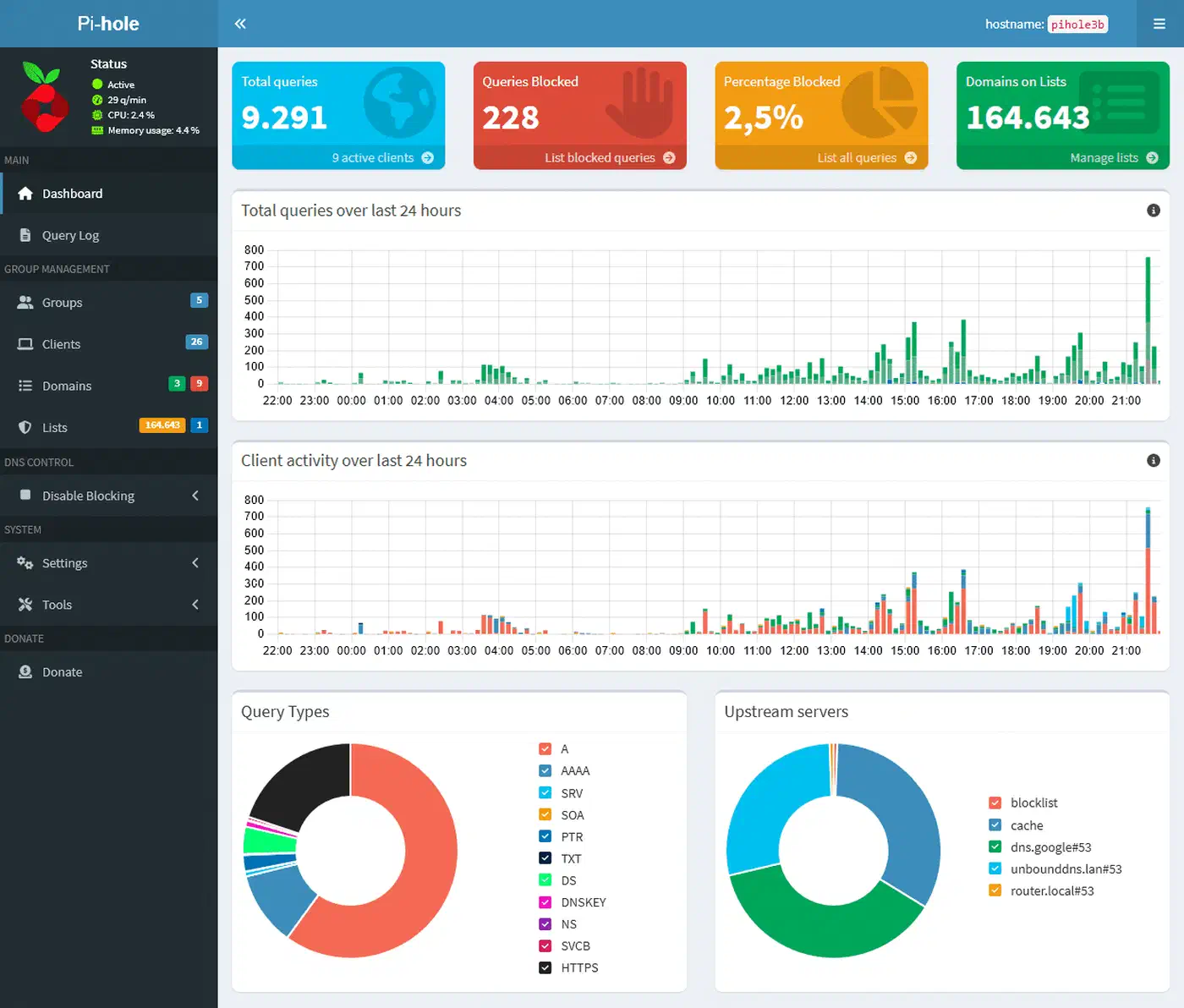
The web interface at http://<pihole-ip>/admin shows live data: total queries, percent blocked, top blocked and allowed domains, and a per-client breakdown. It’s the fastest way to spot trouble, since a device making thousands of queries to odd domains stands out here.
Unbound statistics
sudo unbound-control stats_noresetCompare total.num.cachehits with total.num.cachemiss to see how much the cache saves. total.recursion.time.avg shows how long fresh lookups take. A sudden jump in SERVFAIL answers in the query log points back to the DNSSEC table above.
systemd-resolved conflicts
On Ubuntu, systemd-resolved holds port 53, so Pi-hole cannot bind to it. The gentle fix keeps the service and frees the port. Set DNSStubListener=no in /etc/systemd/resolved.conf. Then point /etc/resolv.conf away from the stub that just went quiet, and restart:
sudo ln -sf /run/systemd/resolve/resolv.conf /etc/resolv.conf
sudo systemctl restart systemd-resolved
Fix the so-rcvbuf warning
The so-rcvbuf: 1m line can log “so-rcvbuf 1048576 was not granted”. That means the kernel cap is lower than what Unbound asks for, and the Pi-hole guide raises it:
echo "net.core.rmem_max=1048576" | sudo tee /etc/sysctl.d/99-unbound.conf
sudo sysctl -p /etc/sysctl.d/99-unbound.conf
sudo systemctl restart unbound
Backup and restore
Pi-hole v6 removed pihole -a -t, and the Teleporter backup now runs as:
sudo pihole-FTL --teleporterIt writes a zip archive to the current folder. The archive holds your settings, lists, allow and deny entries, local DNS records and CNAME records. Restore it under Settings, then Teleporter, in the web interface.
High availability
To survive a Pi-hole reboot without taking DNS down for the whole house, run a second Pi-hole and Unbound on another machine. Then have your DHCP server hand out both IPs. Gravity Sync used to keep the pair in step, local DNS records included. It was retired in July 2024 and does not work with Pi-hole v6. For v6, Nebula Sync copies the config and lists from a primary to its replicas through the Pi-hole API.
Wrapping up
The setup takes about 30 minutes. It blocks ads on every device with nothing installed on them, and it keeps your full browsing history away from third parties. Pi-hole filters, Unbound resolves and checks DNSSEC, and Pi-hole’s own DNSSEC box stays off. Email is the next leak to close, and your own disposable inbox keeps sign-up spam off your real address.
After that, upkeep is small. Run apt upgrade, glance at the dashboard now and then, and rerun the fail01.dnssec.works test after any big change.