 Botmonster Tech
Google's jj undoes anything Git will not let you undo

Jujutsu (jj) is a Git-compatible version control system built at Google. It swaps Git’s branch and staging workflow for automatic rebases, first-class conflicts, and an operation log that lets you undo anything. Your data still sits in a normal Git repository your teammates can read. Add jj to any existing Git repo with jj git init --colocate, keep pushing to the same remote, and your coworkers will never know you switched tools. See github.com/jj-vcs/jj
for the project.
Why another version control system in 2026?
Software work in 2026 runs on huge monorepos and spread-out teams, and Git has been the industry standard for over two decades. Under that kind of pressure its limits show. The same pain points come up again and again: the manual staging area (git add), the twisting and backtracking needed to fix conflicts during a rebase, and the trouble of undoing a botched git rebase --abort. Most developers have simply learned to live with them.
Jujutsu, or jj, was built to fix those exact problems. Martin von Zweigbergk started it at Google, and it has grown into a healthy open-source project at version 0.44.0. Its core model treats the working copy as a live commit, so you edit in place. History rewrites happen on their own, they can be undone, and conflicts don’t stop them.
jj is also Git-compatible. Where Mercurial and Pijul ask your whole team to switch at once, jj just sits on top of a normal .git directory. It speaks the Git protocol and pushes to Git remotes, so your coworkers keep using git while you use jj and the repository stays in sync. If that remote is a forge you run yourself, moving every repo off GitHub
is a one-command job with the right tool. You can switch on your own, which is a big reason it spread so fast, picked up by Google’s internal monorepo tooling and by solo developers like Mitchell Hashimoto.
Installing jj and bootstrapping an existing Git repo
Getting started with jj is easy, especially if you already have a Rust toolchain set up. The main install path is Cargo:
cargo install --locked jj-cliOn macOS, Homebrew users can run brew install jj instead. Prebuilt binaries cover almost every platform on the official releases page
.
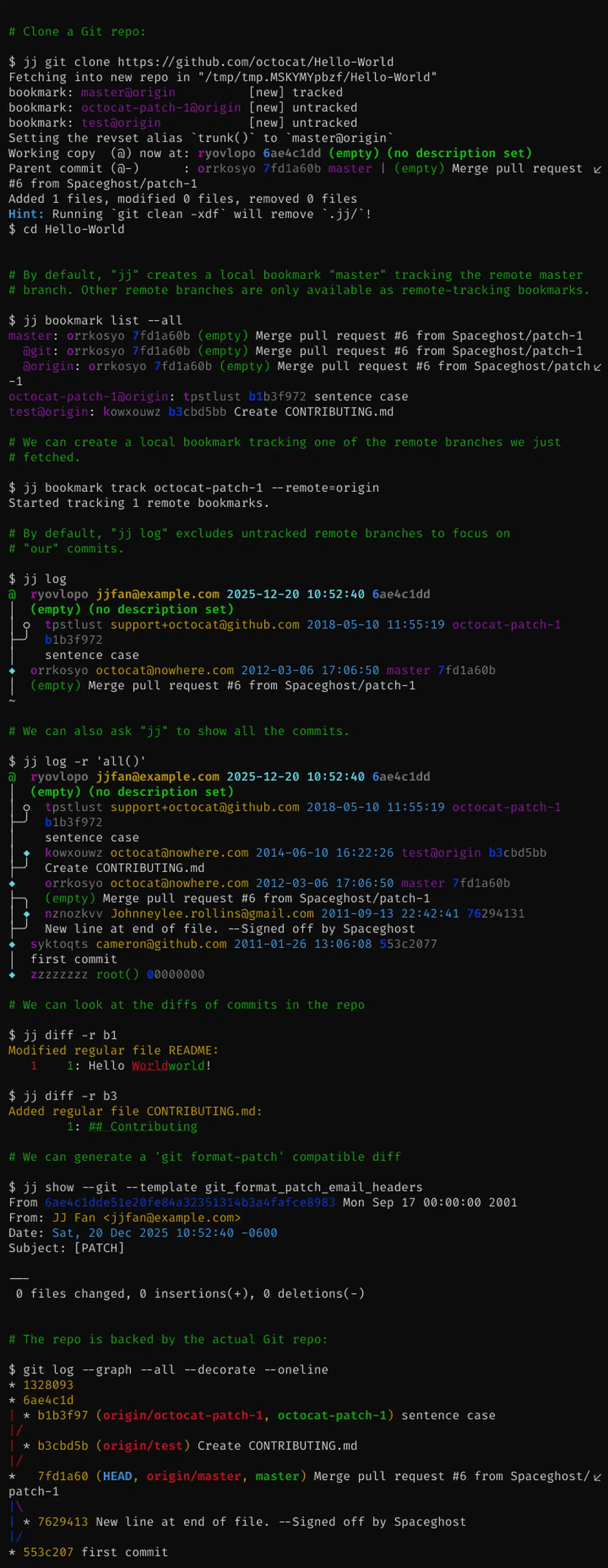
You don’t need a fresh repository to try it. You can “jj-ify” any Git project you already have. Go to your project root and run:
jj git init --colocateThe --colocate flag lets jj and git live in the same directory. It keeps the jj working copy and the Git index in sync. You end up with a .jj directory next to your .git one.
Before you start work, set your identity:
jj config set --user user.name "Your Name"
jj config set --user user.email "your.email@example.com"
Now try jj log. You get a graph view that looks familiar but holds more than a plain git log. Each entry has a “Change ID”, a short stable string like kpqz, plus a “Commit ID”, the usual Git-style hash. The status command jj st shows you that your working copy is a commit too, marked with an @ sign.
The working copy as a commit: why jj feels different
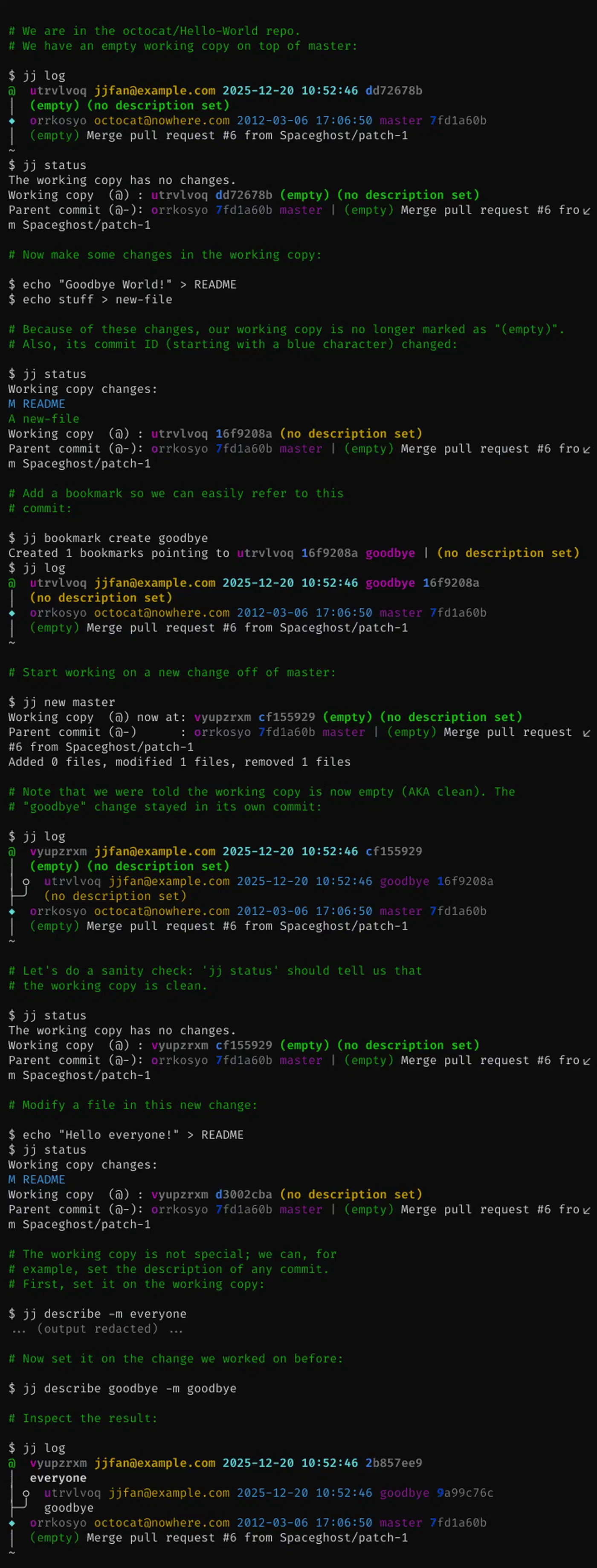
The biggest shift when you move from Git to jj is that there is no staging area and no git add. Every change to a tracked file is already part of the working-copy commit.
In Git, the workflow is: Edit, then git add, then git commit.
In jj, the workflow is: Edit, then jj new.
jj new creates an empty commit on top of your current one. That saves your last batch of work and hands you a fresh slate. In Git the same move takes a git commit followed by a new branch checkout, while in jj it is one atomic step.
To edit a commit that isn’t the most recent one, you don’t have to run an interactive rebase. You run jj edit <change-id>. Your working directory updates to that commit’s state. You make your edits, and when you’re done, jj rebases every child commit on top of your new version for you. That automatic rebase is what makes editing old commits quick.
For quick fixups, reach for jj squash. It moves changes from your working copy into its parent commit. It is a faster, safer stand-in for the git commit --amend dance. You write messages with jj describe, and you can pair that with an AI commit message generator that drafts conventional commit text from your staged diff. Bigger edits work the same way: many AI coding agents
run fine on a jj-colocated repo, since the .git directory underneath stays standard.
First-class conflicts and the operation log
Jujutsu adds two features Git has no real equivalent for: first-class conflicts and a universal operation log.
First-class conflicts
In Git, a conflict blocks you. If you hit one during a rebase, your work stops dead. You fix the conflict, git add the files, then run git rebase --continue. If the conflict is too tangled, your fallback is git rebase --abort, which wipes out all your progress.
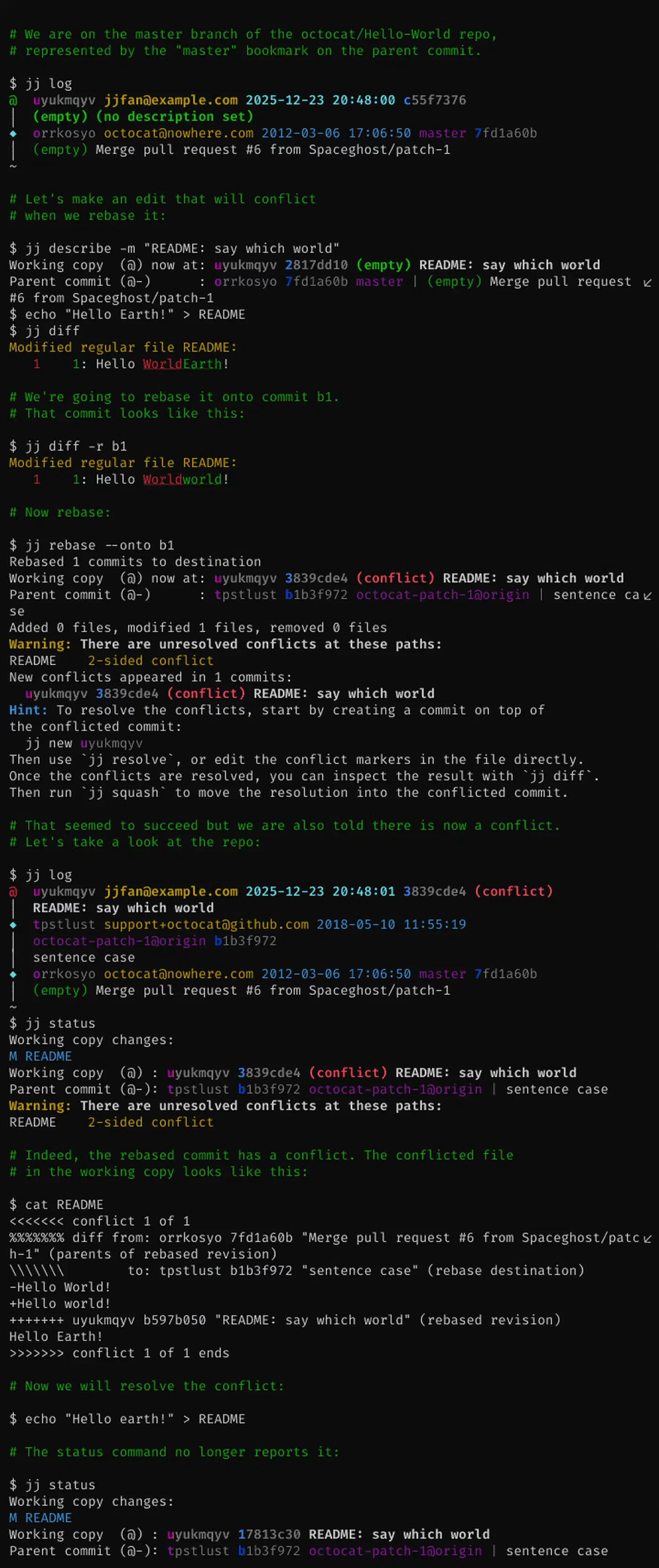
In jj, conflicts are first-class citizens. The conflict data is stored as metadata inside the commit itself. You can commit a conflict, rebase it, and even push it to a remote. So you can fix conflicts at your own pace, or switch to a different task and come back to them later. The conflict travels with the commit as you rebase it through your history.
Agent tooling has picked up the same habit. One of Matt Pocock’s agent skills works a merge hunk by hunk and never bails out, which is the behavior jj builds into its data model.
The operation log
Delete a branch in Git by accident, or botch a rebase so badly that you can’t see a way back, and you learn the value of git reflog. But reflog only tracks where branch pointers have been.
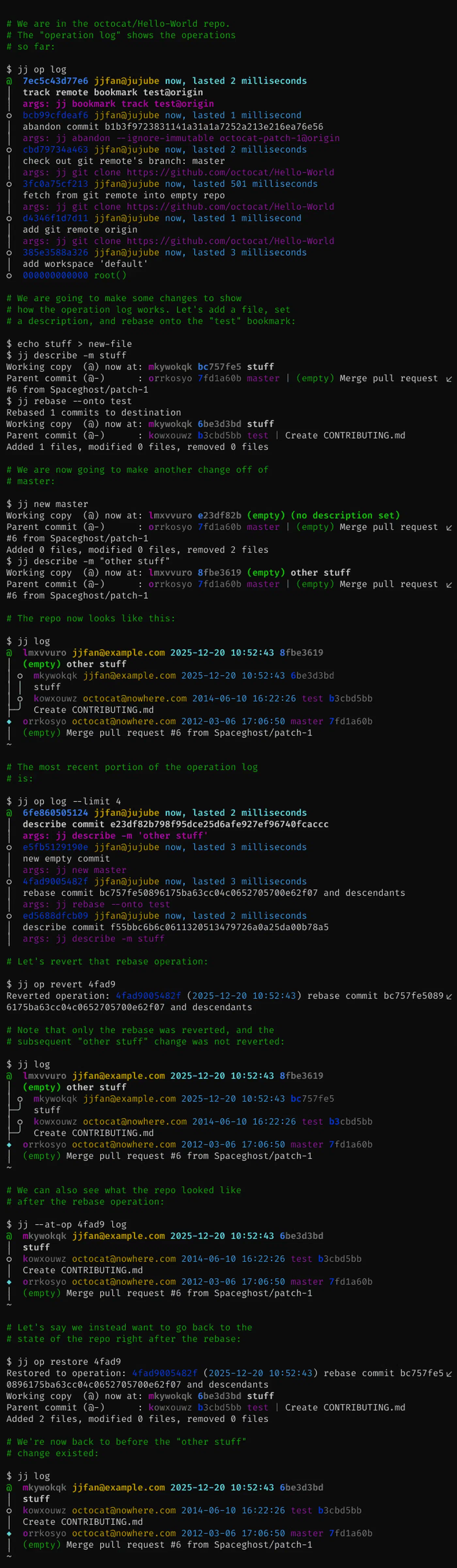
Jujutsu’s jj op log tracks every command you run. Each jj new, jj rebase, or jj edit lands in the log as an atomic operation, and so do the commands that fail.
jj op logThat log is what makes jj undo so useful. Run a command, regret it, and jj undo puts the repository back to the exact state it was in before. For finer time travel, jj op restore <op-id> rolls you back to any earlier point in your history. Nothing is ever really lost, so jj users rewrite history freely.
Daily workflows: branching, rebasing, and pushing
The easiest way to get a feel for jj is to line up a normal work day against the Git version.
How to do X in Git vs Jujutsu
| Operation | Git Command | Jujutsu (jj) Command |
|---|---|---|
| Check Status | git status | jj status |
| View History | git log --graph | jj log |
| Start New Work | git checkout -b feat | jj new main |
| “Commit” Work | git add . && git commit | jj describe -m "message" |
| Amend Last Commit | git commit --amend | jj squash or jj describe |
| Switch Branch/Commit | git checkout <branch> | jj edit <revision> |
| Discard Changes | git reset --hard | jj abandon |
| Rebase on Main | git rebase main | jj rebase -d main |
| Push to Remote | git push | jj git push |
| Fetch from Remote | git fetch | jj git fetch |
| Undo Last Action | git reflog + git reset | jj undo |
Working with a team
When you work on a feature, you create a “bookmark”. That is the jj name for a branch.
- Start work:
jj new main -m "Add authentication" - Iterate: edit files, maybe run
jj newa few times to create a stack of small commits. - Refine: use
jj splitto break a large commit into smaller ones, orjj absorbto spread changes from your working copy into the right commits in your stack. - Bookmark:
jj bookmark create feature-auth -r @ - Push:
jj git push --bookmark feature-auth
This pushes a standard Git branch to your remote. Your teammates review your PR on GitHub or Gitea the same way they always have. On a self-hosted instance you can grab fresh repos straight from the shell
before colocating jj on top of them. When feedback lands, run jj edit on the exact commit in your stack, make the changes, and push again. No more fixup commits or manual rebase-and-force-push cycles, because jj handles the sync for you. To take parallel branch work further, Git worktrees
check out several branches into separate directories at once, which pairs well with jj’s stacks. That same isolation is what lets Orca
run five coding agents on one repo at once, a worktree apiece.
Performance and tooling status in 2026
In large monorepos, jj is a real step up. Git slows down as tracked files climb into the hundreds of thousands. jj was built for that scale. In benchmarks on repositories with 150,000+ files, jj status finishes in under 40ms while Git can take upwards of 2 seconds. The gap comes from step-by-step tracking and a better index of the commit graph.
The tooling around Jujutsu has grown in 2026. Editor support, once the main reason to stay away, has filled in:
- VS Code: the official Jujutsu extension adds a native graph view and a status bar.
- Emacs: the
magit-jjmode brings a Magit-style feel to the Jujutsu workflow. - IntelliJ / JetBrains: a plugin handles Change IDs and operation logs right in the IDE.
The project sits at version 0.44.0 and still moves fast, but the core data model is stable. For most developers who give it a real try, the jj way of handling commits, rebases, and conflicts soon feels more practical than the Git workflow it replaces.