 Botmonster Tech
The Zigbee binding trick that keeps lights working when Home Assistant dies
Zigbee binding is a pairing at the Zigbee Cluster Library layer that tells a source device (a switch or remote) to send its On/Off, Level Control, and Color Control commands directly to a target device (a bulb or group) over the Zigbee mesh, with no hub, automation engine, or MQTT broker in the path. Two things change when you configure it. Latency drops from roughly 150-400ms (switch to Zigbee2MQTT to Home Assistant automation to device command) to roughly 20-80ms (radio to radio), and the light keeps working while Home Assistant is rebooting, crashing, or being upgraded. You configure bindings in Zigbee2MQTT through the web UI’s Bind tab or by publishing to zigbee2mqtt/bridge/request/device/bind, and in ZHA through the Bindings tab under “Manage Zigbee device” or the zigpy-cli helper. Once the binding is written to the source device’s binding table, the coordinator only has to stay online for OTA updates and reporting, not for button presses. Your budget sensors stay on the mesh through that same coordinator.
What Zigbee Binding Actually Does at the Radio Layer
Most smart home users think of a “binding” as a Home Assistant automation or Node-RED flow. Zigbee binding is structurally different: it lives inside the Zigbee firmware of the source device itself, in a data structure called the binding table, and it changes which device in the mesh receives a ZCL command when a button is pressed. Once you accept that a bound switch is sending commands directly to the bulb (or to a Zigbee group address), the rest of the configuration makes sense, and you stop trying to debug HA automations that were never involved in the first place.
A quick primer on the Zigbee Cluster Library: clusters are grouped command sets such as genOnOff (cluster 0x0006), genLevelCtrl (cluster 0x0008), and lightingColorCtrl (cluster 0x0300). Binding is always configured per cluster, not per device wholesale. A remote can be bound on genOnOff but not genLevelCtrl, which is why some dimmer buttons work while others do nothing after a partial configuration.
The binding table lives in the source device’s non-volatile flash. Chipset caps vary: TI CC2652 firmware usually allocates room for 12-16 entries, while Silicon Labs EFR32MG21 builds commonly run with a CONFIG_BINDING_TABLE_SIZE of 32, and Nordic nRF52 falls somewhere in between depending on the stack fork. A full table does not throw an obvious error - new bindings silently fail to commit, which is a common gotcha covered later.
Bindings come in two flavors. A unicast binding targets one specific IEEE address. A groupcast binding targets a 16-bit group ID that multiple bulbs have joined. Groupcast is the only sensible way to control more than two or three lights from one switch, because unicast means the remote has to send one frame per bulb in sequence.
Here is where the coordinator gets out of the way. The ConBee III, SkyConnect, or Sonoff Dongle-E is not in the command path for bound traffic. It is needed at configuration time to write the binding table, and at runtime for OTA updates, state reporting, and any unbound devices you still control from HA. Button presses for bound paths never touch it.
The latency math is easy to measure. On a typical Z2M install, a button-press round-trip runs 150-400ms: button to coordinator, coordinator to MQTT, MQTT to HA automation, HA back out through MQTT, MQTT to coordinator, coordinator to bulb. A direct bind runs 20-80ms, because the switch radio talks to the bulb radio (possibly through one or two router hops) and that is the entire path. The official Zigbee2MQTT binding guide has the authoritative description of the cluster, source, and target model if you want to dig further.
Binding in Zigbee2MQTT via the Web UI and MQTT Request
Zigbee2MQTT exposes binding as a first-class feature in its web UI, which is the easiest starting point, and as an MQTT request topic, which is what you want for reproducible configs and Ansible-style provisioning. Both paths do the same thing under the hood. The web UI hides cluster selection behind a dropdown, while the MQTT path surfaces every lever and is what you will want once you have done a couple of binds by hand.
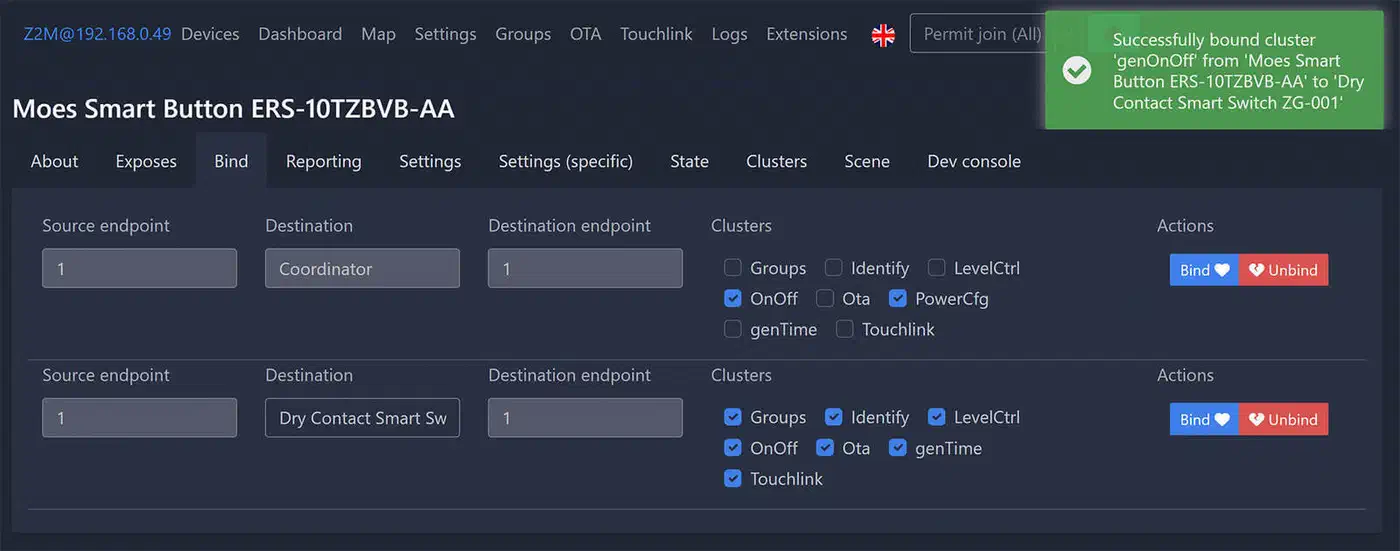
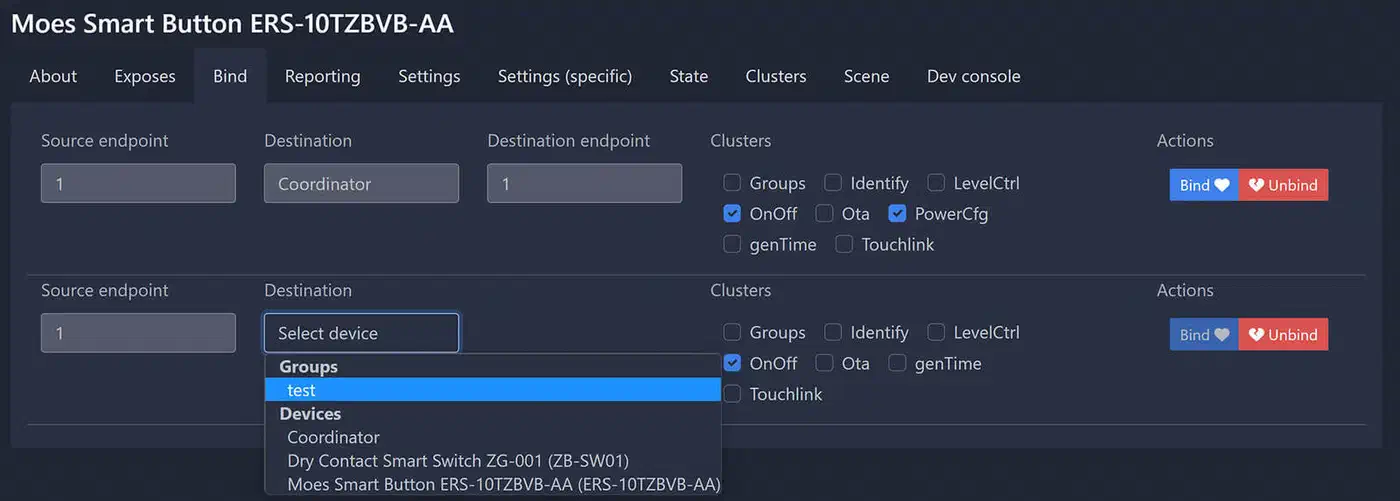
The web UI walkthrough is short. Open http://<z2m-host>:8080, click the source device (say, “Styrbar Living Room”), switch to the Bind tab, pick a destination device or group, check the clusters you want to bind (genOnOff, genLevelCtrl, lightingColorCtrl), and click Bind. Z2M writes the binding table and returns success per-cluster or the specific cluster that failed.
The MQTT request path is identical in effect but scriptable. Publish to zigbee2mqtt/bridge/request/device/bind with a payload like:
{"from": "Styrbar Living Room", "to": "Bulb Living Room"}Z2M responds on zigbee2mqtt/bridge/response/device/bind with per-cluster success or failure. That response matters when a bind silently drops half its clusters - the UI will flash green and you will think you are done, but the MQTT response will show that lightingColorCtrl was rejected because the target bulb is a white-only Tradfri model.
You can target specific clusters explicitly:
{"from": "Styrbar Living Room", "to": "Bulb Living Room", "clusters": ["genOnOff"]}That pattern is useful when you want On/Off but deliberately not dimming, so the remote’s long-press can stay bound to an HA automation for scene changes while short-press fires straight at the bulb.
Endpoints matter for anything with more than one button. Aqara double rockers, the Styrbar’s four buttons, and the Hue Tap Dial’s four zones all require an explicit source endpoint so Z2M knows which button you are binding. Use from_endpoint and to_endpoint fields. Forgetting this is the single most common reason for “it didn’t work” reports in the Z2M issue tracker.
Unbinding uses the same topic with device/unbind in the path. Run this before re-pairing or moving a device to a new mesh, because orphan bindings in the table can block new ones. For a full reset, publish to zigbee2mqtt/bridge/request/device/binds/clear, which wipes every binding on a source device in one request.
The web UI shows the source device’s current binding table in the Bind tab. That is the only reliable way to confirm what the device firmware actually has, since bindings can fall out of sync with Z2M’s database after a restore from a corrupted backup. If you are weighing whether to stay on Zigbee2MQTT long term or migrate to Matter, see our guide on moving from Zigbee2MQTT to Matter in 2026.
Binding in ZHA via zigpy and the Bindings Tab
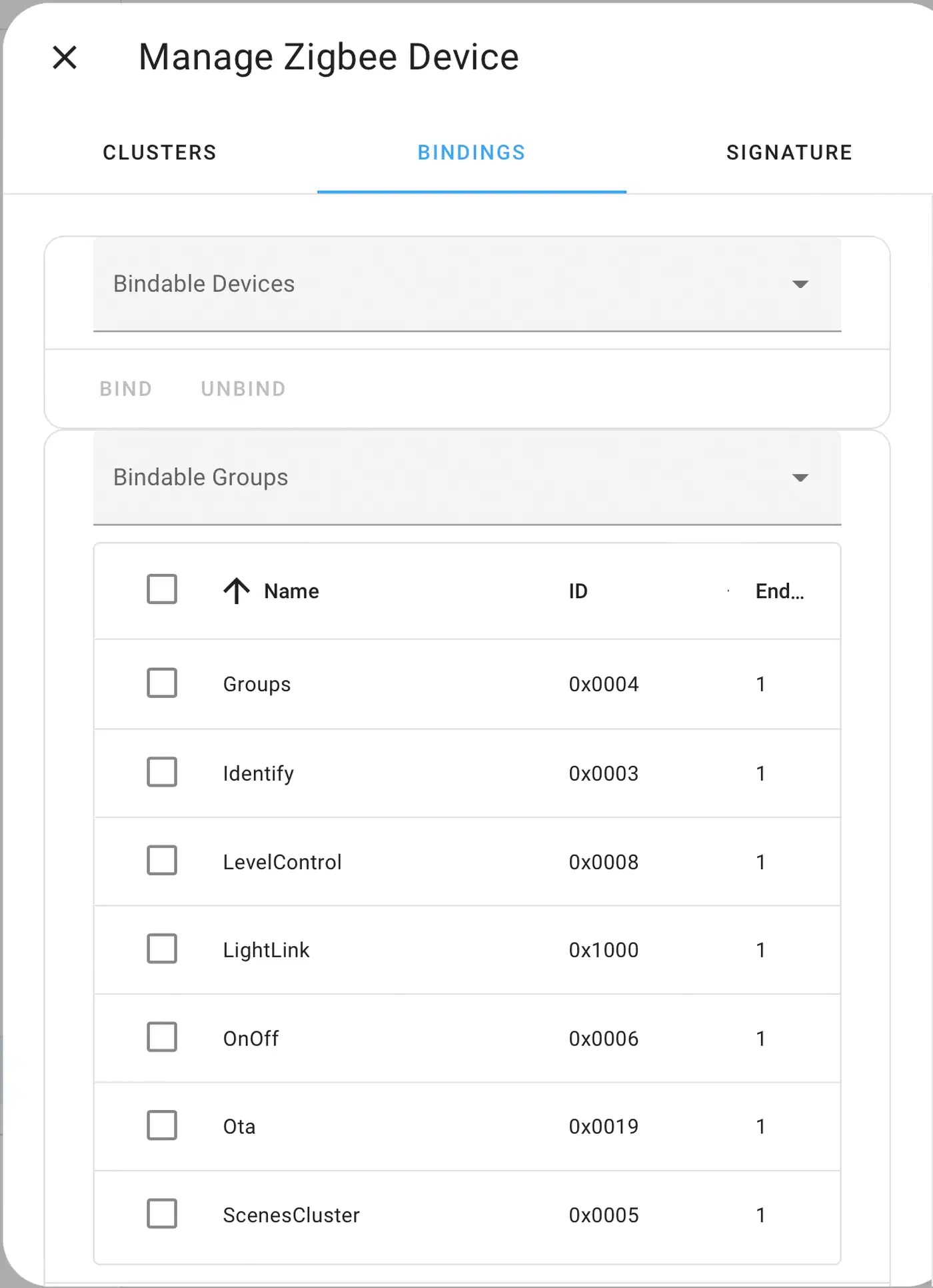
ZHA (the Home Assistant native Zigbee integration) has historically lagged Z2M in binding ergonomics. The capability is fully there, though, and a UI was added in recent releases. Go to Settings > Zigbee > Devices, pick your remote, click “Manage Zigbee device,” and switch to the Bindings tab. Wake a battery-powered remote before you start the binding, or it will time out waiting for an ACK. The ZHA documentation has the current list of supported operations, which shift between HA releases.
One subtle ZHA behavior: it binds remotes to the coordinator by default so that click events can be forwarded to HA. Some remotes only support a single binding target, which means you may need to unbind from the coordinator before you can bind to a bulb. If you do that, the coordinator stops seeing click events entirely, so any HA automation on that remote goes dark - you have traded observability for speed, and you should know that is the trade.
For the power-user path, zigpy-cli is the standalone tool that speaks directly to your coordinator’s serial device. Install it with pipx install zigpy-cli, stop Home Assistant (the serial port can only have one owner), and run commands like zigpy bind add <source_ieee> <source_ep> <cluster_id> <dest_ieee> <dest_ep> to write a binding, or zigpy bind list <ieee> to dump the current table. This is how I debug “the UI says bound, the device says otherwise” situations.
ZHA Toolkit is the community-standard HACS integration that gets ZHA to Z2M-grade binding ergonomics without stopping HA. It exposes services like zha_toolkit.bind_ieee, zha_toolkit.binds_get, and zha_toolkit.binds_remove_all that map one-to-one onto the zigpy primitives. A typical call looks like:
service: zha_toolkit.bind_ieee
data:
  ieee: 00:12:4b:00:22:08:ed:1a
  command_data: 00:12:4b:00:22:08:ed:2b
  cluster: 0x0006
  endpoint: 2
  dst_endpoint: 3
The groups-versus-bindings distinction trips up a lot of people. Group membership says “this bulb will respond to commands addressed to group 0x0042.” Binding says “this remote will send its button presses to group 0x0042 (or to this specific bulb).” You almost always need both, and forgetting one leads to bulbs that appear to ignore the remote for no obvious reason.
Group Binding for One Switch Driving Multiple Lights
Unicast binding is fine for a single switch controlling a single bulb. The moment you have a ceiling with six downlights or a kitchen with an island bar plus a cabinet strip, you need group binding. Otherwise the switch fires six sequential unicast commands and the bulbs turn on visibly staggered.
Six bulbs responding to unicast commands in a busy mesh arrive 200-600ms apart, which reads as a visible wave of lights turning on. One groupcast command reaches all bulbs in a single airtime slot and they fire together, which is the behavior people expect from a wall switch.
Creating a group in Z2M happens in the Groups tab of the web UI. Click Add, pick a numeric ID (say 100) and a friendly name, then drag target bulbs into the group. Each bulb writes itself into its own group table in flash. You then go back to the source remote’s Bind tab and choose the group (not a device) as the destination. The binding-table entry on the remote stores group ID 100 instead of an IEEE address, and the remote now sends groupcast frames.
ZHA groups live in Settings > Zigbee > Groups, with similar semantics. The Home Assistant docs note that native Zigbee groups are faster than HA’s own Group helper for the visual-responsiveness win, but the groupcast frames do flood the mesh if issued repeatedly, so a button that auto-repeats on hold is a bad candidate for groupcast on a dense network.
A few device-specific notes, because the details of which buttons bind cleanly to groups are where people get stuck:
| Device | Group binding support | Notes |
|---|---|---|
| IKEA Tradfri Styrbar | On/Off reliable; directional buttons firmware-dependent | 2026 firmware (2.4.x) fixes older issues; OTA via Z2M ota_update/update |
| IKEA Somrig two-button | Both buttons on genOnOff | Clean out-of-the-box binding on current Z2M |
| Aqara H1 wireless rocker | On/Off and Level Control per rocker endpoint | Modern H1 uses standard clusters, not the old Aqara private ones |
| Philips Hue Tap Dial | Four buttons on genOnOff to one group; dial on genLevelCtrl separately | Common mistake: binding only On/Off and expecting the dial to dim |
| Philips Hue Dimmer (RWL022) | On/Off and Level work; long-press uses Hue’s private manufacturer cluster | Third-party bulbs get basic On/Off; scene memory stays Hue-only |
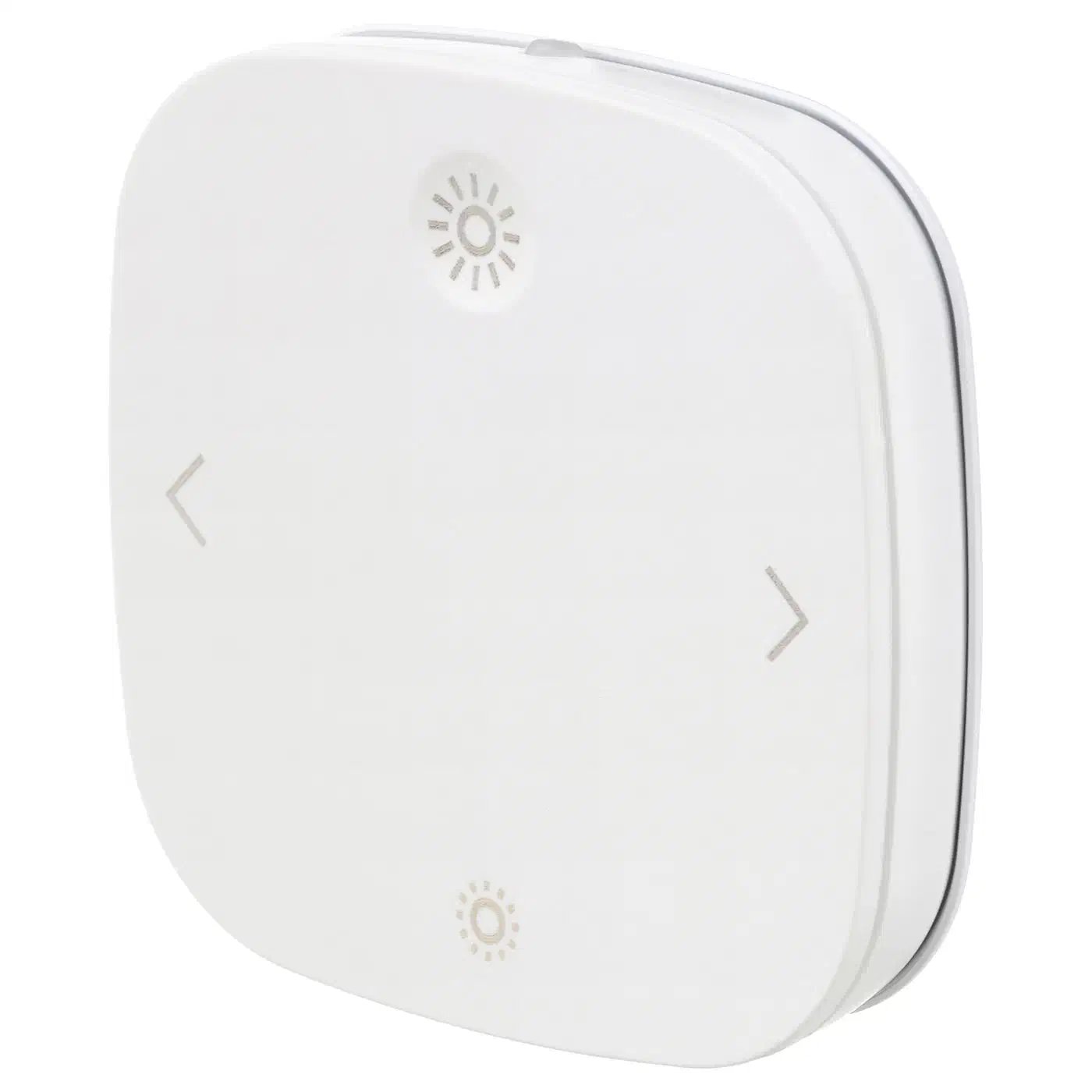
Hue’s proprietary commands are the reason a Hue Dimmer bound to a Tradfri bulb gives you On/Off and dim but nothing else. IKEA remotes are more standards-compliant and bind to third-party bulbs reliably, which is why the Styrbar has become the community default recommendation for multi-vendor setups.
Gotchas, Limitations, and When Not to Bind
Binding is powerful but has sharp edges, and a surprising number of “my bind isn’t working” forum threads come down to the same half-dozen issues.
Cluster compatibility is hard-limited by the Zigbee spec. Binding only works for standard clusters the target device actually implements. genOnOff, genLevelCtrl, lightingColorCtrl, and genScenes are the common ones. Niche clusters like Xiaomi’s private 0xFCC0 will not bind to a non-Xiaomi target at all.
Reporting versus binding is the single biggest source of confusion in the ZCL world. Reporting is a device pushing its state back to the coordinator (so HA knows the bulb is on). Binding is a device pushing commands to another device (so the bulb turns on). You usually want both, and disabling reporting to “clean up” will make HA’s UI stale while the lights themselves keep working.
Vendor-specific bindings differ. Philips Hue remotes send proprietary manufacturer-specific commands on their private clusters for long-press and double-tap, which only bind to other Hue devices. IKEA and most Aqara remotes are standards-compliant and bind cleanly to third-party bulbs.
Binding table exhaustion bites people with lots of rockers. Most Zigbee chipsets cap at 12-32 binding entries per device, and every cluster on every endpoint counts separately. A Styrbar bound to three groups on genOnOff plus genLevelCtrl is already using six slots. Aqara rockers with four endpoints can eat through a table fast.
A bound end-device still needs a parent router to be awake. Removing the nearest router while a bind exists will make the button feel broken even though the binding table is intact. Let the mesh re-heal for 24 hours after topology changes before you start debugging. For a deeper look at mesh topology and router placement, the guide on fixing dropped Zigbee devices covers channel selection, coordinator placement, and network map diagnostics.
Always unbind before re-pairing. Factory-resetting a bulb leaves stale entries in the source remote’s binding table, which can block new binds from being written. Run device/unbind (Z2M) or zigpy bind remove (ZHA) first.
Skip binding deliberately when your automation needs conditions. If the logic is “only after sunset,” “only if presence is detected,” or “only if the TV is off,” keep it in HA. Binding is stateless and has no if clause - it just forwards commands. There is also an observability cost: because bound commands never touch MQTT or HA, they do not show up in the logbook or history. You lose the “who turned the light on” audit trail for bound paths, which matters in shared households and for any kind of security audit.
A hybrid setup works well in practice. Bind the most-used paths (bedroom lamp, hallway downlights, kitchen island) for speed and offline survival, and leave the conditional stuff (motion-triggered night lights, sunset scenes, presence-aware dimming) in HA. The wall switches keep working through your next Home Assistant upgrade, and the automation engine still gets to do what only it can do.