LogoBotmonster Tech
AI Smart Home Self-Hosting Coding Web Dev Hardware Bootpag Image2SVG Tags

Hardware

  • ◀︎
  • 1
  • …
  • 6
  • 7
  • 8
  • 9
  • ▶︎
Small HD Camera (1080p/720p) Light Indicators

Small HD Camera (1080p/720p) Light Indicators

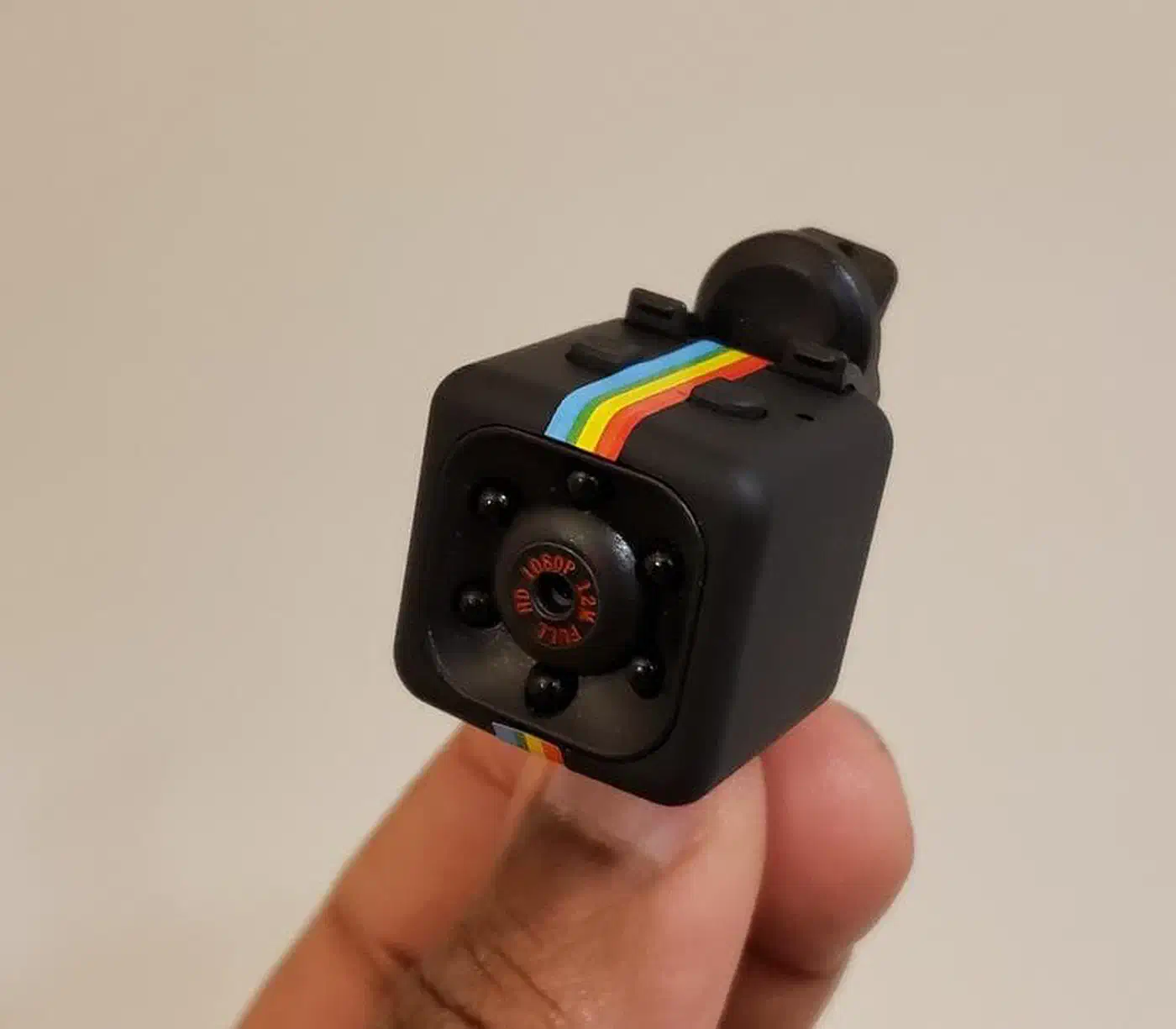
This guide covers the light patterns and controls for generic Chinese mini cameras like the SQ11, SQ8, and SQ12. These pocket recorders use one LED that changes color to signal status. For a full surveillance setup instead, explore local AI security camera solutions.

SQ11 mini camera held between fingers showing the front lens, infrared LEDs, and rainbow stripe
The SQ11 mini camera with its 1080p lens and surrounding IR LEDs for night vision

Setting Up the Chipsailing CS9711 Fingerprint Reader on Linux Mint

Setting Up the Chipsailing CS9711 Fingerprint Reader on Linux Mint

Bought a budget USB fingerprint reader like the Chipsailing CS9711 (USB ID 2541:0236) and Linux Mint can’t see it? You aren’t alone. These “Match-on-Host” devices don’t ship with libfprint support by default. A community driver gets them working in a few steps.

Identifying the Hardware

First, verify your device ID by running lsusb in the terminal. Look for: Bus XXX Device XXX: ID 2541:0236 Chipsailing CS9711Fingprint

If the device shows up but fails to “enumerate” (no name appears), plug it straight into a motherboard USB port. A USB hub often can’t supply steady power.

Local AI Security Cameras: Frigate with Google Coral TPU

Local AI Security Cameras: Frigate with Google Coral TPU

Cloud security camera fees have quietly become one of the priciest bills in the smart home. At $10 to $30 per camera each month, a full setup runs $500 to $1,000 a year. You pay that to have your own footage handled on someone else’s servers. Frigate NVR changes the math. Paired with a Google Coral TPU , it runs real-time AI person and object detection across many 4K streams. Inference times stay in the single-digit milliseconds. It all runs on hardware you own, on a network that never phones home.

Build a Low-Cost Air Quality Sensor with ESPHome

Build a Low-Cost Air Quality Sensor with ESPHome

A DIY air quality monitor built on an ESP32 and a modern particle sensor is one of the best home automation projects you can finish in a single afternoon. Wire a PMS5003 or the newer Sensirion SEN66 to an ESP32 and flash ESPHome . Within minutes, Home Assistant finds the device on your local network. No cloud account, no monthly fee, no privacy worries.

Why Monitor Air Quality at Home?

Most people think of air pollution as an outdoor problem. In fact, indoor air is often worse. Cooking on a gas stove, burning candles, running a laser printer, using sprays, or even new furniture off-gassing formaldehyde can push indoor pollutants well above outdoor levels for hours.

Reverse Engineer USB Devices with Wireshark and Python

Reverse Engineer USB Devices with Wireshark and Python

Reverse engineering an unknown USB device means working out the protocol it uses to talk: the byte sequence that makes it do things. The good news is that most USB devices don’t encrypt their traffic. Everything they send and get back travels in plain sight on the USB bus, and Linux gives you the tools to watch it. Once you know the protocol, a Python script using pyusb can drive the device directly and skip the vendor software.

Track Your Home's Energy Usage with Home Assistant

Track Your Home's Energy Usage with Home Assistant

The average American household spends about $1,500 a year on electricity. Most of it walks out the door with no clear sense of where. Your utility’s smart meter reports yesterday’s total. It won’t tell you that an old game console pulls 30W while it sits “off,” or that your water heater runs right when grid prices peak. Home Assistant fixes that. Pair the right hardware with the built-in Energy Dashboard, and you get per-device, per-circuit visibility.

  • ◀︎
  • 1
  • …
  • 6
  • 7
  • 8
  • 9
  • ▶︎

Most Popular

Gemma 4 vs Qwen 3.5 vs Llama 4: Which Open Model Should You Actually Use? (2026)

Gemma 4 vs Qwen 3.5 vs Llama 4: Which Open Model Should You Actually Use? (2026)

Gemma 4, Qwen 3.5, and Llama 4 compared on benchmarks, licensing, speed, and hardware so you can pick the right open model fast.

5 Open Source Repos That Make Claude Code Unstoppable

5 Open Source Repos That Make Claude Code Unstoppable

Five March 2026 repos extend Claude Code with autonomous ML, self-healing skills, GUI automation, multi-agent coordination, and Google Workspace access.

Cross-section of a translucent crystal brain threaded by red, gold, and teal attention ribbons resting on a doubly-stochastic matrix pedestal beside a guitar-tuning lab figure.

DeepSeek V4 Tech Report: 3 Tricks That Cut Compute 73%

DeepSeek V4 ships 1.6T parameters and 1M context using only 27% of V3.2's inference FLOPs. Inside the hybrid attention, mHC residuals, and Muon optimizer.

Cracked stone tablet engraved with a bulleted system prompt, four crossed-out goblin silhouettes repeated, a tiny goblin escaping with upvote-arrow sparks, a giant dollar-sign price tag, and figures refusing to step onto a glossier pedestal.

GPT 5.5 Reddit Reception: Goblins and the Cost Backlash

GPT-5.5 Reddit reception: viral goblin prompt leak, doubled pricing backlash, and 5.4 holdouts citing hallucination regressions in factual recall workflows.

What X and Reddit Users Are Saying about Claude Opus 4.7

What X and Reddit Users Are Saying about Claude Opus 4.7

How power users on X and Reddit reacted to Claude Opus 4.7: praise for agentic coding, token burn concerns, and teams' practical prompting habits.

Qwen3.6-35B-A3B: Alibaba's Open-Weight Coding MoE

Qwen3.6-35B-A3B: Alibaba's Open-Weight Coding MoE

Alibaba's sparse Mixture-of-Experts: 35B total parameters, 3B active per token. Q4 quantization runs on MacBook Pro M5, matches Claude Sonnet performance.

Alacritty vs. Kitty: Best High-Performance Linux Terminal

Alacritty vs. Kitty: Best High-Performance Linux Terminal

Alacritty vs Kitty in 2026: emoji and Unicode rendering, real benchmarks, latency, memory, maintainer reputation, and the right terminal for your workflow.

Like what you read?

Get new posts on Linux, AI, and self-hosting delivered to your inbox weekly.

Privacy Policy  ·  Terms of Service
2026 Botmonster